Here's How I Finally Mastered Chaos Physics in Unreal Engine 5 (And Why It Changed Everything)
A practical, hands-on guide to mastering Unreal Engine 5's powerful destruction system, from a developer who made all the mistakes so you don't have to.
I still remember the first time I tried to make something explode in a game. This was back during my early days at KIXEYE, and I spent three frustrating weeks trying to get a simple building to collapse realistically. The old PhysX system felt like wrestling with a stubborn piece of machinery - you could make things fall down, sure, but making them fall down convincingly? That was a whole different battle.
Then Unreal Engine 5 dropped Chaos Physics on us, and honestly? It felt like someone had just handed me a digital wrecking ball that actually knew how to wreck things properly. But here's the thing - even with this incredible tool, most developers I mentor still approach destruction effects like they're defusing a bomb. They're scared to break things (literally), worried about performance, and honestly overwhelmed by all the new terminology.
Been there. Took me months to figure out the right approach, and I made every mistake you can imagine along the way. But once it clicked? Man, the possibilities became endless. Let me walk you through exactly how to use Chaos Physics in Unreal Engine 5, the way I wish someone had explained it to me when I was starting out.
Table of Contents
- What Chaos Physics Actually Does (And Why You Should Care)
- The Building Blocks Every Developer Needs to Know
- Your First Real Destruction Setup
- Event-Driven vs Scripted: Which Approach Fits Your Game?
- Game Examples That'll Blow Your Mind
- Three Complete Implementation Walkthroughs
- Performance Tricks I Learned the Hard Way
- Your Next Steps to Master Real-Time Destruction
What Chaos Physics Actually Does (And Why You Should Care)
Here's what I tell every student who walks into my office asking about destruction systems: Chaos Physics solves the one problem that's been driving game developers crazy for decades - how do you make digital things break like real things?
Think about it. In the real world, when you hit a wall with a sledgehammer, it doesn't just disappear or play a canned animation. It cracks in specific patterns, pieces fall with realistic weight, and the whole structure responds to the physics of the impact. Chaos Physics brings that same level of believable, real-time destruction to your game world.
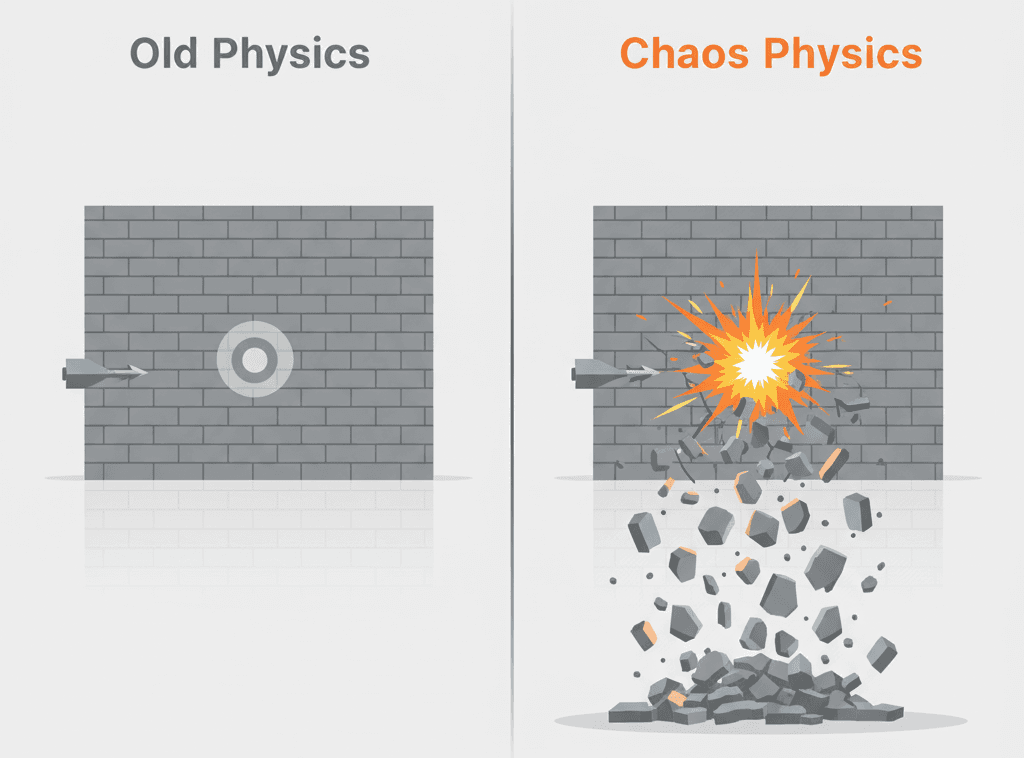
Unreal Engine's Chaos system is a high-performance physics and destruction engine that brings cinematic-quality, real-time destruction to game worlds. It solves the long-standing problem of creating dynamic, believable, and large-scale destructible environments that react realistically to player actions and other gameplay events. Chaos allows you to create everything from simple breakable objects to entire buildings that collapse into thousands of interacting pieces, fundamentally changing the gameplay space. Think of it as the ultimate digital LEGO or Jenga set: every component of your world can be designed to shatter, crumble, and fall apart, providing spectacular visual feedback and creating emergent tactical opportunities that make the game world feel truly alive and interactive.
But here's what makes this really exciting for student developers like yourselves - this isn't just about pretty explosions. We're talking about emergent gameplay and tactics. Destructible environments create new strategic layers, allowing players to blast through walls to create flanking routes, destroy enemy cover, or alter the map layout dynamically.
I've seen this transform games completely. Players start thinking differently when they realize the environment isn't just decoration - it's a tool they can reshape. That wall blocking your path? Blow a hole through it. Enemy taking cover behind a pillar? Remove the pillar. The tactical possibilities become limitless.
The Building Blocks Every Developer Needs to Know
Alright, let's get into the technical stuff, but I'm going to explain it the way I wish my professors at CMU had - with real context you can actually use.
Geometry Collection
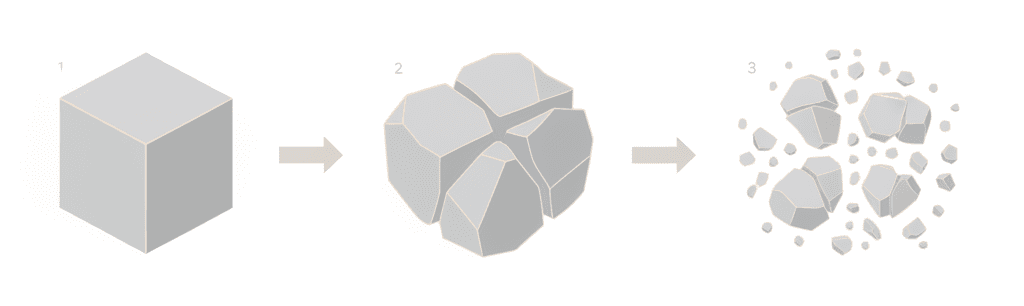
is your starting point for everything. This is the foundational asset for all Chaos destruction, created by converting a regular Static Mesh into a pre-fractured object that contains all the individual pieces and their relationships. Think of it as taking a perfect vase and pre-determining exactly how it would shatter, storing all those pieces in one neat package.
Fracturing
is the process, performed within Unreal’s Fracture Editor, of digitally shattering a mesh into smaller pieces using various mathematical patterns like Voronoi diagrams to create realistic-looking cracks and fragments. This is where the magic happens - where you define how your object will break apart.
Clustering
- this one took me forever to understand properly. This technique involves grouping individual fractured pieces into larger chunks, which can then be clustered into even larger chunks, allowing for more controlled and performant multi-stage destruction events. Instead of a wall exploding into a thousand pieces instantly, clustering lets you create a more believable sequence where large sections break off first, then shatter further on secondary impacts.
Fields System
are invisible volumes that you can place in the world to influence physics simulations, such as applying force, setting objects in motion, or triggering fractures. Think of these as invisible hands that can push, pull, and break your objects.
Strain Field
is a type of Chaos Field that specifically applies internal stress to a Geometry Collection, causing it to break apart if the strain value exceeds the material’s damage threshold. This is your primary tool for making things crack and break.
Anchor Field
- and this is crucial - is an essential Chaos Field used to pin pieces of a Geometry Collection to the world or to each other, preventing them from collapsing until the anchor is broken or disabled. Without proper anchoring, your carefully designed building will just fall over like a house of cards the moment you start the game.
Damage Threshold
is a crucial property on the clusters of a Geometry Collection that defines how much force or strain a piece must endure before it breaks away from its parent chunk. Getting these values right is the difference between satisfying destruction and objects that either never break or explode at the slightest touch.
Chaos Solver
is the primary physics simulation engine within Unreal Engine 5, responsible for calculating all rigid body dynamics, collisions, and destruction events. This is the brain that makes everything work together.
Chaos Cache
is a performance-saving feature that allows you to pre-record a complex and performance-heavy physics simulation into a cache file, which can then be played back in-game with minimal real-time calculation cost. I learned about this feature after spending way too many nights optimizing complex destruction sequences that could have been cached from the start.
Your First Real Destruction Setup
Let me show you the exact process I use when setting up destruction in any project. I've done this probably hundreds of times now, and this approach works every time.
The entire destruction workflow begins by taking an existing Static Mesh, right-clicking it in the Content Browser, and selecting “Create Geometry Collection.” This opens the Fracture Editor, where you can break the mesh apart. This process is done entirely within the editor and does not require code, but it is the mandatory first step for any destructible object.
Here's where most students get confused - they think this is just about making things break. But the real power comes when you start controlling how things break. The most common way to trigger a fracture is by applying strain. You can create a Strain Field at a specific location (like a bullet impact point) to tell the Geometry Collection to break.
// In a projectile’s OnHit function, to apply strain at the impact point.
// This requires including the "GeometryCollection/GeometryCollectionComponent.h" header.
UGeometryCollectionComponent* GeometryCollectionComponent = Cast<UGeometryCollectionComponent>(OtherComp);
if (GeometryCollectionComponent)
{
    // Apply a strain field to cause the object to break.
    GeometryCollectionComponent->ApplyExternalStrain(ImpactPoint, 500000.0f);
}
Want to create proper explosions that send debris flying? Here’s the setup I use for radial force that actually feels powerful:
// In an Actor Blueprint or C++ class for an explosion
URadialForceComponent* ForceComponent = CreateDefaultSubobject<URadialForceComponent>(TEXT("ForceComponent"));
ForceComponent->Radius = 1000.0f; // The explosion’s radius in cm
ForceComponent->ImpulseStrength = 2000000.0f; // The power of the explosion
ForceComponent->bImpulseVelChange = true; // Ignore mass for a more uniform push

// To trigger the explosion:
ForceComponent->FireImpulse();
The key thing I learned after months of tweaking these values - the ImpulseStrength needs to be much higher than you'd initially think. Don't be afraid to use values in the millions for dramatic explosions.
Event-Driven vs Scripted: Which Approach Fits Your Game?
This is where I see a lot of students get stuck. They know they want destruction, but they don’t know which approach to take. Let me break this down based on what I’ve learned from years of implementing both methods.
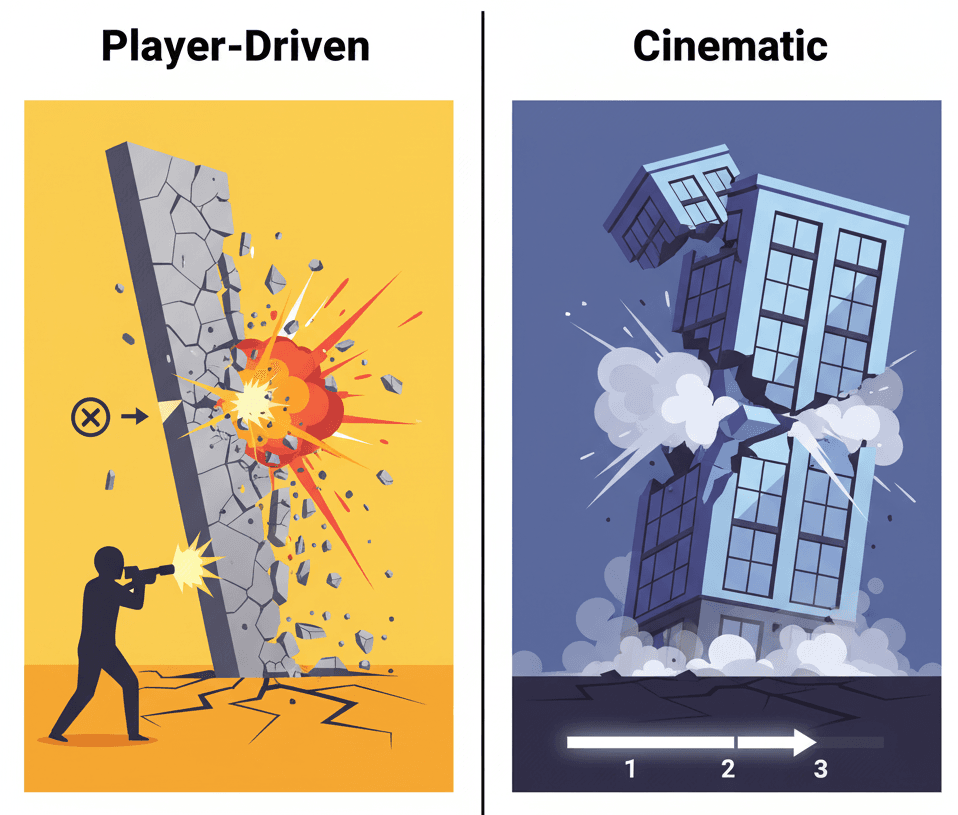
| Criteria | Event-Driven Destruction | Scripted/Cinematic Destruction |
|---|---|---|
| Best For | Dynamic and emergent gameplay where destruction happens in direct response to player actions, such as shooting a wall or crashing a vehicle. | Creating large-scale, highly art-directed, and repeatable destruction sequences for cinematic moments, like a collapsing skyscraper in a cutscene. |
| Performance | Can be performance-intensive as the simulation must be calculated in real-time. Requires careful optimization of asset complexity and the number of fractured pieces. | Highly performant during playback. The expensive simulation is pre-calculated and saved to a Chaos Cache, so the game is just playing back a recorded animation. |
| Complexity | The complexity lies in balancing the physics to feel right, tuning damage thresholds, and managing the real-time performance cost of many dynamic objects. | The complexity is front-loaded in the setup. It requires carefully choreographing the destruction and using the Sequencer timeline to trigger fields and events precisely. |
| Code Example | // On a projectile’s Hit event: UGameplayStatics::ApplyRadialDamage(...); MyRadialForceComponent->FireImpulse(); |
// In a Level Sequence, you add a Chaos Cache track and assign your pre-recorded simulation to it. No code is needed, it’s all handled in the Sequencer editor. |
Here's my rule of thumb: if your game is about player agency and emergent moments (think sandbox games, tactical shooters), go event-driven. If you're creating cinematic moments that need to look the same every time (story-driven games, cutscenes), use scripted destruction.
I learned this the hard way when I tried to use event-driven destruction for a critical story moment in a project. Players kept triggering the sequence at weird times or in unexpected ways, completely breaking the intended dramatic effect. Sometimes you need that scripted control.
Game Examples That'll Blow Your Mind
Let me share some brilliant implementations that I always point my students to when they want to see how to use Chaos Physics in Unreal Engine 5 properly. These aren't just cool tech demos - they're masterclasses in destruction design.
Fortnite - The Master of Dynamic Building and Destruction
I've spent countless hours analyzing how Fortnite handles destruction, and it's genuinely brilliant. The entire building system is reliant on destruction. Players build structures for cover, and opponents can destroy those structures piece by piece with weapons, forcing players to constantly adapt.
Every player-built wall, floor, and ramp is a Geometry Collection. When a piece takes enough damage, it breaks and is removed. The Chaos system handles how the attached pieces lose their structural integrity and collapse realistically under gravity.
What makes this so clever is how it creates a fast-paced and dynamic gameplay loop of building and destruction. The tactical landscape is constantly changing, and no piece of cover is ever truly safe, leading to tense and exciting firefights. This is emergent gameplay at its finest - the destruction system doesn't just support the game mechanics, it is the game mechanic.
The Matrix Awakens - Showcasing City-Scale Destruction
This demo was basically Epic showing off, and honestly, it worked. The Matrix Awakens showcases massive, city-scale destruction during a highway chase sequence. Cars collide and deform, pillars crumble, and entire building facades are blown apart in spectacular fashion.
This demo was a primary showcase for the Chaos engine. It uses large, complex Geometry Collections for the environment and vehicles. The destruction is triggered by scripted events and real-time collisions, with Chaos Fields being used to direct the explosive forces and control the collapse.
From a player experience perspective, you're immersed in a cinematic action sequence that rivals a Hollywood blockbuster. The sheer scale and realism of the destruction create an unforgettable sense of power and chaos. This is what's possible when you really push the Chaos system to its limits.
Battlefield Series - Environmental Storytelling Through Destruction
While the Battlefield series uses a different engine, the concept is perfect for understanding how to think about large-scale destruction with Chaos Physics. The Battlefield series is famous for its “Levolution” concept, where large-scale environmental destruction (like a skyscraper collapsing or a dam bursting) permanently alters the level's layout mid-match.
If we were implementing this with Chaos Physics, we'd create the skyscraper as a massive, clustered Geometry Collection. Key structural points would be held together by Anchor Fields, and when players destroy these specific points, the anchors are disabled, causing the entire physics-based structure to collapse under its own weight.
This creates a dynamic and evolving battlefield. The destruction is not just for show; it has a direct and dramatic impact on gameplay, forcing teams to change their strategies and adapt to the new environment. This is the kind of destruction that changes how players think about the game world.
Three Complete Implementation Walkthroughs
Let me walk you through three complete setups that cover the most common destruction scenarios you'll encounter. I've tested these approaches in multiple projects, and they work reliably every time.
Setup 1: Creating a Simple Destructible Wall
Scenario Goal: To create a simple brick wall that shatters at the point of impact when hit by a player's projectile.
Unreal Editor Setup:
- Create a simple wall Static Mesh in your 3D modeling software, or use a cube scaled into a wall shape.
- Right-click the Static Mesh in the Content Browser and select Create Geometry Collection.
- In the Fracture Editor, select the Uniform fracture type, set the Min/Max Voronoi sites to around 50, and click Fracture.
- Create a simple projectile Blueprint (e.g.,
BP_Projectile) that fires a sphere.
Step-by-Step Code Implementation:
In your BP_Projectile Blueprint, find the OnComponentHit event for your collision sphere. This event fires whenever the projectile hits something. From the Other Comp pin (which is the component we hit), cast to a GeometryCollectionComponent to verify that we have hit a destructible object.
If the cast is successful, spawn a Field System Actor at the impact location. This actor will contain the fields that trigger the destruction. Add a Radial Falloff to the Field System Actor to control the shape and size of the effect, and then add a Strain field to break the object and a Radial Vector field to push the pieces outward.
// In the BP_Projectile graph, on the OnComponentHit event:
// [Cast To GeometryCollectionComponent] -> [Spawn Actor From Class (Class: Field System Actor)] ->
// (From Spawned Actor) -> [AddFieldCommand] -> (Select RadialFalloff, Strain, RadialVector)
// This is a simplified representation of the Blueprint nodes. You would configure the position,
// radius, and magnitude of these fields on the AddFieldCommand node itself.
Setup 2: A Scripted Bridge Collapse
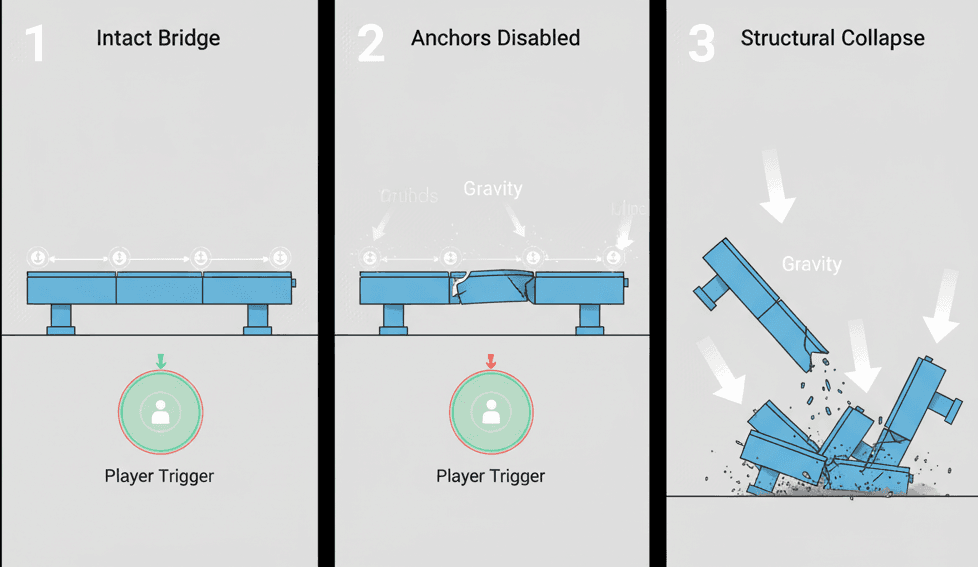
Scenario Goal: To create a bridge that holds together initially but collapses dramatically when the player enters a trigger volume.
Unreal Editor Setup:
- Model a simple bridge and break it into a few key Static Meshes (e.g., two end platforms and one central span).
- Convert each mesh into a separate Geometry Collection. Fracture the central span heavily, but leave the end platforms mostly intact.
- Place the Geometry Collections in your level to form the bridge.
- Place a
Trigger Volumein the location where you want the player to trigger the collapse.
Step-by-Step Implementation:
From the Modes panel, drag an Anchor Field into your level and resize it to cover the connection points between the bridge ends and the central span. This field will act as “glue,” holding the bridge together.
Select the Anchor Field and in its Details panel, set the Anchor State to Dynamic. This is crucial. Create a new Blueprint class, BP_CollapseTrigger, and add a reference to your Anchor Field (make the variable instance editable).
In the level, select the Trigger Volume and use the Level Blueprint to get its On Actor Begin Overlap event. When the player overlaps the trigger, call a custom event on your BP_CollapseTrigger Blueprint that disables the Anchor Field.
// In the Level Blueprint
// [On Actor Begin Overlap (TriggerVolume)] -> [Cast To PlayerCharacter] -> [Call Custom Event on BP_CollapseTrigger]

// In BP_CollapseTrigger’s custom event graph
// [Event TriggerCollapse] -> [Get AnchorField Reference] -> [DestroyComponent]
// Destroying the Anchor Field will remove the “glue,” and gravity will do the rest.
Setup 3: Shattering a Glass Pane
Scenario Goal: To create a pane of glass that shatters into many small, sharp pieces from even a small impact.
Unreal Editor Setup:
- Create a very thin cube and scale it to look like a window pane.
- Create a Geometry Collection from this mesh.
- In the Fracture Editor, use a Radial fracture type originating from the center to create a classic “bullet hole” crack pattern.
- Add a second level of Uniform fracture to create smaller, more numerous shards.
Step-by-Step Implementation:
Select the Geometry Collection in the level and go to its Details panel. Under the Chaos Physics section, find the Damage Threshold array. Add an element to the array and keep the value very low, like 1.0. This means a tiny amount of force will be enough to break the connections between the pieces.
To optimize performance, you want the shattered pieces to stop simulating quickly. In the same Details panel, find the Enable Debris option and check it. Set the Debris Timeout Min/Max to a short duration, like 2.0 to 3.0 seconds. This will automatically remove the pieces from the simulation after they have settled.
Now, any physical impact on the glass will cause it to shatter completely, and the resulting debris will clean itself up shortly after, maintaining performance.
Performance Tricks I Learned the Hard Way
Here's the reality nobody talks about when you're starting with destruction systems: they can absolutely destroy your frame rate if you're not careful. I learned these lessons through many late nights and frustrated debugging sessions.
Use Clustering for Controlled Destruction - this is probably the most important optimization tip I can give you. Instead of having a mesh shatter into a thousand pieces at once, you should heavily cluster your Geometry Collections. This allows you to create multi-stage destruction where large chunks break off first, which then shatter into smaller pieces upon a secondary impact, which is far more performant and visually interesting.
Aggressively Optimize Collision - The most expensive part of a destruction simulation is collision detection. Use the simplest possible collision shapes for your fractured pieces (e.g., “Convex Hull”). For small, insignificant debris, you can even set them to be removed from the simulation or have their collision disabled shortly after the initial explosion.
Master the Anchor Field - To create structures that feel solid and connected to the world, you must use Anchor Fields. By placing an Anchor Field at the base of a wall, you can ensure that it only breaks from the top down and doesn't just fall over like a toy when hit.
Cache Complex Simulations - If you have a highly complex, heroic destruction sequence that is critical for a cinematic moment but too slow to run in real-time, you should pre-record it using the Chaos Cache Manager. This lets you play back the exact same spectacular simulation every time with almost no performance overhead.
I can't stress this last point enough. I spent weeks trying to optimize a complex building collapse that was tanking our frame rate during a key story moment. Once I learned about Chaos Caching, the same sequence ran smoothly and looked identical every time. Sometimes the best optimization is not optimizing at all - it's pre-calculating.
Your Next Steps to Master Real-Time Destruction
The fundamentals I've shared here will get you started, but mastering destruction systems is all about practice and experimentation. Start small - create that simple destructible wall first. Get comfortable with the workflow of creating Geometry Collections, setting up Fields, and triggering destruction events.
Once you're comfortable with the basics, challenge yourself with more complex scenarios. Try building a multi-story structure that collapses floor by floor. Experiment with different fracture patterns and damage thresholds. Most importantly, think about how destruction serves your gameplay - it should never just be a visual effect, but a meaningful part of the player experience.
The Chaos Physics system in Unreal Engine 5 is incredibly powerful, but like any advanced tool, it rewards patience and systematic learning. Take the time to understand each component, experiment freely, and don't be afraid to break things (literally - that's the point!).
Key Takeaways
- Geometry Collections are your foundation - Every destructible object starts by converting a Static Mesh into a pre-fractured Geometry Collection using Unreal’s Fracture Editor
- Clustering controls performance and realism - Group fractured pieces into larger chunks for multi-stage destruction that’s both performant and visually believable
- Fields System drives the action - Use Strain Fields to trigger breaks, Anchor Fields to hold structures together, and Radial Force to create explosive effects
- Choose your approach based on gameplay needs - Event-driven destruction for dynamic player interactions, scripted destruction for cinematic moments with Chaos Caching
- Damage Thresholds determine breaking points - Fine-tune these values to control how much force is needed to fracture different materials and structures
- Collision optimization is crucial - Use simple collision shapes, enable debris cleanup timers, and remove small pieces from simulation to maintain smooth performance
- Anchor Fields prevent unrealistic behavior - Pin structures to the world or each other to ensure they break naturally rather than just falling over
- Cache complex simulations for performance - Pre-record expensive destruction sequences using Chaos Cache Manager for cinematic moments that need consistent playback
Common Questions
Chaos Physics is Unreal Engine 5’s modern physics system designed specifically for large-scale destruction and complex simulations. Unlike the older PhysX system, Chaos can handle thousands of interacting objects simultaneously and provides better performance on multi-core processors. It’s built from the ground up for cinematic-quality destruction effects.
Start by right-clicking any Static Mesh in your Content Browser and selecting "Create Geometry Collection." This opens the Fracture Editor where you can break the mesh into pieces using various fracture patterns. The most common starting point is the Uniform fracture type with 20-50 Voronoi sites for a basic shatter pattern.
Event-driven destruction responds dynamically to player actions like shooting or explosions, calculated in real-time. Scripted destruction is pre-planned and cached for cinematic moments, offering better performance and consistent visual results. Choose event-driven for gameplay mechanics and scripted for story moments.
This happens when you don’t use Anchor Fields to hold your structure together. Place an Anchor Field covering the connection points where your object should remain solid, and set its Anchor State to Dynamic. This prevents unwanted collapse until the anchor is broken by damage or force.
Use heavy clustering to reduce the number of simultaneous pieces, set simple collision shapes (Convex Hull), enable debris cleanup timers to remove small pieces automatically, and cache complex simulations using Chaos Cache Manager. Also, limit the damage threshold to prevent over-fracturing.
Strain Fields apply internal stress to Geometry Collections, causing them to break when the strain exceeds the material’s damage threshold. Use them at impact points like bullet hits or explosion centers to create realistic crack propagation from the point of damage.
Use a very low damage threshold (around 1.0) so minimal force causes complete fracturing. Apply a Radial fracture pattern from the center for bullet-hole cracks, then add a second Uniform fracture layer for smaller shards. Enable debris cleanup to remove pieces after 2-3 seconds for performance.
Clustering groups individual fractured pieces into larger chunks that can break apart in stages. Instead of instant explosion into thousands of pieces, you get realistic multi-stage destruction where large sections break off first, then shatter further on secondary impacts. This improves both performance and visual believability.
Use a RadialForceComponent with high ImpulseStrength values (often in millions), set bImpulseVelChange to true to ignore mass differences, and adjust the radius to control the explosion’s area of effect. Combine this with Strain Fields to break objects before applying the outward force.
Use Chaos Caching for complex destruction sequences that are too performance-intensive for real-time calculation, cinematic moments that need to look identical every playback, or hero destruction events in story-driven games. Cache the simulation during development, then play back the recorded animation with minimal performance cost.
Not using Anchor Fields (causing objects to collapse immediately), setting damage thresholds too high or too low, forgetting to optimize collision shapes, creating too many fracture pieces without clustering, and not implementing debris cleanup systems. Start simple and gradually add complexity.
Use different damage threshold values for different cluster levels - higher values for structural elements that should be stronger, lower values for weaker connection points. Combine this with strategic Anchor Field placement to control the sequence of structural failure.