How I Learned to Create Random Objects In Unity (And Why It Changed My Game Development Forever)
Suddenly, my games had that unpredictable spark that kept players coming back. Today, I'm going to show you exactly how to master this fundamental skill.

Here's the thing about game development that nobody tells you when you're starting out - the magic isn't in the fancy graphics or complex AI. It's in the simple systems that make worlds feel alive. When I first started coding games at CMU, I spent weeks trying to manually place every enemy, every power-up, every obstacle. My levels were static, predictable, and frankly, boring. Then I discovered the art of spawning random objects, and everything changed. Suddenly, my games had that unpredictable spark that kept players coming back. Today, I'm going to show you exactly how to master this fundamental skill that transforms static scenes into dynamic, engaging experiences.
Table of Contents
- What Actually Happens When You Spawn Objects (And Why It Matters)
- The Essential Building Blocks Every Developer Needs to Know
- Your First Steps: Making Objects Appear Out of Thin Air
- Here's What I Wish Someone Had Told Me: Two Approaches Compared
- Why This Changes Everything for Your Games
- The Mistakes I Made (So You Don't Have To)
- Real Games That Nailed Random Spawning
- Let's Build Something: Three Complete Implementations
What Actually Happens When You Spawn Objects (And Why It Matters)
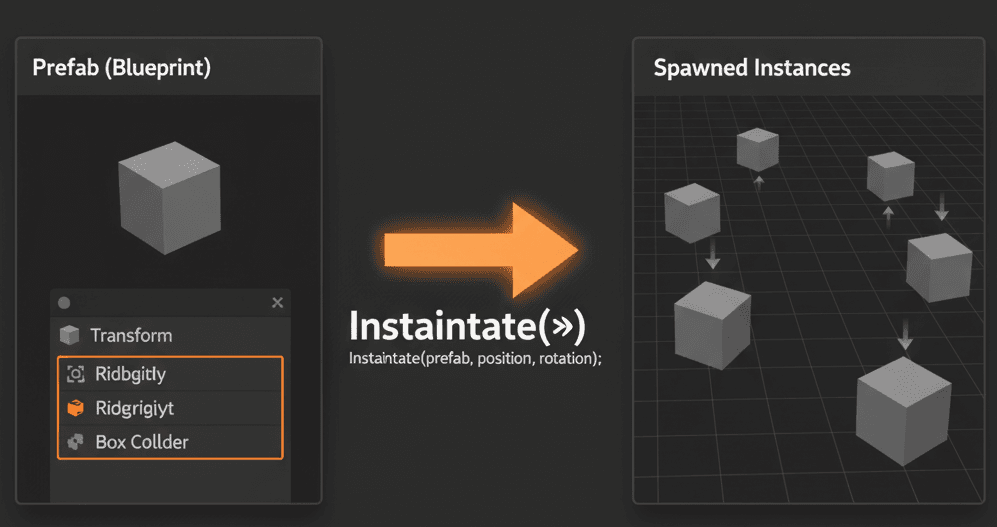
Let me tell you what random object spawning really is, because when I first heard the term at KIXEYE, I thought it sounded way more complicated than it actually is. Creating random objects, often called "spawning," is simply the process of dynamically generating new GameObjects into your scene while the game is running. Think of it like a gumball machine - every time you turn the crank (trigger an event), a random gumball (object) appears and falls down, bouncing around until it settles.
This solves one of the biggest problems new developers face: creating unpredictable, dynamic, and replayable experiences. When I was working on mobile games, we realized that players would abandon games that felt too repetitive. But when we combined random spawning with physics interaction, something magical happened - objects would fall, bounce, and react to the player and environment in ways that felt genuinely alive.
The beauty of this approach is that it creates worlds where spawned items can interact with everything around them. Your randomly generated enemies don't just appear - they tumble down stairs, bounce off walls, and create emergent gameplay moments that you, as the developer, never explicitly programmed.
The Essential Building Blocks Every Developer Needs to Know
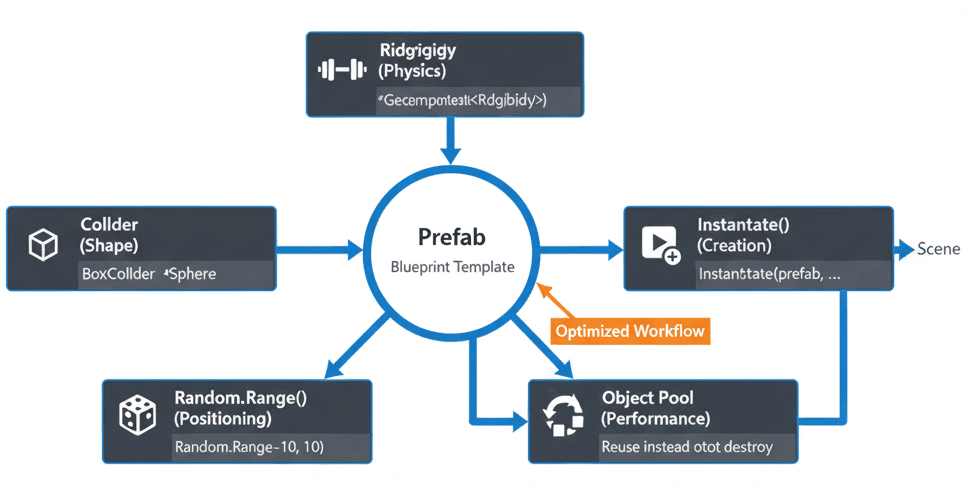
Been there - staring at Unity's interface, wondering what all these components actually do. Let me break down the fundamental tools Unity gives us for creating and simulating random objects, because understanding these is crucial before we dive into code.
- Prefab - This is your blueprint, your template. A Prefab is a reusable GameObject stored in your project assets that contains all the components, properties, and child objects that make up whatever you want to spawn. Think of it as a cookie cutter - you design it once, then use it to create identical copies.
- Instantiate() - This is your magic wand function. It's the core Unity function that takes your Prefab blueprint and creates a live copy in your scene. You can specify exactly where and how that object appears.
- Random.Range() - Your randomness generator. This fundamental function from Unity's Random class returns a random number between any minimum and maximum you specify. This is what adds unpredictability to spawn locations, rotations, or even which object gets selected.
- Rigidbody / Rigidbody2D - The physics enabler. When you add this component to a GameObject, Unity's physics engine takes control. Suddenly your object can be affected by gravity, forces, and collisions - it becomes a "physical" object.
- Collider / Collider2D - The interaction definer. This component creates the physical shape of your object for collision detection. Without it, your GameObject is essentially a ghost that nothing can touch or interact with.
- Object Pooling - The performance saver. Instead of constantly creating and destroying objects (which kills performance), you pre-create a "pool" of them and activate/deactivate as needed. Trust me, you'll need this when spawning lots of objects frequently.
Your First Steps: Making Objects Appear Out of Thin Air
Actually, wait - before we jump into complex systems, let me show you the absolute basics. When I first started, I made the mistake of trying to spawn scene objects directly. Here's what you need to know: you never spawn a scene object directly. Instead, you create a Prefab in the editor and instantiate that Prefab from code. This keeps everything clean and organized.
// Public variable to hold the Prefab you want to spawn.
// You drag your Prefab from the Project window onto this slot in the Inspector.
public GameObject enemyPrefab;
The act of creation happens with the Instantiate function. This takes a Prefab and creates a live copy in your scene. You can provide a position and rotation for where it should appear:
// Spawns the enemyPrefab at the spawner's location with no rotation.
void SpawnEnemy()
{
    Instantiate(enemyPrefab, transform.position, Quaternion.identity);
}
Here's where it gets interesting - adding unpredictability. You can use Random.Range to decide where to spawn an object, creating variety in your game:
// Spawns an object at a random X position within a range of -10 to 10.
void SpawnAtRandomX()
{
    float randomX = Random.Range(-10f, 10f);
    Vector3 spawnPosition = new Vector3(randomX, 10, 0);
    Instantiate(enemyPrefab, spawnPosition, Quaternion.identity);
}
For an object to truly interact with your game world, its Prefab must have both a Collider component (to give it shape) and a Rigidbody component (to make it react to physics forces like gravity). This is verified in the Unity Rigidbody documentation.
Here's What I Wish Someone Had Told Me: Two Approaches Compared
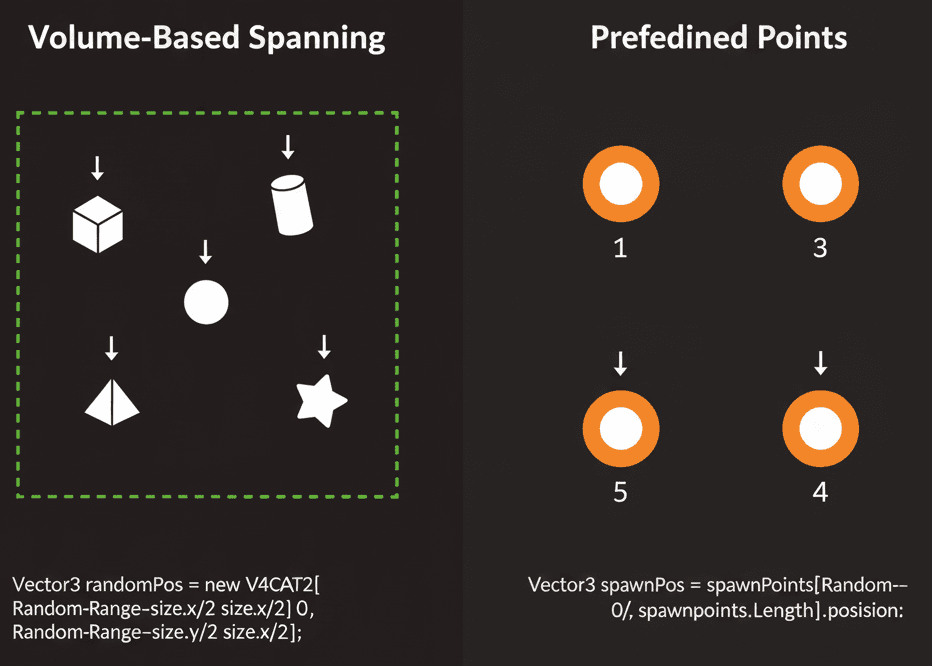
| Criteria | Approach A: Spawning in a Defined Volume | Approach B: Spawning at Predefined Points |
|---|---|---|
| Best For | Creating a chaotic, unpredictable field of objects, like an asteroid field or falling rain. | Controlling spawn locations for strategic gameplay, like enemy spawn points in a level or power-up pads. |
| Performance | Calculating a random position is very fast. | Accessing an array of transforms is also very fast. Performance is comparable. |
| Complexity | Requires calculating a random Vector3 within the bounds of a shape, like a box or sphere. |
Requires setting up a list or array of empty GameObjects in the editor to serve as spawn points. |
| Code Example | Vector3 pos = center + new Vector3(Random.Range(-size.x/2, size.x/2), ...); |
Transform spawnPoint = spawnPoints[Random.Range(0, spawnPoints.Length)]; |
Choose the volume approach when you want natural, organic randomness. Choose predefined points when you need strategic control over spawn locations.
Why This Changes Everything for Your Games
You know what's funny? I used to think random spawning was just a technical feature. But after shipping multiple games, I realize it's actually the foundation of player engagement. Here are the key benefits that'll transform your game development:
- Endless Replayability - Randomly spawning enemies, loot, or obstacles ensures that no two playthroughs are exactly the same. This dramatically increases your game's replay value, something I learned was crucial during my time working on mobile games.
- Dynamic and Emergent Gameplay - When randomly spawned objects all obey physics laws, they interact with each other and the player in unexpected and interesting ways. These emergent moments often become the most memorable parts of your game.
- Scalable Content Creation - Instead of manually placing thousands of objects, you write a simple script to spawn them procedurally. This lets you create massive, complex worlds with minimal effort - a technique that saved us months at KIXEYE.
- Built-in Challenge Systems - Spawning systems form the foundation of enemy waves in shooters, zombie hordes in survival games, and obstacles in endless runners. Master this, and you've mastered a core game design pattern.
The Mistakes I Made (So You Don't Have To)

Here's the thing about learning game development - everyone makes the same mistakes. Let me share the lessons that took me months to figure out, so you can skip the painful learning curve.
- Always Instantiate from a Prefab - This is the golden rule I wish someone had drilled into me earlier. It keeps your project organized and makes updating all spawned objects as simple as editing the Prefab. Never try to spawn scene objects directly.
- Use Object Pooling for Frequent Spawning - If you're spawning and destroying objects rapidly (like bullets), use an object pool to avoid garbage collection spikes that'll kill your frame rate:
// Instead of this...
Destroy(gameObject);

// ...do this with a pool.
gameObject.SetActive(false);
// Return to pool logic here- Separate Your Spawning Logic - Keep your spawning logic in dedicated scripts like
EnemyManagerorLootSpawner. This makes your code much cleaner and easier to manage. Trust me on this one - I've refactored too many messy spawning systems.
This approach is backed by Unity's official guidance on object pooling.
Real Games That Nailed Random Spawning
Let me tell you about some brilliant implementations I've studied over the years. These examples show exactly why mastering random spawning is so important.
Tetris: The Perfect Example of Predictable Unpredictability
I've always been fascinated by how Tetris handles this. The game has an array of seven block Prefabs, and a script randomly selects one using Random.Range(0, 7), then instantiates it at the top of the playfield. The randomness forces players to constantly adapt their strategy, making the game compelling and ever-changing. What makes this brilliant is that players know exactly what pieces are possible, but never what's coming next.
Enter the Gungeon: Object Pooling at Scale
This "bullet hell" shooter demonstrates object pooling mastery. Enemies fire hundreds of projectiles that fill the screen - each bullet is an instance of a Prefab with Rigidbody2D and Collider2D components. To handle the sheer number without crashing, the game uses a highly optimized object pooling system instead of constantly calling Instantiate and Destroy. The result? Players navigate dense fields of physical projectiles in an intense, visually spectacular experience.
Let's Build Something: Three Complete Implementations
Time to get our hands dirty. I'm going to walk you through three complete implementations that solve real problems you'll face in your projects. These are the exact approaches I use when building games.
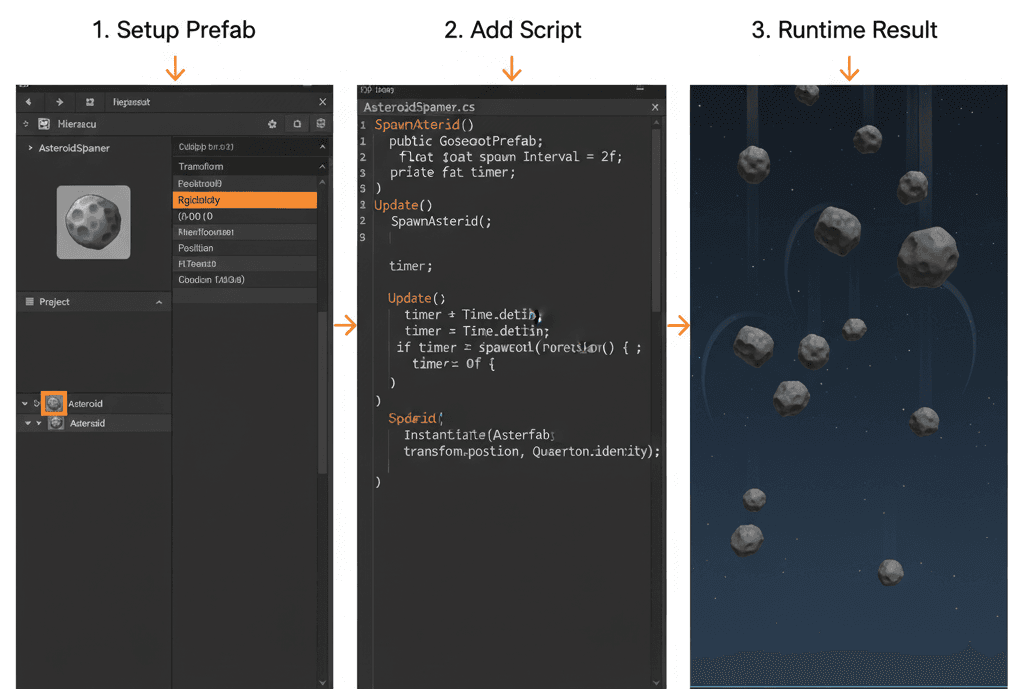
My Go-To Method: Spawning Falling Asteroids
What we're building: A spawner that randomly drops physical objects from the top of the screen that fall with gravity - perfect for space games, obstacle courses, or destruction effects.
Unity Editor Setup:
- Create a Prefab (Sprite for 2D, Sphere for 3D) named "Asteroid"
- Add the appropriate Rigidbody component (
Rigidbody2DorRigidbody) to your "Asteroid" Prefab - Create an empty GameObject named "AsteroidSpawner" and attach this script
Here's the complete implementation:
// File: AsteroidSpawner.cs
using UnityEngine;

public class AsteroidSpawner : MonoBehaviour
{
    public GameObject asteroidPrefab; // Assign your Asteroid Prefab in the Inspector
    public float spawnRate = 2.0f;    // How often to spawn a new asteroid
    public float spawnAreaWidth = 10.0f; // The width of the spawn area

    private float nextSpawnTime;

    void Update()
    {
        // Use a timer to spawn objects at a regular rate
        if (Time.time > nextSpawnTime)
        {
            SpawnAsteroid();
            nextSpawnTime = Time.time + spawnRate;
        }
    }

    void SpawnAsteroid()
    {
        // Calculate a random horizontal position within the spawn area
        float randomX = Random.Range(-spawnAreaWidth / 2, spawnAreaWidth / 2);
        Vector3 spawnPosition = new Vector3(randomX, transform.position.y, 0);

        // Create the new asteroid. It will start falling due to its Rigidbody.
        Instantiate(asteroidPrefab, spawnPosition, Quaternion.identity);
    }
}
This implementation is documented in the Unity Instantiate documentation.
When You Need Controlled Randomness: Zone-Based Spawning
What we're building: A system that spawns health packs at random positions inside a specific rectangular area - perfect for loot systems or resource distribution.
Unity Editor Setup:
- Create a health pack Prefab
- Create an empty GameObject named "SpawnZone"
- Add a
BoxColliderto "SpawnZone", check "Is Trigger", and adjust size to define your spawn area - Attach this script to the "SpawnZone" GameObject
// File: SpawnZone.cs
using UnityEngine;

public class SpawnZone : MonoBehaviour
{
    public GameObject itemPrefab; // Assign your health pack Prefab
    private BoxCollider spawnArea;

    void Awake()
    {
        spawnArea = GetComponent();
    }

    void Start()
    {
        // Spawn one item at the beginning
        SpawnItem();
    }

    void SpawnItem()
    {
        // Get the bounds of the collider
        Bounds bounds = spawnArea.bounds;

        // Calculate a random position within the bounds
        float randomX = Random.Range(bounds.min.x, bounds.max.x);
        float randomZ = Random.Range(bounds.min.z, bounds.max.z);
        // We use the zone's y-position to spawn on the ground
        Vector3 spawnPosition = new Vector3(randomX, transform.position.y, randomZ);

        Instantiate(itemPrefab, spawnPosition, Quaternion.identity);
    }
}
Advanced Technique: Physics-Powered Explosions
What we're building: A system that spawns debris and immediately launches it in random directions with physical forces - perfect for destruction effects or impact responses.
Unity Editor Setup:
- Create a debris Prefab (small Cube) with a
Rigidbodycomponent - Create an empty GameObject named "ExplosionPoint" and attach this script
// File: Explosion.cs
using UnityEngine;

public class Explosion : MonoBehaviour
{
    public GameObject debrisPrefab; // Assign your debris Prefab
    public int numberOfDebris = 10;
    public float launchForce = 500.0f;

    void Start()
    {
        // When the game starts, create an explosion of debris
        Explode();
    }

    void Explode()
    {
        for (int i = 0; i < numberOfDebris; i++)
        {
            // Create the debris at the center of the explosion
            GameObject debrisInstance = Instantiate(debrisPrefab, transform.position, Quaternion.identity);

            // Get its Rigidbody component
            Rigidbody rb = debrisInstance.GetComponent();

            if (rb != null)
            {
                // Calculate a random direction and apply a force
                Vector3 randomDirection = Random.onUnitSphere; // A random point on a sphere of radius 1
                rb.AddForce(randomDirection * launchForce);
            }
        }
    }
}
Now that you've learned how to create random objects in Unity and bring your worlds to life with dynamic spawning systems, you're ready to take your game development skills to the next level. These fundamental concepts form the backbone of countless game mechanics - from enemy waves to loot systems to environmental storytelling.
If you want to go from understanding these concepts to building complete, professional game experiences, I've designed a comprehensive course that takes you through the entire journey. Learn to create your first complete game with "Mr. Blocks" - where you'll apply these spawning techniques alongside every other essential game development skill you need to succeed.
Key Takeaways
- Master the Prefab-Instantiate workflow - Never spawn scene objects directly; always create Prefabs first and instantiate them through code for clean, maintainable projects.
- Combine Random.Range() with Instantiate() to spawn random objects in Unity at unpredictable locations, creating dynamic and replayable gameplay experiences.
- Use Rigidbody and Collider components together to make your spawned objects interact physically with the game world through gravity, forces, and collisions.
- Implement object pooling for frequently spawned objects like bullets or particles to avoid performance-killing garbage collection spikes.
- Choose your spawning approach strategically - use volume-based spawning for organic randomness, predefined points for controlled placement.
- Separate spawning logic into dedicated manager scripts (EnemyManager, LootSpawner) to keep your codebase organized and maintainable.
- Study successful implementations in games like Tetris and Enter the Gungeon to understand how spawn prefab unity techniques create compelling gameplay mechanics.
- Test your spawning systems early and often - random object generation can create unexpected interactions that either enhance or break your game balance.
Common Questions
What is a Prefab in Unity and why do I need it for spawning objects?
A Prefab is a reusable GameObject template stored in your project assets. It contains all the components, properties, and child objects that define what you want to spawn. You need Prefabs because Unity cannot spawn scene objects directly - you must create a blueprint first, then instantiate copies of that blueprint during gameplay.
How do I spawn random objects unity at different locations each time?
Use the Random.Range() function to generate random coordinates for your spawn position. For example: float randomX = Random.Range(-10f, 10f); creates a random X position between -10 and 10. Combine this with Instantiate() to spawn objects at unpredictable locations.
What components does my Prefab need to interact with physics?
Your Prefab needs both a Collider component (to define its physical shape) and a Rigidbody component (to make it respond to physics forces). Without a Collider, the object is like a ghost that nothing can touch. Without a Rigidbody, it won't be affected by gravity or forces.
When should I use object pooling instead of Instantiate and Destroy?
Use object pooling when spawning and destroying objects frequently, especially for things like bullets, particles, or enemies in wave-based games. Constantly calling Instantiate() and Destroy() creates garbage collection that can cause frame rate drops and stuttering.
How do I spawn prefab unity objects at predefined locations?
Create an array of Transform points in your spawner script, then use Random.Range(0, spawnPoints.Length) to randomly select a spawn point. This gives you control over exactly where objects can appear while maintaining unpredictability.
What's the difference between Rigidbody and Rigidbody2D?
Rigidbody is for 3D physics simulation, while Rigidbody2D is for 2D games. Choose based on your game type - use Rigidbody2D for platformers or top-down games, and Rigidbody for 3D worlds with depth.
How can I make spawned objects launch in random directions?
After instantiating an object with a Rigidbody, use AddForce() with a random direction. For 3D: Vector3 randomDirection = Random.onUnitSphere; gives you a random point on a sphere. For 2D, use Vector2 randomDirection = Random.insideUnitCircle.normalized;
Why aren't my spawned objects falling or responding to physics?
Check that your Prefab has a Rigidbody component attached. Also ensure the Rigidbody isn't set to "Kinematic" mode, which disables physics simulation. The object also needs a Collider to interact with other physics objects.
How do I prevent spawned objects from overlapping each other?
Use collision detection before spawning, or implement a spacing system. You can check if a position is clear using Physics.CheckSphere() or Physics2D.OverlapCircle() before calling Instantiate. Alternatively, use predefined spawn points with sufficient spacing.
What's the best way to organize spawning code in my project?
Create dedicated manager scripts for different object types (EnemyManager, LootSpawner, EffectsManager). This keeps your spawning logic separate from gameplay code and makes it easier to manage, debug, and modify spawning behaviors.
How do I spawn different types of objects randomly?
Create an array of different Prefabs, then use Random.Range() to select which one to spawn: GameObject prefabToSpawn = prefabArray[Random.Range(0, prefabArray.Length)]; This technique works great for randomizing enemy types, loot drops, or environmental objects.
Can I spawn objects in a specific pattern while still keeping some randomness?
Yes! You can combine structured spawning with random elements. For example, spawn enemies in waves (structured timing) but randomize their spawn positions, types, or movement directions. This gives you the best of both controlled design and unpredictable variety.