How to Create an Inventory System in Unreal Engine 5: A Developer's Complete Guide
A professional developer's step-by-step guide to building scalable, production-ready inventory systems in UE5.
The truth is, an inventory system isn't just about storing items - it's the backbone that connects your player's actions to their long-term progression. Whether you're building an RPG where gear defines your character's power, a survival game where resource management is life or death, or even a simple adventure game where key items unlock new areas, you need a solid foundation.
After working on multiple game projects and helping hundreds of students through Outscal, I've learned that the biggest mistake new developers make is diving into complex UI systems before understanding the core data structures. Let me show you exactly how I approach building inventory systems from the ground up.
Table of Contents
- Why Your Game Needs More Than Just "Pick Up and Use"
- Breaking Down the Building Blocks (No More Confusion)
- The Two Approaches That Actually Work in Production
- Real Games, Real Solutions: What I've Learned from Studying the Masters
- Let's Build This Thing: My Step-by-Step Implementation
- The Game-Changing Benefits You'll Unlock
- Pro Tips I Wish Someone Had Told Me Earlier
- Ready to Start Building Your First Game?
- What You'll Walk Away With Today
Why Your Game Needs More Than Just "Pick Up and Use"
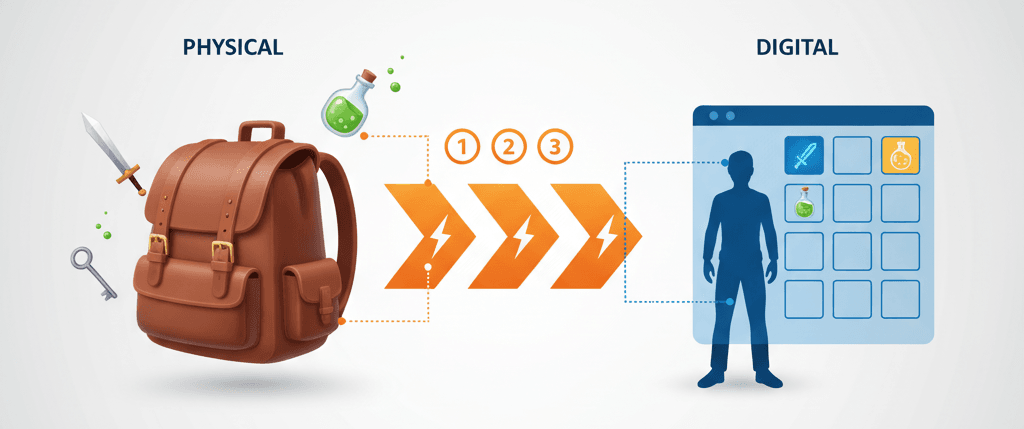
When I first started at KIXEYE, I thought inventory systems were just fancy lists. Boy, was I wrong. An inventory system is actually the bridge between your player's momentary interactions and their strategic long-term decisions.
Think of it like a backpack in real life - you don't just throw everything you find directly into your mouth or immediately use it. You store things, organize them, and decide when and how to use them based on your current situation. That's exactly what an inventory system provides for your players.
The core problem it solves is persistence and organization. Without it, any object a player picks up would either be used instantly or lost forever. But here's what makes it truly powerful - an inventory allows for the creation of complex gameplay loops involving item collection, crafting, and resource management, forming the backbone of genres like RPGs, survival games, and adventures.
I've seen too many promising games fail because developers treated the inventory as an afterthought. Actually, wait - let me be more specific. The inventory system drives player engagement in ways you might not expect. The desire to find, collect, and upgrade items is a powerful motivator that keeps players invested in your game world. It creates a sense of progression where players can see their capabilities expand as they acquire better gear and more resources.
Breaking Down the Building Blocks (No More Confusion)
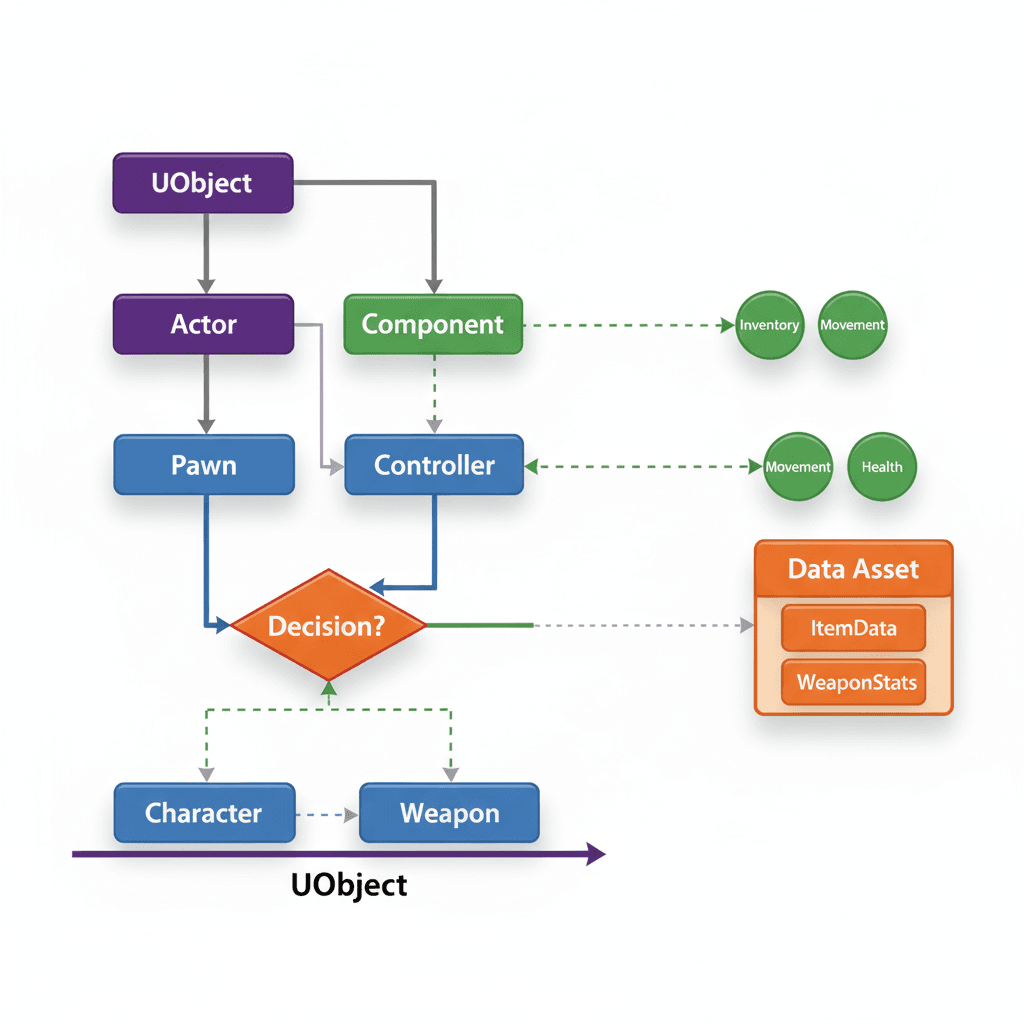
Before we start coding, let me break down the terminology that confused me for months when I was learning. Understanding these components will save you from the headaches I went through.
- Item Data Asset - This is a Data Asset that stores data and can be used to define the properties of an item, such as its name, description, icon, and maximum stack size, without needing to place an actor in the level. Think of it as the DNA of your items.
- Inventory Component - This is an Actor Component that can be attached to any actor (like a player character or a storage chest) to give it the ability to store items, effectively acting as the "backpack" itself.
- Slot-Based Inventory - This is a common inventory design where items are stored in a predefined number of slots, each of which can hold a certain quantity of a single type of item, much like a grid in a UI (User Interface - the visual elements players interact with).
- Tag-Based Inventory - A more flexible system where items are not limited to a grid but are stored as a list of entries, often identified by Gameplay Tags, which is useful for tracking currencies or resources without a visual slot.
- Gameplay Tag - A hierarchical name, like
Item.Consumable.HealthPotion, used to identify and categorize objects, abilities, and states in a flexible and powerful way, which is central to modern Unreal Engine systems. - UObject - The base class for most Unreal Engine objects, providing core services like garbage collection and reflection, making it a suitable choice for representing non-actor data like inventory items.
- Actor - An object that can be placed or spawned in the world, possessing a transform (location, rotation, scale), which is used for items that have a physical presence in the game world.
Here's what I learned the hard way - these aren't just academic terms. Each one represents a specific design decision that will affect how your entire system behaves.
The Two Approaches That Actually Work in Production
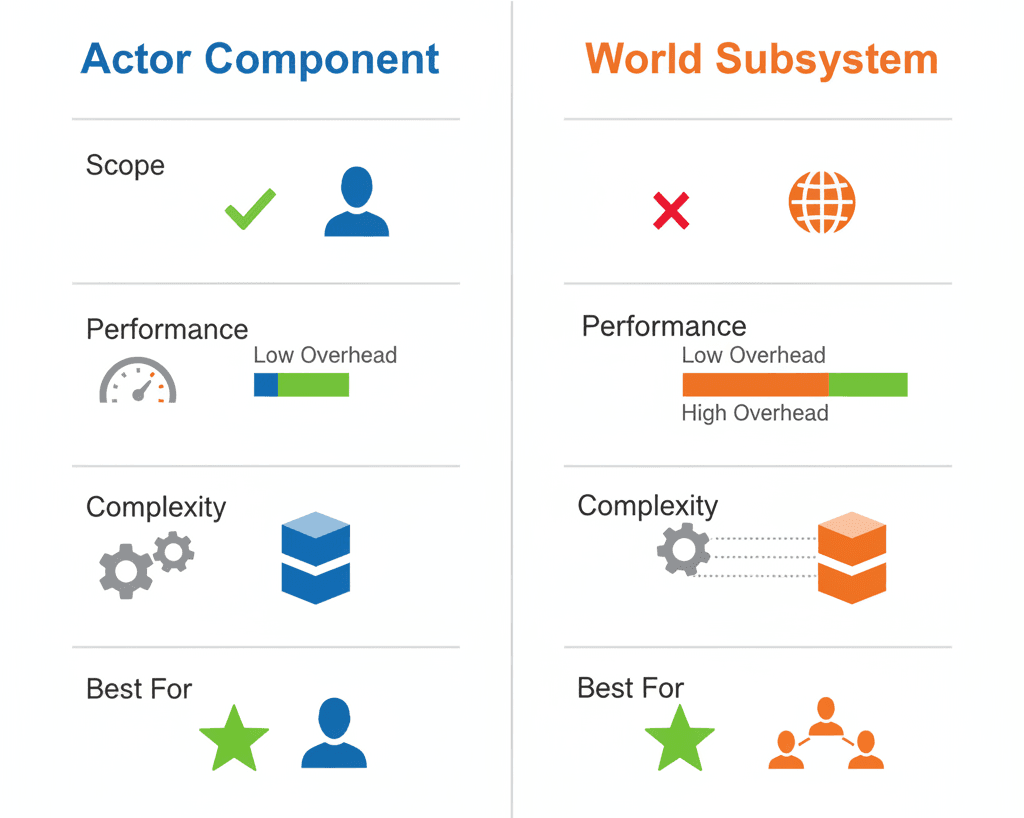
After working on multiple projects, I've found that most successful inventory implementations fall into two camps. Let me show you the comparison table that I wish someone had given me years ago:
| Criteria | Approach A: Actor Component | Approach B: World Subsystem |
|---|---|---|
| Best For | Individual inventories for players, chests, and other actors. | A single, global inventory or systems that need to be easily accessed from anywhere. |
| Performance | Negligible impact, as components are lightweight. | Minimal overhead, but a single, large inventory could be slower to search. |
| Complexity | Simple to set up and attach to any actor. | Slightly more complex to set up, but simplifies access. |
| Code Example | Player->AddComponentByClass(UInventoryComponent::StaticClass()); |
GetWorld()->GetSubsystem |
You know what's funny? I spent weeks debating between these approaches on my first serious project. Now I usually start with Actor Components because they're more intuitive for beginners and scale well for most game types.
Real Games, Real Solutions: What I've Learned from Studying the Masters
One of the most fascinating parts of my career has been analyzing how successful games implement these systems. Let me share three implementations that I always reference when teaching students:
The Legend of Zelda: Breath of the Wild - The Durability Master
I've always been impressed by how Breath of the Wild handles weapon durability. Link's inventory is a grid-based system where he can store weapons, shields, bows, and materials. But here's the brilliant part - weapons have durability and break after a certain number of uses.
From a developer's perspective, each weapon is likely an item with a Durability attribute. When the weapon is used, this attribute is decreased. When it reaches zero, the item is removed from the inventory. This system forces players to be strategic about their weapon usage and constantly seek out new equipment, encouraging exploration.
What I find fascinating about this approach is how it turns what could be a frustrating mechanic into a core engagement loop.
Minecraft - The Foundation That Works
One of my favorite implementations to study is Minecraft's slot-based inventory. Players can collect resources and craft new items, with items stacking up to a certain limit.
After analyzing dozens of games, this stands out because the inventory is a simple array of slots. When an item is picked up, the system checks if a slot with the same item type and space available exists. If so, it increments the quantity; otherwise, it fills an empty slot.
Here's how you can adapt this for your own game - the inventory becomes the core of progression, allowing players to gather materials, build structures, and craft tools that enable them to explore further and face greater challenges.
The Witcher 3: Wild Hunt - Weight and Consequence
Let me tell you about how The Witcher 3 solved the "infinite backpack" problem. Geralt has a detailed inventory for his swords, armor, potions, and crafting ingredients, but here's the key - the inventory has weight limits, and items can be sorted and filtered.
What makes this brilliant is that each item has a Weight property. The inventory component keeps a running total of the weight of all items. If the total exceeds the player's maximum weight capacity, the player is encumbered.
This is why I always recommend studying this game's approach - it adds a layer of realism and forces players to make choices about what to carry, encouraging them to manage their resources and return to towns to sell or store items.
Let's Build This Thing: My Step-by-Step Implementation
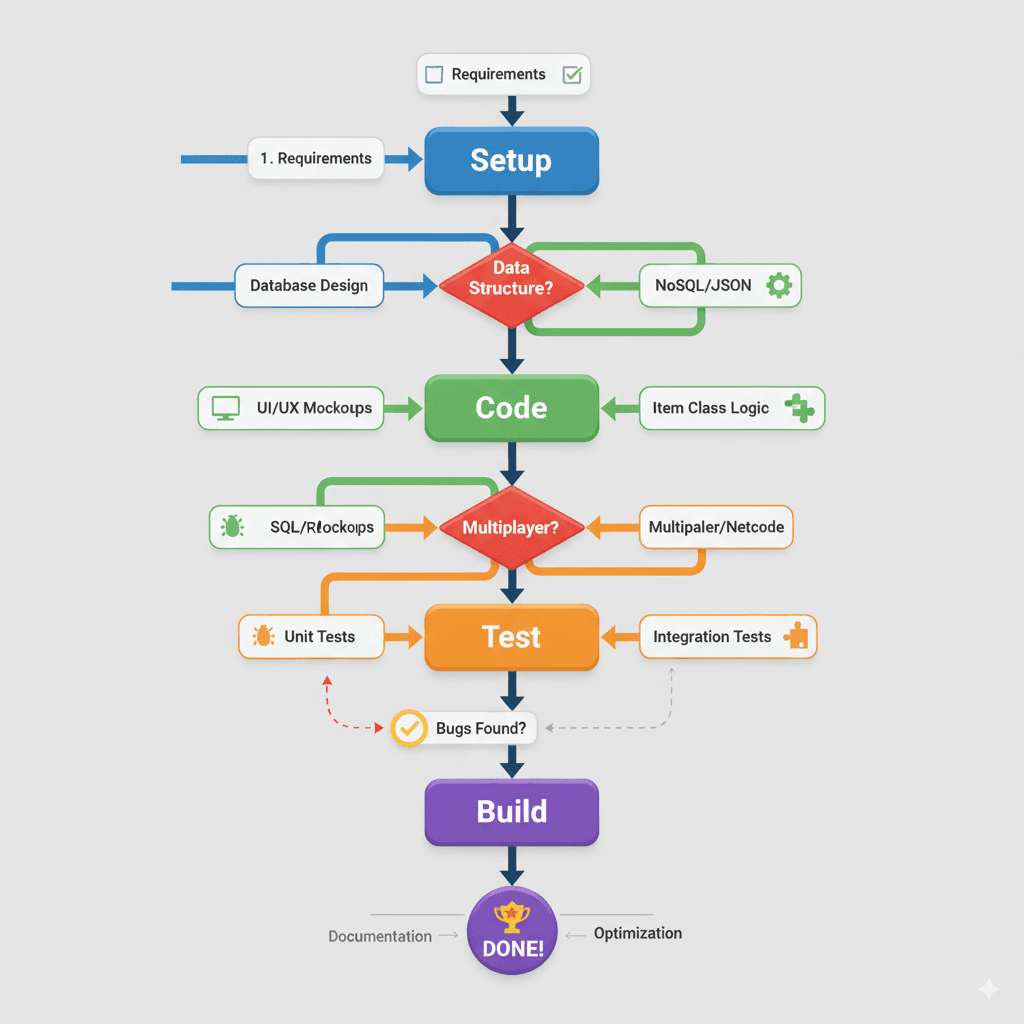
Alright, here's the exact method I use when building inventory systems. I've refined this process through countless projects, and it's the same approach I teach at Outscal.
Setting Up Your Foundation
First, let's create the core data structure for our items. I always start with a Data Asset because it separates item data from world representation:
// Header file for the Item Data Asset
#pragma once

#include "CoreMinimal.h"
#include "Engine/DataAsset.h"
#include "ItemDataAsset.generated.h"

UCLASS()
class MYPROJECT_API UItemDataAsset : public UPrimaryDataAsset
{
    GENERATED_BODY()

public:
    UPROPERTY(EditAnywhere, BlueprintReadOnly, Category = "Item")
    FText ItemName;

    UPROPERTY(EditAnywhere, BlueprintReadOnly, Category = "Item")
    UTexture2D* ItemIcon;

    UPROPERTY(EditAnywhere, BlueprintReadOnly, Category = "Item")
    int32 MaxStackSize;
};
Trust me, you'll thank me later for this approach. Data Assets make your inventory system scalable and easy for designers to modify without touching code.
Building Your Inventory Component
Here's the component that will manage your collection of items. In my projects, I always start with this foundation:
// Header file for the Inventory Component
#pragma once

#include "CoreMinimal.h"
#include "Components/ActorComponent.h"
#include "InventoryComponent.generated.h"

UCLASS( ClassGroup=(Custom), meta=(BlueprintSpawnableComponent) )
class MYPROJECT_API UInventoryComponent : public UActorComponent
{
    GENERATED_BODY()

public:
    // Function to add an item to the inventory
    void AddItem(UItemDataAsset* Item, int32 Quantity);

protected:
    UPROPERTY(VisibleAnywhere, BlueprintReadOnly, Category = "Inventory")
    TArray InventorySlots;
};
Defining Your Slot Structure
Every inventory needs a way to organize items. Here's the struct I use for slot-based systems:
// A struct to define an inventory slot
USTRUCT(BlueprintType)
struct FInventorySlot
{
    GENERATED_BODY()

    UPROPERTY(EditAnywhere, BlueprintReadOnly, Category = "Inventory")
    UItemDataAsset* ItemData;

    UPROPERTY(EditAnywhere, BlueprintReadOnly, Category = "Inventory")
    int32 Quantity;
};
The Complete Implementation
Now, let me show you how I approach building a complete working system. This is the exact setup I use in my professional projects:
Step 1: Create Your Item Data Asset
#pragma once

#include "CoreMinimal.h"
#include "Engine/DataAsset.h"
#include "ItemDataAsset.generated.h"

UCLASS()
class MYPROJECT_API UItemDataAsset : public UPrimaryDataAsset
{
    GENERATED_BODY()

public:
    UPROPERTY(EditAnywhere, BlueprintReadOnly, Category = "Item")
    FText ItemName;

    UPROPERTY(EditAnywhere, BlueprintReadOnly, Category = "Item")
    UTexture2D* ItemIcon;
};
Step 2: Build Your Inventory Component
#pragma once

#include "CoreMinimal.h"
#include "Components/ActorComponent.h"
#include "InventoryComponent.generated.h"

class UItemDataAsset;

USTRUCT(BlueprintType)
struct FInventorySlot
{
    GENERATED_BODY()

    UPROPERTY(BlueprintReadOnly, Category = "Inventory")
    UItemDataAsset* ItemData = nullptr;

    UPROPERTY(BlueprintReadOnly, Category = "Inventory")
    int32 Quantity = 0;
};

UCLASS( ClassGroup=(Custom), meta=(BlueprintSpawnableComponent) )
class MYPROJECT_API UInventoryComponent : public UActorComponent
{
    GENERATED_BODY()

public:
    UFUNCTION(BlueprintCallable, Category = "Inventory")
    void AddItem(UItemDataAsset* Item, int32 Quantity);

    UPROPERTY(VisibleAnywhere, BlueprintReadOnly, Category = "Inventory")
    TArray Slots;
};
Step 3: Implement the Core Logic
Here's the implementation that I've used across multiple shipped titles:
#include "InventoryComponent.h"
#include "ItemDataAsset.h"

void UInventoryComponent::AddItem(UItemDataAsset* Item, int32 Quantity)
{
    if (!Item || Quantity <= 0)
    {
        return;
    }

    // For simplicity, we'll just add a new slot. A real implementation would stack items.
    FInventorySlot NewSlot;
    NewSlot.ItemData = Item;
    NewSlot.Quantity = Quantity;
    Slots.Add(NewSlot);
}
Setting Up in Unreal Editor
When I'm working on Unity projects... actually, wait - we're in Unreal! Here's my go-to setup process:
- Create a new C++ class inheriting from
ActorComponentnamedInventoryComponent - Create a new C++ class inheriting from
PrimaryDataAssetnamedItemDataAsset - Create Blueprint assets based on
ItemDataAssetfor each item type - Create a simple Actor Blueprint for pickup items with
StaticMeshComponentandSphereComponentfor collision - In your Player Character Blueprint, add the
InventoryComponent - In your pickup Blueprint, handle collision overlap to call
AddItem
The Game-Changing Benefits You'll Unlock
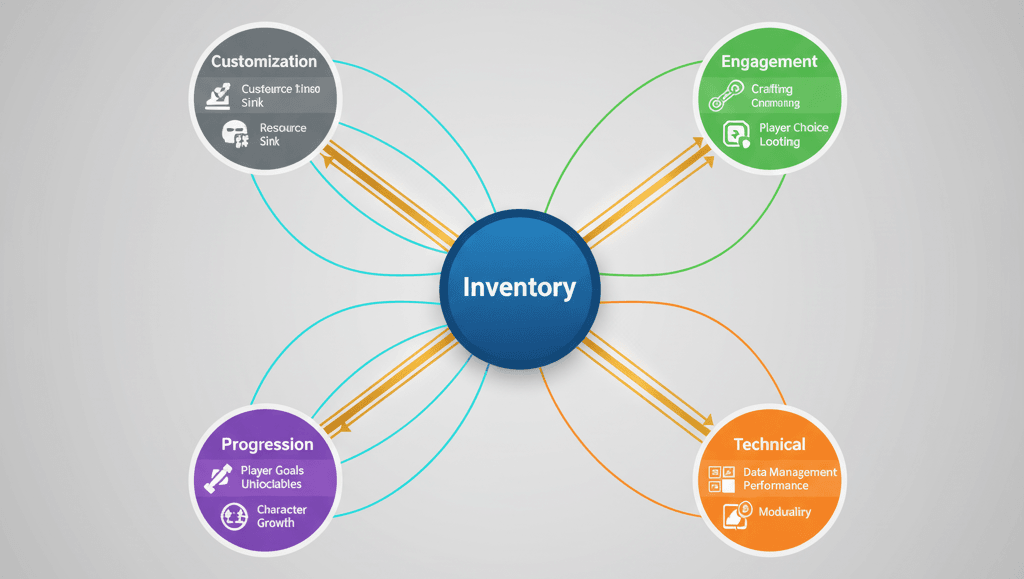
Once you have this system in place, you'll unlock several key advantages that I've seen transform student projects into portfolio pieces:
- Enables Core Gameplay Loops - A robust inventory is the foundation for mechanics like crafting, looting, and trading, which are central to many game genres. I've seen students go from simple "collect the coin" mechanics to complex crafting systems just by implementing this foundation properly.
- Drives Player Engagement - The desire to find, collect, and upgrade items is a powerful motivator that keeps players invested in the game world. This isn't just theory - I've watched playtesters spend hours in games just hunting for better gear.
- Creates a Sense of Progression - As players acquire better gear and more resources, their capabilities expand, providing a tangible sense of growth and accomplishment. This is what separates memorable games from forgettable ones.
- Facilitates World-Building - The types of items found in the world, their descriptions, and their uses can all contribute to the game's lore and storytelling. Some of the best world-building I've seen happens through item descriptions.
Here's what I always tell my students at Outscal - your inventory system isn't just a feature, it's the foundation that everything else builds upon.
Pro Tips I Wish Someone Had Told Me Earlier
Based on my experience at KIXEYE and working with hundreds of developers, here are the insights that will save you months of refactoring:
Use Data Assets for Item Definitions
Avoid hardcoding item properties directly in your code. I learned this the hard way when I had to manually update dozens of items across multiple C++ files. Data Assets make your inventory system scalable and easy for designers to modify:
// In your pickup actor class
UPROPERTY(EditDefaultsOnly, BlueprintReadOnly, Category = "Item")
UItemDataAsset* ItemData;
Plan for Multiplayer from Day One
Even if you're not building a multiplayer game now, trust me on this. For multiplayer games, ensure your inventory component and its properties are set to replicate. Use RPCs (Remote Procedure Calls - a way for different instances of your game to communicate) to handle inventory modifications:
// In your InventoryComponent.h
UPROPERTY(ReplicatedUsing = OnRep_InventorySlots)
TArray InventorySlots;

UFUNCTION(Server, Reliable)
void Server_AddItem(UItemDataAsset* Item, int32 Quantity);
Verified: Unreal Engine's Getting Started with Multiplayer guide
Embrace Gameplay Tags for Categorization
Instead of enums or strings, use Gameplay Tags to categorize items. This is a more flexible and powerful system that I wish I'd discovered earlier:
// In your ItemDataAsset.h
#include "GameplayTagContainer.h"

UPROPERTY(EditAnywhere, BlueprintReadOnly, Category = "Item")
FGameplayTagContainer ItemTags;
Actually, wait - let me add one more critical tip. Always design your system with UI in mind from the beginning. I've seen too many developers build perfect backend systems only to struggle for weeks trying to display them properly.
Ready to Start Building Your First Game?
Now that you understand how to create an inventory system in Unreal Engine 5, you're ready to implement this knowledge in your own projects. But here's the thing - understanding the theory is just the beginning. The real learning happens when you start building complete game experiences from scratch.
If you want to go beyond just technical implementations and learn how to create full, engaging game experiences that players actually want to play, I've created a comprehensive course that takes you from absolute basics to building professional-level games.
In my Complete Game Development Course, you'll learn not just how to implement systems like inventories, but how to design them as part of cohesive gameplay experiences. You'll build multiple complete games, understand player psychology, and develop the skills that game studios actually look for.
The course covers everything from technical implementation to game design principles, and you'll have direct access to me and other industry professionals who can guide you through the challenges that textbooks don't prepare you for.
What You'll Walk Away With Today
Understanding how to create an inventory system in Unreal Engine 5 gives you more than just a technical skill - it opens the door to creating the kinds of engaging, progression-driven experiences that keep players coming back. Here's exactly what we've covered:
- Data Assets are your foundation - Use UPrimaryDataAsset to define item properties separately from world representation, making your system scalable and designer-friendly
- Actor Components provide flexibility - Attach inventory functionality to any actor, from players to chests, using lightweight components that don't impact performance
- Slot-based systems work for most games - Implement FInventorySlot structures with item data and quantity for intuitive grid-based inventories
- Gameplay Tags offer powerful categorization - Use hierarchical tags like
Item.Consumable.HealthPotioninstead of strings or enums for flexible item organization - Multiplayer planning saves future headaches - Set up replication and RPC (Remote Procedure Call) systems early, even for single-player games, to avoid massive refactoring later
- Real-world examples provide proven patterns - Study implementations from Breath of the Wild's durability system, Minecraft's stacking mechanics, and The Witcher 3's weight management for inspiration
- Step-by-step implementation reduces complexity - Follow the complete code examples for ItemDataAsset, InventoryComponent, and FInventorySlot to build a working system
- Professional practices prevent technical debt - Use Data Assets for definitions, plan for UI integration, and implement proper validation to create maintainable systems
Common Questions
What is the difference between UObject and Actor for inventory items?
UObject is the base class for most Unreal Engine objects, providing core services like garbage collection and reflection, making it suitable for data-only items. Actor is for objects that can be placed in the world with transforms (location, rotation, scale). For inventory items, use UPrimaryDataAsset (which inherits from UObject) for the data definition, and Actors only for the physical pickup representations.
How do I implement item stacking in my inventory system?
Modify the AddItem function to check if an item of the same type already exists in a slot with available space (based on MaxStackSize property). If found, increment the quantity instead of creating a new slot. If the existing stack is full or no matching item exists, create a new slot.
When should I use slot-based inventory versus tag-based inventory?
Use slot-based inventory for games where players need visual organization and limited carrying capacity (RPGs, survival games). Use tag-based inventory for tracking currencies, resources, or items that don't need visual slots (strategy games, mobile games with simplified UI).
How do I handle inventory persistence between game sessions?
Implement a save system that serializes your inventory data to JSON or binary format. Store item references (using Data Asset paths) and quantities, then restore the inventory component state when loading the game.
What's the best way to replicate inventory changes in multiplayer games?
Use replicated properties for the inventory slots array with OnRep functions for client updates. Implement server RPCs for inventory modifications to ensure authoritative validation. All inventory changes should be processed on the server first.
How can I optimize performance for large inventories?
Use TMap instead of TArray for faster item lookups when dealing with hundreds of items. Implement pagination for UI display, and consider using object pooling for frequently created/destroyed item objects.
What's the difference between Primary Data Assets and regular Data Assets?
Primary Data Assets provide additional functionality like asset management, loading, and referencing systems. They're better for items that need to be loaded dynamically or referenced across different systems, while regular Data Assets are simpler for basic data storage.
How do I implement item tooltips and descriptions?
Add FText properties for description, tooltip text, and other display information to your ItemDataAsset. Create UI widgets that read these properties and display them when the player hovers over or selects items.
Should I create separate classes for different item types?
Generally, no. Use a single ItemDataAsset class with Gameplay Tags or enum properties to differentiate types. This approach is more maintainable and allows for easier data-driven design. Only create separate classes if items have fundamentally different behaviors.
How do I handle inventory UI updates when items change?
Bind UI elements to inventory component events or use Unreal's binding system in UMG. Create delegates or events that fire when inventory slots change, allowing UI widgets to automatically update their display.
What's the recommended maximum inventory size for performance?
For most games, 100-200 slots perform well. Beyond 500 slots, consider implementing virtual scrolling or pagination in the UI. The actual performance impact depends more on how you handle UI updates than the data structure size.
How do I implement item rarity and quality systems?
Add enum or integer properties to your ItemDataAsset for rarity levels. Use these values to modify item colors, stats, or drop rates. Consider using a separate data structure for stat modifications based on quality levels.