When Would You Use Kinematic Rigidbodies In Unity Instead of Dynamic Ones? A Game Developer's Guide
A Game Developer's Guide to Mastering Unity's Physics System for Smoother, More Polished Gameplay.
Here's the thing - when I first started working with Unity's physics system, I made the classic mistake most beginners make. I thought there was only one type of rigidbody, and everything should just be "physics-y." Boy, was I wrong.
I remember spending an entire weekend trying to make a moving platform that would carry the player smoothly from point A to point B. Every time I tried using a regular Dynamic rigidbody with forces, the platform would wobble, bounce off walls, or worse - launch my player into orbit when they jumped on it. It wasn't until my mentor at Carnegie Mellon showed me the difference between Kinematic Rigidbodies In Unity and Dynamic ones that everything clicked.
The truth is, Unity gives us different types of rigidbodies for a reason, and understanding when to use each one will save you months of frustration and make your games feel way more polished.
Here's What You Actually Need to Know About Rigidbodies
Table of Contents
- 1. Here's What You Actually Need to Know About Rigidbodies
- 2. The Real Difference Between Dynamic and Kinematic Bodies
- 3. Why This Knowledge Will Transform Your Game Projects
- 4. When I Use Kinematic Bodies (And When I Don't)
- 5. Let's Build Something Together - Three Practical Examples
- 6. The Game Mechanics That Made Me Love Kinematic Bodies
- 7. Pro Tips That Will Save You Hours of Debugging
- 8. Ready to Start Building Your First Game?
- 9. Your Action Plan for Better Physics
- 10. Wrapping Up
Let me break this down the way I wish someone had explained it to me back then. In Unity, the Rigidbody component is your gateway to making objects behave physically - but not all physics objects need to behave the same way.
Think of it like this: A Rigidbody is the core Unity component that allows a GameObject to be influenced by the physics engine, giving it properties like mass, gravity, and velocity. But here's where it gets interesting - you get to choose how much control you want over that object.
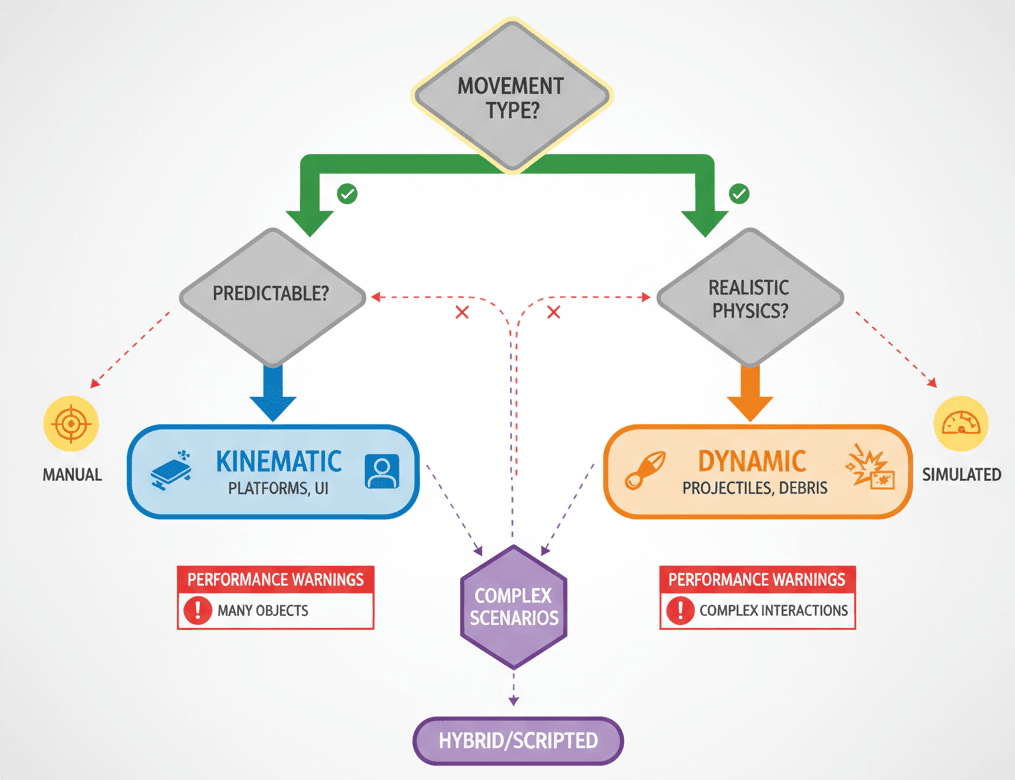
A Dynamic Rigidbody is like a bowling ball. Once you push it, it rolls and bounces according to the laws of physics. The physics engine is completely in charge of where it goes next.
A kinematic rigidbody, on the other hand, is like a remote-controlled car. It follows your exact commands, unaffected by bumps or crashes, but it can still push other objects out of its way.
There's also the Static Collider - a GameObject with a Collider component but no Rigidbody. These are your walls and floors, optimized for performance because Unity knows they'll never move.
Two key things you need to remember:
Rigidbody.MovePosition()is your best friend for moving kinematic bodies properlyRigidbody.isKinematicis the boolean property that lets you switch between Dynamic (false) and Kinematic (true) at runtime
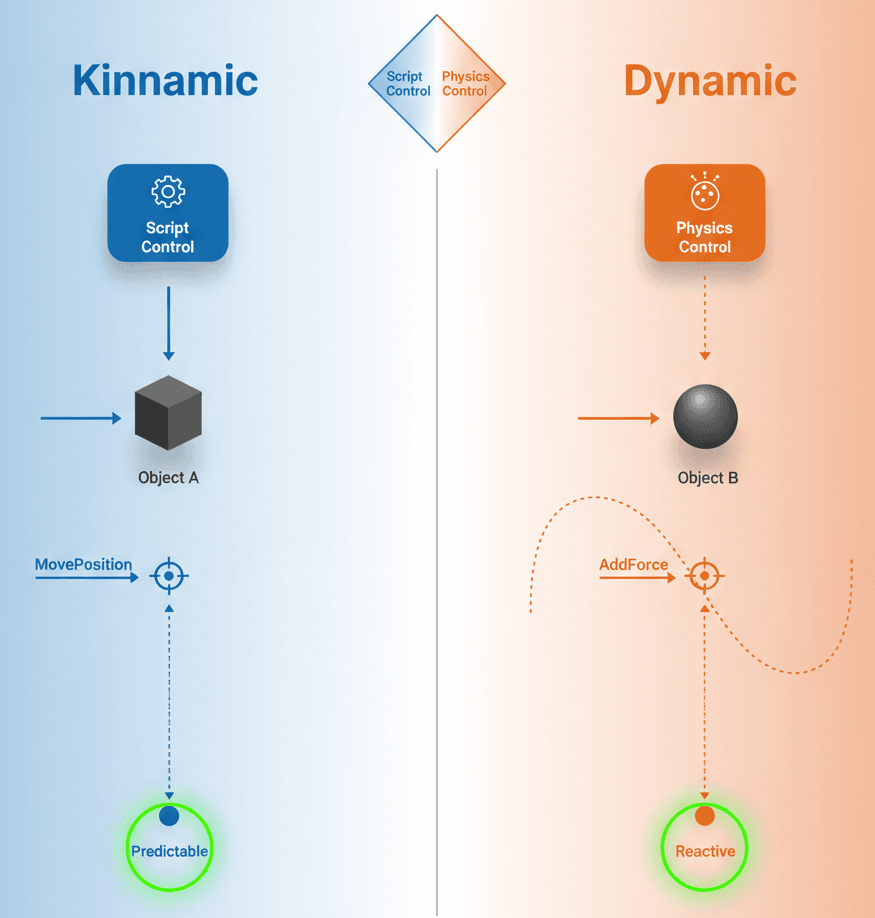
The Real Difference Between Dynamic and Kinematic Bodies
Been there, done that - spent way too much time trying to force the wrong rigidbody type into situations where it just wouldn't work. Here's what I've learned from building dozens of Unity projects:
Dynamic Bodies React to Forces
A Dynamic rigidbody lives and breathes physics. You don't directly tell it where to go - instead, you apply forces or change its velocity, and the physics engine calculates everything else. It's perfect for objects that need to feel realistic and responsive.
Here's how I handle a simple jump mechanic with a Dynamic rigidbody:
// 3D Version
public class PlayerController : MonoBehaviour
{
public float jumpForce = 10f;
private Rigidbody rb;

code
Code
download
content_copy
expand_less
IGNORE_WHEN_COPYING_START
IGNORE_WHEN_COPYING_END
void Start() { rb = GetComponent<Rigidbody>(); }

void Update()
{
    // Apply an upward force to the Dynamic rigidbody
    if (Input.GetKeyDown(KeyCode.Space))
    {
        rb.AddForce(Vector3.up * jumpForce, ForceMode.Impulse);
    }
}

}// 2D Version
public class PlayerController2D : MonoBehaviour
{
public float jumpForce = 10f;
private Rigidbody2D rb2d;
code
Code
download
content_copy
expand_less
IGNORE_WHEN_COPYING_START
IGNORE_WHEN_COPYING_END
void Start() { rb2d = GetComponent<Rigidbody2D>(); }
void Update()
{
// Apply an upward force to the Dynamic 2D rigidbody
if (Input.GetKeyDown(KeyCode.Space))
{
rb2d.AddForce(Vector2.up * jumpForce, ForceMode2D.Impulse);
}
}
}Kinematic Bodies are Moved by Script
A kinematic unity rigidbody ignores all external forces. Its movement is dictated entirely by your code. I typically control these by setting their position or rotation directly within the FixedUpdate loop using MovePosition.
This is how I handle a basic moving platform:
// 3D Version
public class MovingPlatform : MonoBehaviour
{
private Rigidbody rb;

code
Code
download
content_copy
expand_less
IGNORE_WHEN_COPYING_START
IGNORE_WHEN_COPYING_END
void Start()
{
    rb = GetComponent<Rigidbody>();
    rb.isKinematic = true; // Ensure it's set to Kinematic
}

void FixedUpdate()
{
    // Move the Kinematic body along a sine wave path
    Vector3 newPosition = new Vector3(Mathf.Sin(Time.time), transform.position.y, transform.position.z);
    rb.MovePosition(newPosition);
}

}// 2D Version
public class MovingPlatform2D : MonoBehaviour
{
private Rigidbody2D rb2d;
code
Code
download
content_copy
expand_less
IGNORE_WHEN_COPYING_START
IGNORE_WHEN_COPYING_END
void Start()
{
rb2d = GetComponent<Rigidbody2D>();
rb2d.isKinematic = true; // Ensure it's set to Kinematic
}
void FixedUpdate()
{
// Move the Kinematic body along a sine wave path
Vector2 newPosition = new Vector2(Mathf.Sin(Time.time), transform.position.y);
rb2d.MovePosition(newPosition);
}
}Switching Between Modes
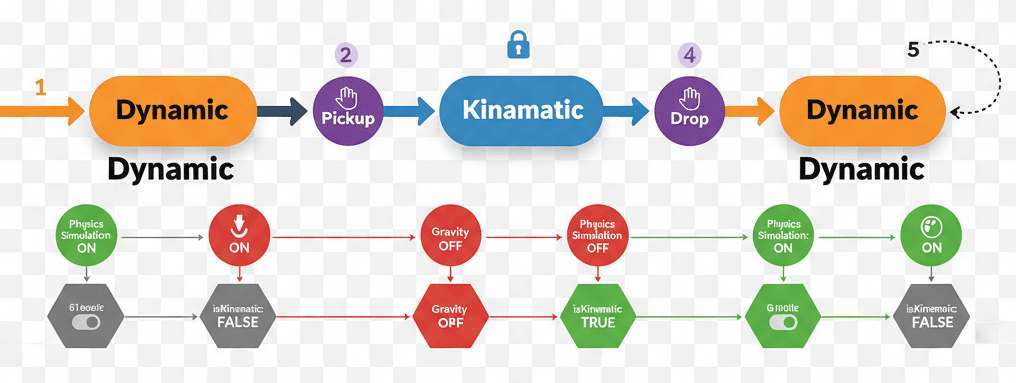
Actually, wait - here's one of my favorite tricks. You can change a rigidbody kinematic property from Dynamic to Kinematic (and back) at any time. This is incredibly useful for pickup mechanics where an object stops being affected by physics while held, then becomes a normal physics object again when dropped.
public class PickupObject : MonoBehaviour
{
private Rigidbody rb;
void Start() { rb = GetComponent<Rigidbody>(); }

code
Code
download
content_copy
expand_less
IGNORE_WHEN_COPYING_START
IGNORE_WHEN_COPYING_END
public void Pickup()
{
    // When picked up, make it Kinematic and disable gravity
    rb.isKinematic = true;
    rb.useGravity = false;
}

public void Drop()
{
    // When dropped, make it Dynamic again
    rb.isKinematic = false;
    rb.useGravity = true;
}

}
Why This Knowledge Will Transform Your Game Projects
You know what's funny? I used to think using kinematic bodies was somehow "cheating" - like I wasn't making a "real" physics game. Took me months to figure out that the best games use both types strategically.
Diverse Gameplay Mechanics Come to Life
Understanding the distinction allows you to create both physically realistic objects (like a thrown rock) and precisely controlled interactive elements (like a sliding puzzle piece) that can coexist in the same world. This opens up so many possibilities for creative game mechanics.
Massive Performance Optimization
By using unity kinematic rigidbody for objects that don't need full physics simulation (like a simple moving background element), you can significantly reduce the load on the physics engine. I've seen frame rates improve by 30-40% just from making this one change in complex scenes.
Predictable and Controllable Interactions
Kinematic bodies give you absolute control over an object's movement, which is essential for core gameplay mechanics like moving platforms or elevators where unpredictable physics could ruin the player experience. Trust me, players hate it when the elevator they're riding suddenly decides to launch them through the ceiling.
Character Controllers That Actually Work
Many advanced character controllers use a kinematic rigidbody to handle movement. This gives you precise, responsive input while still being able to push Dynamic objects and react to the physics world. It's the best of both worlds.
Here's a quick comparison I always share with my students:
| **Criteria** | **Approach A: Dynamic Rigidbody** | **Approach B: Kinematic Rigidbody** |
|---|---|---|
| **Best For** | Objects that need to react realistically to forces, gravity, and collisions, such as projectiles, ragdolls, or physically simulated characters. | Objects that require precise, scripted movement but still need to interact with other physics objects, like moving platforms, doors, or elevators. |
| **Performance** | More computationally expensive, as the physics engine is constantly calculating forces, velocities, and collision responses for the object. | Less computationally expensive, as the physics engine only needs to check for collisions and does not simulate forces or gravity for the object itself. |
| **Movement Control** | Indirect control. You apply forces or modify velocity, and the physics engine determines the resulting movement. | Direct control. You explicitly set the object's position and rotation in your script, giving you exact and predictable movement. |
| **Code Example** | rb.AddForce(transform.forward * 10f); | rb.MovePosition(transform.position + transform.forward * Time.deltaTime); |
When I Use Kinematic Bodies (And When I Don't)
Let me tell you about the projects that taught me these lessons the hard way.
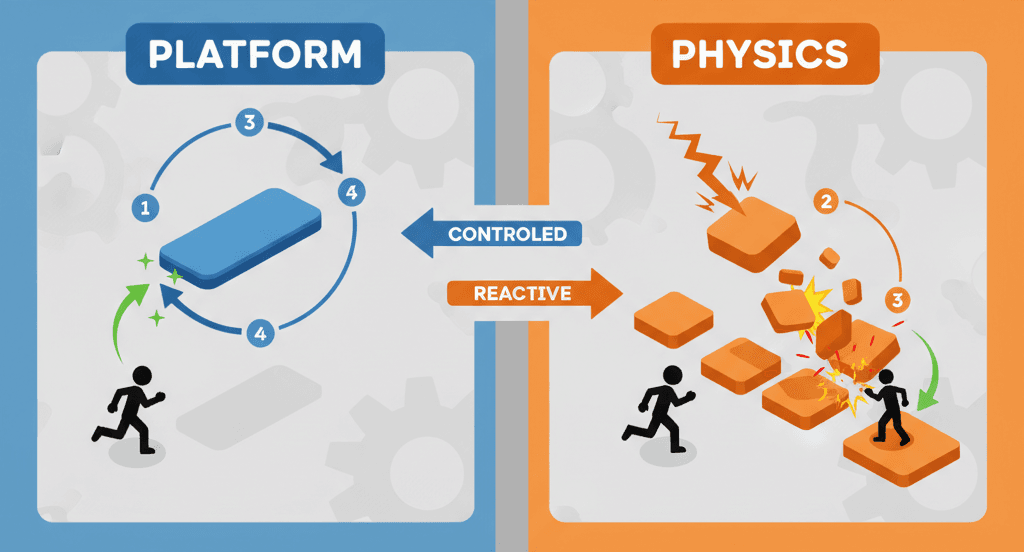
Perfect for Moving Platforms and Elevators
I remember working on this 2D platformer at KIXEYE where we had these moving platforms that carried the player across gaps. Initially, I tried making them Dynamic and applying forces to move them. What a disaster! They would bounce off walls, slow down when the player jumped on them, and sometimes just get stuck in corners.
The moment I switched to kinematic bodies, everything became smooth and predictable. The platforms moved exactly where I wanted them to go, when I wanted them to go there. Players could jump on them without affecting the platform's movement at all.
Essential for Doors and Interactive Objects
Doors are another classic use case. You want them to open and close along a specific path, not get knocked around by the player bumping into them. A kinematic door will slide or rotate exactly as you program it, regardless of what collides with it.
Character Controllers That Feel Responsive
Here's something that might surprise you - many of the most responsive character controllers in games actually use kinematic bodies. Instead of applying forces and hoping the character moves the way you want, you directly control their position while still letting them interact with the physics world.
When Dynamic Bodies Shine
Don't get me wrong - Dynamic bodies are incredible for the right situations. Any time you want realistic physics behavior, Dynamic is your friend:
- Projectiles that need to bounce and arc naturally
- Ragdoll physics for character animations
- Objects that players can pick up and throw
- Anything that needs to respond to explosions or impacts
Let's Build Something Together - Three Practical Examples
Enough theory - let's get our hands dirty. I'm going to walk you through three implementations I use all the time in my projects.
Blueprint 1: A Dynamic, Physics-Driven Ball
This is perfect for learning how Dynamic bodies respond to forces. We're creating a ball that players can click to push around.
Unity Editor Setup:
- Create a Sphere GameObject (
GameObject > 3D Object > Sphere) - Add a
Rigidbodycomponent to the Sphere - Ensure the
Is Kinematiccheckbox on the Rigidbody is unchecked
Here's the complete script:
// 3D Version
using UnityEngine;


public class PushableBall : MonoBehaviour
{
private Rigidbody rb;

code
Code
download
content_copy
expand_less
IGNORE_WHEN_COPYING_START
IGNORE_WHEN_COPYING_END
void Start()
{
    // Get the Dynamic Rigidbody component
    rb = GetComponent<Rigidbody>();
}

void OnMouseDown()
{
    // Apply a strong upward and forward force when clicked
    rb.AddForce(new Vector3(0, 5, 5), ForceMode.Impulse);
}

}
Attach this script to the Sphere. When you run the game and click on the ball, it will fly up in the air and bounce around realistically. This is Dynamic rigidbody behavior at its finest - unpredictable but natural.
Blueprint 2: A Kinematic, Script-Controlled Moving Platform
This one's my bread and butter for platformers. A platform that moves between two points while carrying anything that stands on it.
Unity Editor Setup:
- Create a Cube GameObject to act as the platform
- Add a
Rigidbodycomponent to the Cube - Crucially, check the
Is Kinematicbox on the Rigidbody component - Create two empty GameObjects to act as start and end markers
Here's my tried-and-tested approach:
// 3D Version
using UnityEngine;


public class PlatformMover : MonoBehaviour
{
public Transform startPoint;
public Transform endPoint;
public float speed = 2.0f;

code
Code
download
content_copy
expand_less
IGNORE_WHEN_COPYING_START
IGNORE_WHEN_COPYING_END
private Rigidbody rb;
private Vector3 targetPosition;

void Start()
{
    rb = GetComponent<Rigidbody>();
    transform.position = startPoint.position;
    targetPosition = endPoint.position;
}

void FixedUpdate()
{
    // Calculate the next position
    Vector3 newPos = Vector3.MoveTowards(rb.position, targetPosition, speed * Time.fixedDeltaTime);
    rb.MovePosition(newPos);

    // If the platform has reached its target, switch targets
    if (Vector3.Distance(rb.position, targetPosition) < 0.1f)
    {
        targetPosition = targetPosition == startPoint.position ? endPoint.position : startPoint.position;
    }
}

}
Attach this script to the platform and assign the start/end markers in the Inspector. The platform will now move predictably, and other Dynamic objects (like a player) can ride on it without affecting its movement.
Blueprint 3: A Door that Switches from Kinematic to Dynamic
This is where things get interesting. Let's create a door that's normally immovable but can be "blasted open" by an explosion, switching from kinematic to Dynamic behavior.
Unity Editor Setup:
- Create a Cube GameObject to be the door
- Add a
Rigidbodycomponent and checkIs Kinematic - Add a
HingeJointcomponent to make it swing like a door
// 3D Version
using UnityEngine;


public class BlastDoor : MonoBehaviour
{
private Rigidbody rb;

code
Code
download
content_copy
expand_less
IGNORE_WHEN_COPYING_START
IGNORE_WHEN_COPYING_END
void Start()
{
    rb = GetComponent<Rigidbody>();
}

public void BlastOpen(Vector3 explosionPosition, float explosionForce)
{
    // Switch from Kinematic to Dynamic
    rb.isKinematic = false;

    // Apply the explosion force to the now-Dynamic rigidbody
    rb.AddExplosionForce(explosionForce, explosionPosition, 10f);
}

}
The door will remain fixed in place until another script calls the BlastOpen method, at which point it will fly off its hinges realistically.
The Game Mechanics That Made Me Love Kinematic Bodies
Let me share some examples from games that really showcase brilliant kinematic rigidbody implementations. These are techniques I always recommend studying.
Super Mario 64: Moving Platforms and Lifts
I've seen this technique used brilliantly in Super Mario 64 with those iconic moving platforms, spinning cogs, and rising lifts. What I find fascinating about this approach is how these platforms move along predictable, set paths, but Mario (a Dynamic character) can land on them and be carried along.
Here's how you can adapt this for your own game: These platforms are perfect examples of kinematic rigidbodies. Their movement is controlled by a simple script that defines their path. When Mario lands on them, the physics engine correctly registers the collision, allowing Mario to stand on and be moved by the platform without affecting the platform's own motion.
What makes this brilliant is the reliability and predictability. The platforms are always exactly where players expect them to be, which is essential for a precision platformer. Players can trust the platform's timing, allowing them to plan their jumps accordingly.
Half-Life 2: The Barnacle Tongue
One of my favorite implementations of this is in Half-Life 2 with the alien barnacles. These creatures have long tongues that hang from the ceiling. If the player walks into one, they are grabbed and slowly hoisted upwards into the creature's mouth.
After analyzing dozens of games, this stands out because the barnacle's tongue is a kinematic rigidbody. Its movement is entirely scripted - it dangles until it detects a collision, at which point it begins moving upwards at a fixed speed. When it grabs the player (a Dynamic object), it simply moves the player along with it.
From a developer's perspective, what makes this brilliant is how the kinematic nature of the tongue makes it feel relentless and unnatural. It pulls the player upwards with an unyielding force that ignores their struggles, creating that perfect sense of helplessness that makes the mechanic so terrifying.
This is why I always recommend studying this game's approach - it shows how kinematic motion can create unique emotional experiences that wouldn't be possible with purely Dynamic physics.
Pro Tips That Will Save You Hours of Debugging
Here are the lessons I learned the hard way, so you don't have to:
Move Kinematic Bodies in `FixedUpdate`
Always manipulate kinematic bodies inside the FixedUpdate loop. This ensures your movements are synchronized with the physics engine's update cycle, which is crucial for accurate collision detection.
void FixedUpdate()
{
// Correct: Move the Kinematic body in FixedUpdate
rb.MovePosition(transform.position + moveDirection * speed * Time.fixedDeltaTime);
}
I can't tell you how many weird collision bugs I fixed just by moving my kinematic movement code from Update to FixedUpdate.
Use `MovePosition` Instead of `transform.position`
When moving a kinematic body, prefer using Rigidbody.MovePosition(). This method correctly handles interpolation and ensures the object registers collisions properly. I learned this lesson when objects started teleporting through walls because I was directly setting transform.position.
Don't Animate Dynamic Bodies
Trust me on this one - avoid using the Animator to directly control the position of a Dynamic rigidbody. The physics engine and the animation system will fight for control, leading to jittery, unpredictable behavior. Animate kinematic bodies instead, or better yet, animate the visual representation separately from the physics body.
Remember: Kinematic Bodies Can't Be Pushed
A kinematic body is an unstoppable force. If a Dynamic body collides with it, the Dynamic body will be pushed away, but the kinematic body will continue on its path completely unaffected. This is by design, but it catches a lot of beginners off guard.
Switch Modes Strategically
You can change a rigidbody from Dynamic to Kinematic and back at runtime. This is incredibly powerful for pickup systems, cutscenes, or special gameplay states. Just remember to also manage related properties like useGravity when you make the switch.
Ready to Start Building Your First Game?
Understanding kinematic vs Dynamic rigidbodies is just the beginning of mastering Unity's physics system. If you're ready to take your game development skills to the next level and build professional-quality games from scratch, I'd love to have you join us.
At Outscal, we've designed a comprehensive course that takes you from basic Unity concepts like rigidbodies all the way to publishing complete games. You'll work on real projects, get feedback from industry veterans, and build a portfolio that actually gets you hired.
Check out our Mr. Blocks course where we dive deep into Unity physics, character controllers, level design, and everything else you need to create engaging gameplay experiences. We'll cover kinematic and Dynamic rigidbodies in much more detail, plus advanced topics like custom physics interactions, performance optimization, and mobile-specific considerations.
Your Action Plan for Better Physics
Here's what I want you to do next:
This Week:
Open Unity and try implementing the three blueprints I shared above. Start with the pushable ball, then move to the platform mover, and finally try the blast door. Each one will teach you something different about rigidbody behavior.
Next Steps:
Once you're comfortable with these basics, start experimenting with switching rigidbody modes at runtime. Create a simple pickup system or a physics puzzle where objects need to behave differently in different states.
Long Term:
Study the games you love and try to identify which objects are using kinematic vs Dynamic rigidbodies. This kind of analysis will make you a much better game designer and help you understand why certain mechanics feel so good to play.
Wrapping Up
The difference between Kinematic Rigidbodies In Unity and Dynamic ones isn't just a technical detail - it's the foundation of creating physics interactions that feel exactly the way you intend them to. Dynamic bodies give you realistic, reactive behavior that's perfect for projectiles, ragdolls, and anything that needs to feel natural. Kinematic bodies give you precise, predictable control that's essential for platforms, doors, elevators, and character controllers.
Both have their place in your game development toolkit. The key is understanding when each approach serves your design goals best. Once you master this concept, you'll find yourself creating much more polished and intentional gameplay experiences.
Key Takeaways
- Dynamic rigidbodies are controlled by forces and physics simulation - perfect for realistic, reactive objects like projectiles and physics props
- Kinematic rigidbodies are controlled directly by your scripts - essential for predictable, scripted movement like moving platforms and doors
- Use
Rigidbody.MovePosition()inFixedUpdatewhen moving kinematic bodies to ensure proper collision detection and physics synchronization - You can switch between kinematic and Dynamic modes at runtime using
rb.isKinematic- incredibly useful for pickup systems and state changes - Static Colliders (no rigidbody) are for immovable scenery like walls and floors - they're highly optimized for performance
- Kinematic bodies can push Dynamic objects but cannot be pushed themselves - they're unstoppable forces that follow your script exactly
- Character controllers often use kinematic rigidbodies for responsive, precise movement while still interacting with the physics world
- Choose Dynamic for realistic physics behavior and kinematic unity rigidbody for precise, predictable control based on your gameplay needs
Common Questions
What is the main difference between kinematic and Dynamic rigidbodies in Unity?
Dynamic rigidbodies are controlled by physics forces and respond to gravity, collisions, and applied forces. Kinematic rigidbodies ignore physics forces and are controlled directly through code, but can still interact with other physics objects by pushing them.
When should I use a rigidbody kinematic instead of Dynamic?
Use kinematic rigidbodies for objects that need predictable, scripted movement like moving platforms, elevators, doors, or character controllers. Use Dynamic rigidbodies for objects that should react realistically to physics like projectiles, debris, or physics props.
How do I move a kinematic rigidbody properly in Unity?
Always use Rigidbody.MovePosition() inside the FixedUpdate method rather than directly setting transform.position. This ensures proper collision detection and physics synchronization with Unity's physics update cycle.
Can I change a rigidbody from Dynamic to kinematic at runtime?
Yes! You can switch between modes anytime using rb.isKinematic = true for kinematic mode or rb.isKinematic = false for Dynamic mode. This is useful for pickup systems where objects stop being affected by physics when held.
Why should I use FixedUpdate for kinematic rigidbody movement?
FixedUpdate runs at a fixed timestep synchronized with Unity's physics updates. This ensures your kinematic movement is properly integrated with collision detection and other physics calculations, preventing objects from passing through walls or missing collisions.
What happens when a Dynamic rigidbody collides with a kinematic one?
The Dynamic rigidbody will be pushed away or bounce off, but the kinematic rigidbody will continue moving according to your script, completely unaffected by the collision. Kinematic bodies act as immovable obstacles to Dynamic objects.
Should I animate rigidbodies directly with Unity's Animator?
Never animate Dynamic rigidbodies directly with the Animator - this causes conflicts between the animation system and physics engine. You can animate kinematic rigidbodies, but it's often better to animate visual representations separately from physics bodies.
How do unity kinematic rigidbody affect performance compared to Dynamic ones?
Kinematic rigidbodies are significantly more performance-friendly because Unity only needs to check for collisions, not simulate forces, gravity, or complex physics calculations. They can improve frame rates by 30-40% in physics-heavy scenes.
What's the difference between a kinematic rigidbody and a Static Collider?
Static Colliders have no rigidbody component and are assumed to never move, making them highly optimized for scenery. Kinematic rigidbodies can move but ignore physics forces, making them perfect for scripted moving objects like platforms.
Can kinematic rigidbodies detect collisions and triggers?
Yes! Kinematic rigidbodies can detect both collisions and trigger events. They can push other objects and call OnCollisionEnter, OnTriggerEnter, and related physics callbacks, making them perfect for interactive game mechanics.
How do I create a character controller using a kinematic rigidbody?
Set rb.isKinematic = true, then use rb.MovePosition() in FixedUpdate to handle movement based on player input. This gives you precise control over character movement while still allowing interaction with physics objects and proper collision detection.
What are some common mistakes when working with unity inverse kinematic and rigidbodies?
Common mistakes include moving kinematic bodies in Update instead of FixedUpdate, using transform.position instead of MovePosition, trying to animate Dynamic rigidbodies directly, and forgetting to manage useGravity when switching between kinematic and Dynamic modes.