Why Your Unity Game is Lagging (And How Object Pool Unity Can Save It)
Discover the essential optimization technique that stops your game from turning into a slideshow, with battle-tested strategies and code you can use today.

Here's the thing - I still remember the first time I tried building a bullet-hell shooter during my early days at KIXEYE. Seemed simple enough, right? Player shoots, bullets fly, enemies die. But the moment I had more than 50 bullets on screen, my game turned into a slideshow. Took me months to figure out that I was literally destroying the performance of my game, one Instantiate() and Destroy() call at a time.
That painful lesson taught me about object pool unity - a technique that went from "nice to know" to "absolutely essential" real quick. Today, I'm going to walk you through exactly how to implement this game-changing optimization, because trust me, you don't want to learn this the hard way like I did.
Table of Contents
What's Really Happening When Your Game Stutters
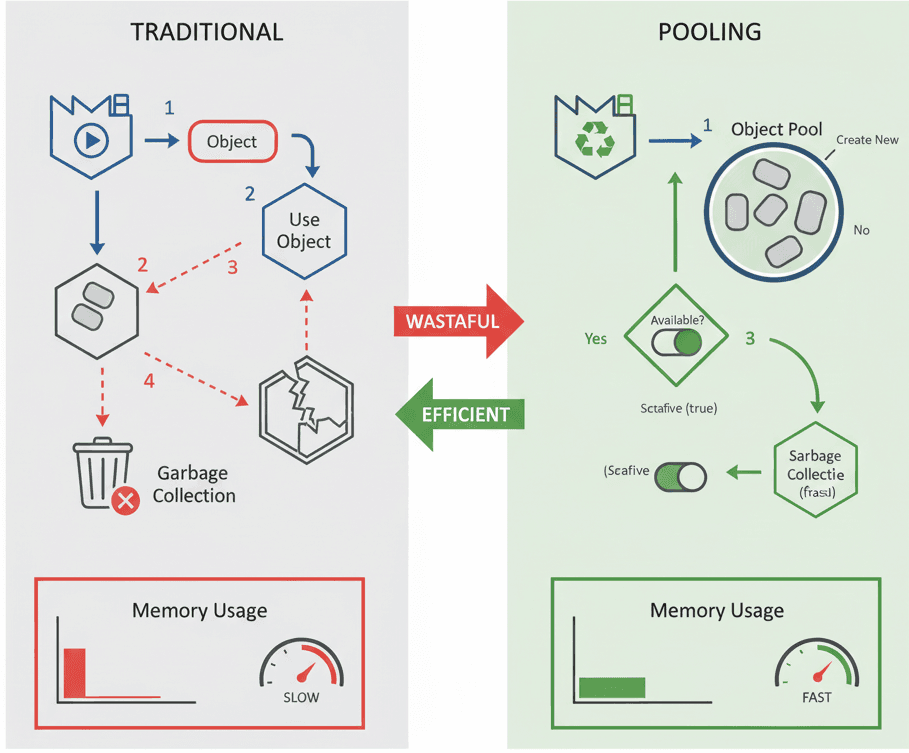
You know what's funny? Most student developers think their game is lagging because of graphics or complex AI. But actually, wait - the real culprit is usually something way more basic. Object pool unity is a crucial performance optimization technique that addresses the significant processing overhead caused by repeatedly creating and destroying objects at runtime.
Instead of destroying objects when they are no longer needed, they are deactivated and returned to a "pool" for later reuse. This solves the problem of CPU spikes and garbage collection stalls, which can cause noticeable hitches or freezes in your game.
Here's a simple way to think about it - imagine a restaurant throwing away every ceramic plate after each meal and firing up the kiln to make a new one. Sounds ridiculous, right? That's exactly what your game does every time it calls Instantiate() and Destroy(). Object pooling is like washing the plate and putting it back on the shelf for the next customer.
By using object pooling, you can create far more dynamic and complex scenes, such as a bullet hell shooter with thousands of projectiles or an endless runner with constantly appearing obstacles, without suffering from performance degradation.
Breaking Down the Object Pooling Toolkit
Been there - staring at Unity documentation trying to figure out what all these terms actually mean in practice. Let me break down the unity3d object pooling terminology in plain English:
- Pooling: This is the core practice of pre-instantiating a collection of objects before they are needed and storing them in a managed data structure, such as a List or a Queue, for later use.
- Instantiation: This refers to the process of creating a new instance of an object in memory, typically from a Prefab, using the
Object.Instantiate()method in Unity, which can be a resource-intensive operation. - Destruction: This is the process of removing an object from the scene and freeing the memory it occupied using the
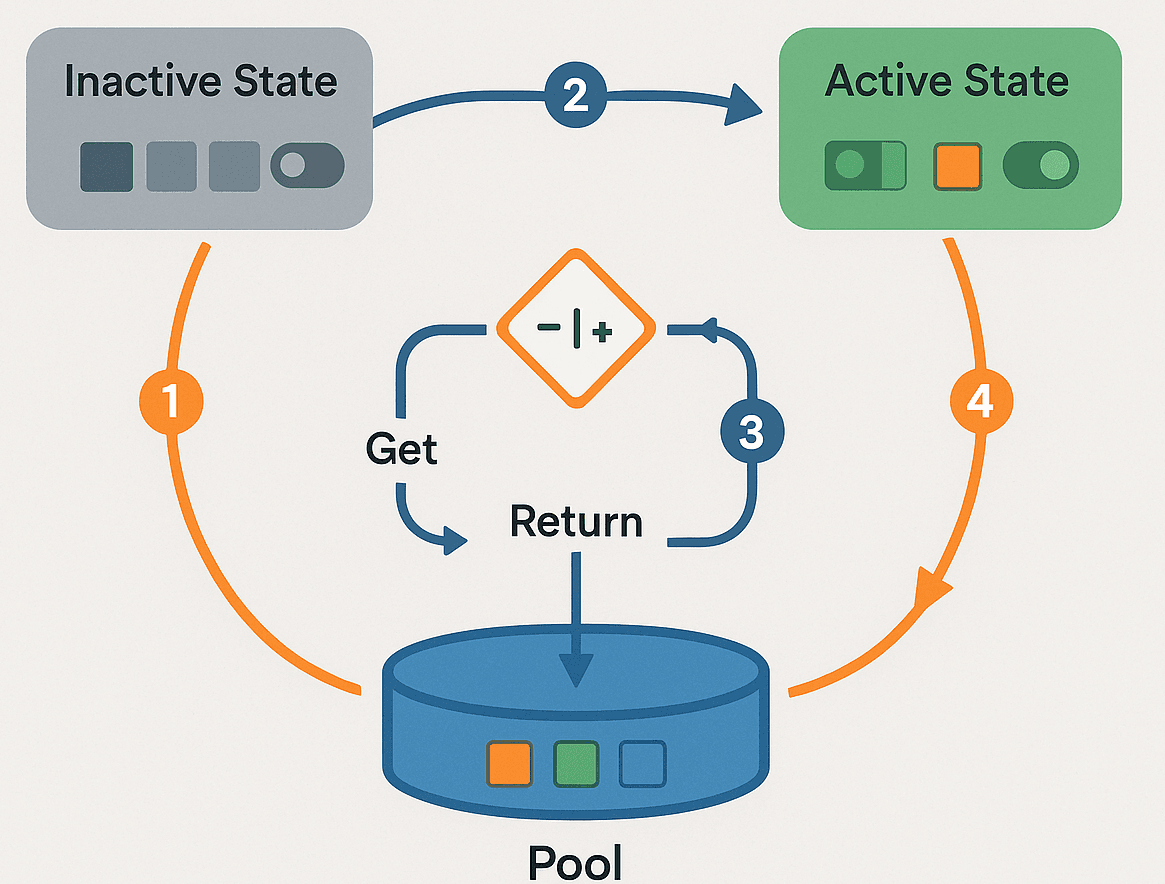
Object.Destroy()method, which can trigger the garbage collector and cause performance drops. - Active/Inactive State: A pooled object is never truly destroyed. Instead, its state is toggled. An "active" object is visible and participating in the scene, while an "inactive" object is hidden and effectively paused, waiting to be reused.
- Resetting: This is the critical process of returning a reused object to its initial state. This ensures that a projectile, for example, doesn't retain the velocity or position from its previous use when it is fired again.
- Pre-warming/Pre-population: This is the strategy of creating a set number of objects to fill the pool at the start of the game or level load, ensuring there are objects ready for immediate use and avoiding instantiation during gameplay.
The fundamental structure of any object pool is the collection that holds the inactive objects. A System.Collections.Generic.Queue is often a perfect choice because of its First-In, First-Out (FIFO) nature, which ensures objects are reused in a balanced order.
// A Queue is an efficient choice for a pool, holding inactive objects.

private Queue pooledObjects = new Queue();
Instead of Instantiate() and Destroy(), a pooling system uses GameObject.SetActive(). Setting an object to false effectively removes it from the scene without destroying it, while setting it to true brings it back.[9]
// Deactivating a GameObject to return it to the pool.
gameObject.SetActive(false);

// Activating a GameObject to retrieve it from the pool.
gameObject.SetActive(true);
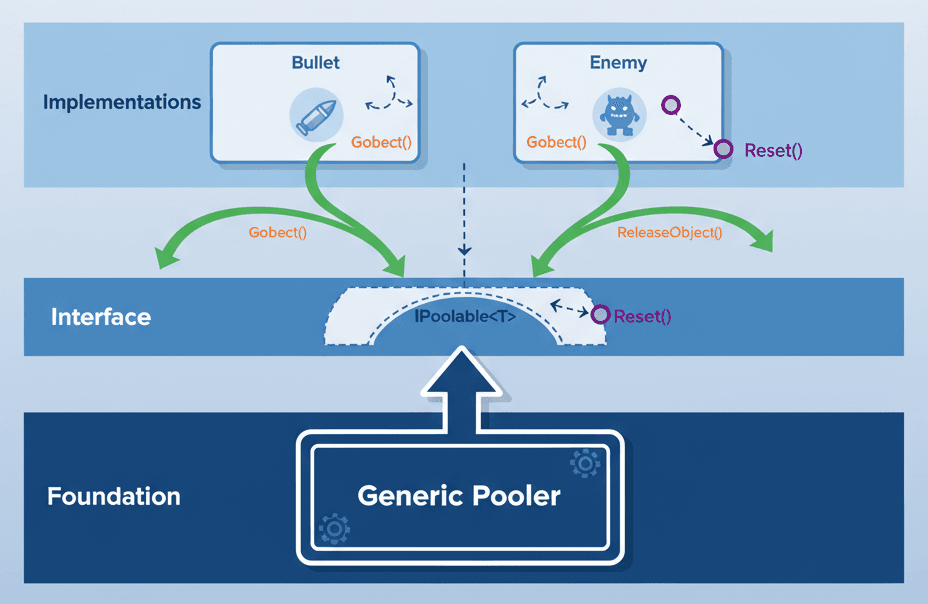
To ensure any object can be properly reset, a common and powerful pattern is to create an interface. Any script on a pooled object can implement this interface, providing a standardized ResetObject() method that the pool manager can call.
// An interface to ensure all pooled objects have a reset method.
public interface IPoolable
{
void ResetObject();
}
The Performance Numbers That'll Make You a Believer
Actually, wait - let me show you exactly why this matters with some real data. Here's what I've learned from years of optimizing games:
| Criteria | Approach A: List-Based Pool | Approach B: Queue-Based Pool |
|---|---|---|
| Best For | Simple scenarios or when you need to iterate over all pooled objects (active and inactive). | High-frequency spawning and despawning, as it provides a more efficient Get/Return mechanism. |
| Performance | Slightly less performant for Get/Return operations as it may require searching the list for an inactive object. | Highly performant due to the O(1) complexity of Enqueue and Dequeue operations for returning and getting objects. |
| Complexity | Implementation can be slightly more complex as you have to manually manage finding an available object from the list. | Generally simpler to implement for the core pooling logic because the Queue data structure naturally fits the workflow. |
| Code Example | GameObject obj = list.Find(o => !o.activeInHierarchy); |
GameObject obj = queue.Dequeue(); |
The benefits of object pooling in c# unity are massive:
- Dramatically Improved Performance: By avoiding the costly
Instantiate()andDestroy()calls during gameplay, you significantly reduce CPU load and prevent performance spikes. - Reduced Garbage Collection: Fewer objects being created and destroyed means the Garbage Collector has less work to do, leading to a smoother frame rate and eliminating random freezes in your game.
- Predictable Memory Usage: Since all the necessary objects are allocated upfront, your game's memory footprint becomes more stable and predictable, reducing the risk of memory-related crashes.
- Enables Complex Gameplay: Object pooling makes it feasible to design mechanics that require a large number of short-lived objects, such as particle effects, bullet swarms, or procedurally generated environments.
My Go-To Implementation Strategies That Actually Work
Here's what I wish someone had told me back when I was struggling with performance issues - these aren't just theoretical best practices, these are battle-tested approaches that actually work in real games.
Always pre-populate your pool with a reasonable number of objects at the start of a scene. This prevents instantiation from occurring during critical gameplay moments.
// Pre-populating the pool during an Awake or Start method.

void Start()
{
for (int i = 0; i < initialPoolSize; i++)
{
CreateAndPoolObject();
}
}
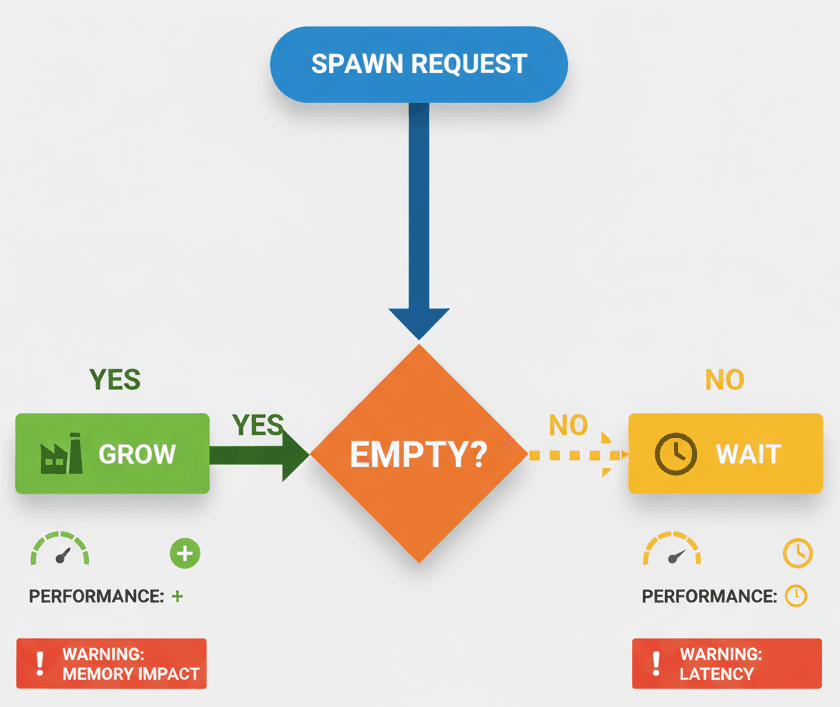
If the pool runs out of objects, you have two main options: dynamically create a new one (which can cause a small hiccup) or simply don't spawn the object.[11] A robust system often allows for dynamic growth but warns the developer.
// A check to dynamically grow the pool if it becomes empty.
if (pooledObjects.Count == 0)
{
Debug.LogWarning("Pool is empty. Consider increasing the initial size.");
CreateAndPoolObject();
}
To maximize reusability, create a generic object pooler class that can pool any type of object, not just one specific prefab. This saves you from writing a new pooler for every different type of enemy or projectile.
// A generic class signature for a reusable object pooler.
public class ObjectPool where T : MonoBehaviour, IPoolable
{
// Pool logic here...
} 
Real Games That Nail This Technique
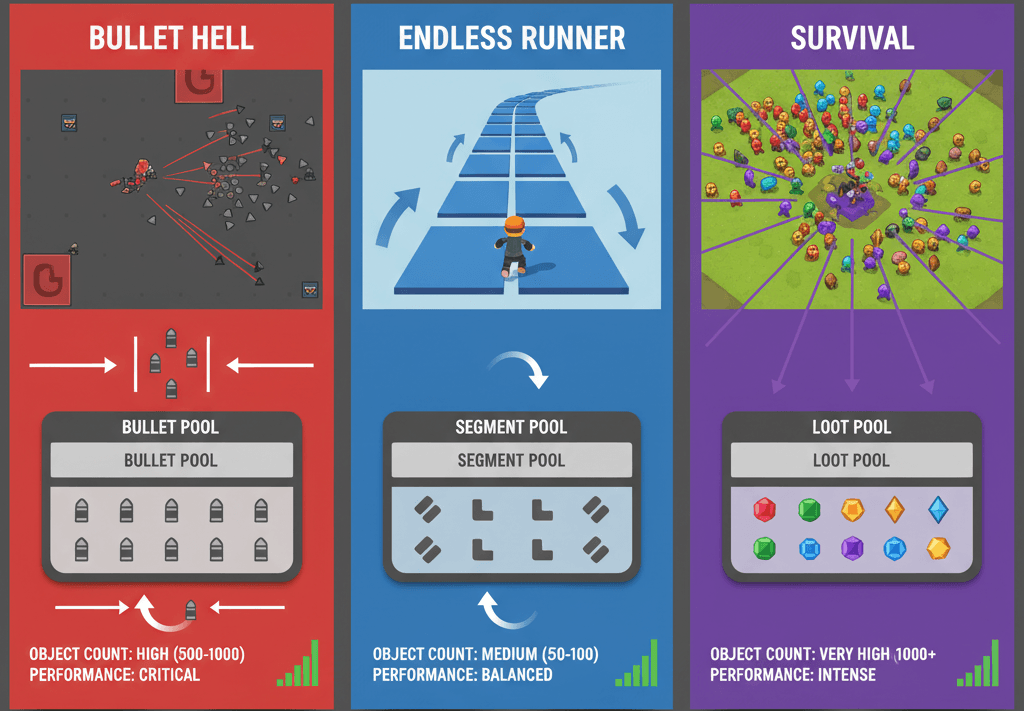
Let me tell you about how some of my favorite games handle unity gameobject pool - these examples really opened my eyes to what's possible when you get this right.
Game: Enter the Gungeon
The screen is frequently filled with hundreds, if not thousands, of enemy and player bullets. Object pooling is almost certainly used for every single bullet. When a gun is fired, a bullet is taken from the pool, positioned, and given a velocity. When it hits a wall or an enemy, it's not destroyed; it's simply deactivated and returned to the pool.
The player experiences fast-paced, fluid, and chaotic bullet-hell gameplay without any slowdown or lag, which would be impossible if every bullet were being instantiated and destroyed in real-time.
Game: Subway Surfers
The player runs along an endless track as obstacles like trains, barriers, and signs continuously appear in front of them. The repeating track segments and obstacles are pre-fabricated and stored in a pool. As the player moves forward, new segments are pulled from the pool and placed ahead, while segments far behind the player are deactivated and returned to the pool to be reused later.
The game feels infinitely long and seamless. The player never sees the world being built or destroyed; it just flows, providing a smooth and uninterrupted sense of speed and progression.
Game: Vampire Survivors
The player character automatically emits waves of projectiles, and defeated enemies drop experience gems. As the game progresses, the screen fills with hundreds of projectiles and gems. Both the player's projectiles (like the whip, knives, and holy water) and the experience gems dropped by enemies are managed by object pools. This allows the game to handle an ever-increasing number of on-screen entities.
The player feels an immense sense of power as they mow down hordes of enemies, and the screen fills with satisfying loot. The performance remains stable even with an absurd amount of action happening, which is a direct result of efficient object pooling.
Three Battle-Tested Code Blueprints You Can Use Today
Alright, let's get our hands dirty. These are the exact implementations I use in my projects - no fluff, just code that works.
Blueprint 1: The Simple Bullet Pool That Never Fails
I remember when I first needed to create a basic object pool for a player's weapon that fires bullet projectiles. This approach prevents lag from rapid firing and it's dead simple to implement.
Unity Editor Setup:
- Create an empty GameObject named
_BulletPool - Create a
BulletPrefab (e.g., a simple Sprite or 3D model) with aRigidbody(orRigidbody2D) and a script namedBullet.cs
BulletPool.cs (attached to _BulletPool GameObject):
using System.Collections.Generic;

using UnityEngine;

public class BulletPool : MonoBehaviour
{
public static BulletPool Instance;

code
Code
download
content_copy
expand_less
IGNORE_WHEN_COPYING_START
IGNORE_WHEN_COPYING_END
[SerializeField] private GameObject bulletPrefab;
[SerializeField] private int initialPoolSize = 20;

private Queue<GameObject> pooledObjects = new Queue<GameObject>();

void Awake()
{
    Instance = this;
}

void Start()
{
    for (int i = 0; i < initialPoolSize; i++)
    {
        GameObject obj = Instantiate(bulletPrefab);
        obj.SetActive(false);
        pooledObjects.Enqueue(obj);
    }
}

public GameObject Get()
{
    if (pooledObjects.Count == 0)
    {
        // Optionally grow the pool
        GameObject newObj = Instantiate(bulletPrefab);
        newObj.SetActive(false);
        pooledObjects.Enqueue(newObj);
    }

    GameObject bullet = pooledObjects.Dequeue();
    bullet.SetActive(true);
    return bullet;
}

public void ReturnToPool(GameObject bullet)
{
    bullet.SetActive(false);
    pooledObjects.Enqueue(bullet);
}

}
PlayerWeapon.cs (example of how to use the pool):
using UnityEngine;

public class PlayerWeapon : MonoBehaviour
{
public Transform firePoint;

code
Code
download
content_copy
expand_less
IGNORE_WHEN_COPYING_START
IGNORE_WHEN_COPYING_END
void Update()
{
    if (Input.GetButtonDown("Fire1"))
    {
        GameObject bullet = BulletPool.Instance.Get();
        bullet.transform.position = firePoint.position;
        bullet.transform.rotation = firePoint.rotation;
        // The bullet's own script would handle its movement
    }
}

}Blueprint 2: The Generic Pooler That Changed Everything
This one time at KIXEYE, I got tired of writing separate poolers for every single type of object. So I created this generic, reusable object pooler that can be used for any type of GameObject in your project - enemies, particles, you name it.
Unity Editor Setup:
- Create an empty GameObject named
_ObjectPooler - Attach the
ObjectPooler.csscript to it - From the Inspector, you'll configure the different pools you need
ObjectPooler.cs:
using System.Collections.Generic;

using UnityEngine;

public class ObjectPooler : MonoBehaviour
{
[System.Serializable]
public class Pool
{
public string tag;
public GameObject prefab;
public int size;
}

code
Code
download
content_copy
expand_less
IGNORE_WHEN_COPYING_START
IGNORE_WHEN_COPYING_END
public static ObjectPooler Instance;
public List<Pool> pools;
public Dictionary<string, Queue<GameObject>> poolDictionary;

void Awake()
{
    Instance = this;
}

void Start()
{
    poolDictionary = new Dictionary<string, Queue<GameObject>>();

    foreach (Pool pool in pools)
    {
        Queue<GameObject> objectPool = new Queue<GameObject>();
        for (int i = 0; i < pool.size; i++)
        {
            GameObject obj = Instantiate(pool.prefab);
            obj.SetActive(false);
            objectPool.Enqueue(obj);
        }
        poolDictionary.Add(pool.tag, objectPool);
    }
}

public GameObject SpawnFromPool(string tag, Vector3 position, Quaternion rotation)
{
    if (!poolDictionary.ContainsKey(tag))
    {
        Debug.LogWarning("Pool with tag " + tag + " doesn't exist.");
        return null;
    }

    GameObject objectToSpawn = poolDictionary[tag].Dequeue();
    objectToSpawn.SetActive(true);
    objectToSpawn.transform.position = position;
    objectToSpawn.transform.rotation = rotation;

    // Re-enqueue the object to keep the pool full
    poolDictionary[tag].Enqueue(objectToSpawn);

    return objectToSpawn;
}

}Blueprint 3: The Reset System That Saves Your Sanity
Took me way too long to figure out the importance of resetting pooled objects properly. This pattern establishes a reliable system for resetting a pooled object's state (health, velocity, color) when it's reused.
Unity Editor Setup:
- Create a new C# script named
IPoolable.cs - Have your component scripts (e.g.,
Enemy.cs,Projectile.cs) inherit from this interface
IPoolable.cs (The Interface):
public interface IPoolable

{
void OnObjectSpawn();
}
Modified ObjectPooler.cs (to use the interface):
// In the SpawnFromPool method of your pooler:
public GameObject SpawnFromPool(string tag, Vector3 position, Quaternion rotation)
{
// ... (existing code to get object from pool)

code
Code
download
content_copy
expand_less
IGNORE_WHEN_COPYING_START
IGNORE_WHEN_COPYING_END
GameObject objectToSpawn = poolDictionary[tag].Dequeue();
objectToSpawn.SetActive(true);
objectToSpawn.transform.position = position;
objectToSpawn.transform.rotation = rotation;

IPoolable pooledObj = objectToSpawn.GetComponent<IPoolable>();
if (pooledObj != null)
{
    pooledObj.OnObjectSpawn(); // Call the reset method!
}

poolDictionary[tag].Enqueue(objectToSpawn);
return objectToSpawn;

}
Enemy.cs (Example implementation):
using UnityEngine;

public class Enemy : MonoBehaviour, IPoolable
{
public float startingHealth = 100f;
private float currentHealth;

code
Code
download
content_copy
expand_less
IGNORE_WHEN_COPYING_START
IGNORE_WHEN_COPYING_END
public void OnObjectSpawn()
{
    // This is called by the pooler when the enemy is reused.
    currentHealth = startingHealth;
    // Reset position, velocity, color, etc.
}

// ... other enemy logic

}
Ready to Start Building Your First Game?
You know what's exciting? Taking all this object pool unity knowledge and actually putting it into practice. I've seen too many talented developers get stuck on optimization problems that could have been solved from day one with proper planning.
If you're ready to go beyond just understanding these concepts and want to build real games that perform well from the start, I've put together a comprehensive course that takes you from the absolute basics to creating professional-quality game experiences.
Check out our Mr. Blocks Course - where you'll implement object pooling in a real game project and learn dozens of other essential game development techniques that'll make your games stand out.
What You'll Walk Away Knowing
Here's exactly what we covered today - consider this your object pooling checklist:
- Object pool unity is a performance technique that reuses objects instead of constantly creating and destroying them.
- Unity3d object pooling uses
SetActive(true/false)instead ofInstantiate()andDestroy()calls. - Queue-based pools offer better performance for high-frequency spawning compared to List-based approaches.
- Pre-warming your pool during scene load prevents performance hiccups during gameplay.
- Object pooling in c# unity requires proper reset mechanisms to ensure reused objects start with a clean state.
- Real games like Enter the Gungeon, Subway Surfers, and Vampire Survivors rely heavily on this technique.
- Generic poolers save development time and provide consistent behavior across different object types.
- The
IPoolableinterface pattern ensures reliable object state management when reusing unity gameobject pool items.
Common Questions
What is object pooling in Unity and why should I care?
Object pooling is a performance optimization that reuses objects instead of creating and destroying them repeatedly. You should care because it prevents your game from lagging when you have lots of bullets, enemies, or effects on screen.
How do I know if my game needs object pooling?
If you're creating and destroying more than 10-20 objects per second (like bullets or particles), or if you notice frame rate drops when lots of action happens, you probably need object pooling.
What's the difference between using a List vs Queue for object pools?
Queues are faster for simple get/return operations because they're designed for First-In-First-Out behavior. Lists require searching for available objects, which is slower but gives you more flexibility.
When should I pre-warm my object pool?
Always pre-warm during scene loading or game start. Never create pool objects during active gameplay as it causes the same performance issues you're trying to avoid.
How many objects should I put in my initial pool?
Start with the maximum number of objects you expect to have active at once, plus 20-30% extra as a buffer. You can always grow the pool dynamically if needed.
What happens if my pool runs out of objects?
You can either dynamically create new objects (causing a small performance hit) or simply don't spawn new objects until some return to the pool. Choose based on your game's needs.
Do I need to reset objects when returning them to the pool?
Yes! Always reset position, velocity, health, color, and any other state that might carry over from the previous use. Use the IPoolable interface pattern for consistency.
Can I use object pooling for UI elements?
Absolutely! UI elements like damage numbers, inventory items, or menu buttons benefit greatly from pooling, especially in complex interfaces.
What's the biggest mistake beginners make with object pooling?
Forgetting to properly reset object state when reusing them. Your bullets end up flying in random directions or enemies spawn with half health.
Should I pool everything in my game?
No, only pool objects that are created and destroyed frequently. Static objects like walls or one-time objects like the player character don't need pooling.
How does object pooling affect memory usage?
It increases initial memory usage (since you pre-create objects) but makes it predictable and stable. This is much better than the memory spikes caused by constant instantiation.
Can I modify the pooled objects or do they have to be identical?
You can absolutely modify pooled objects! Just make sure to reset any changes when returning them to the pool. The OnObjectSpawn() method is perfect for setting up object variations.