How I Learned to Stop Losing Game Progress and Love Persistent Data Unity
A professional guide to implementing rock-solid data persistence in your Unity games, from simple settings to complex game states.
Author: Mayank Grover, Founder of Outscal | LinkedIn
Mayank Grover is the founder of Outscal, an edtech startup helping aspiring developers transition into the game industry. With over a decade of experience in gaming and education, he shares practical lessons that help developers not only build games, but build careers.
Here's the thing - I remember my first Unity game project at CMU. I'd spent weeks building this awesome character progression system, and then... disaster. Every time I closed the game, everything reset. My carefully crafted player stats, inventory items, even the simple volume settings - all gone. I was basically asking players to start from scratch every single session. Not exactly the professional experience I was aiming for.
After months of diving deep into persistent data unity systems and learning from some painful mistakes at KIXEYE, I finally cracked the code. Today, I'm going to share exactly how you can implement rock-solid data persistence in your Unity games - the same techniques I use in my professional projects and teach to aspiring developers.
Table of Contents
- What Actually Happens When Your Game "Remembers" Things
- The Core Building Blocks Every Developer Should Master
- PlayerPrefs vs JSON - When I Use Each Approach
- My Go-To Implementation Strategy for Student Projects
- Real Games That Got This Right (And What We Can Learn)
- The Step-by-Step Walkthrough I Use for Every Project
- What This Knowledge Will Actually Do for Your Games
- Your Next Moves as a Developer
What Actually Happens When Your Game "Remembers" Things
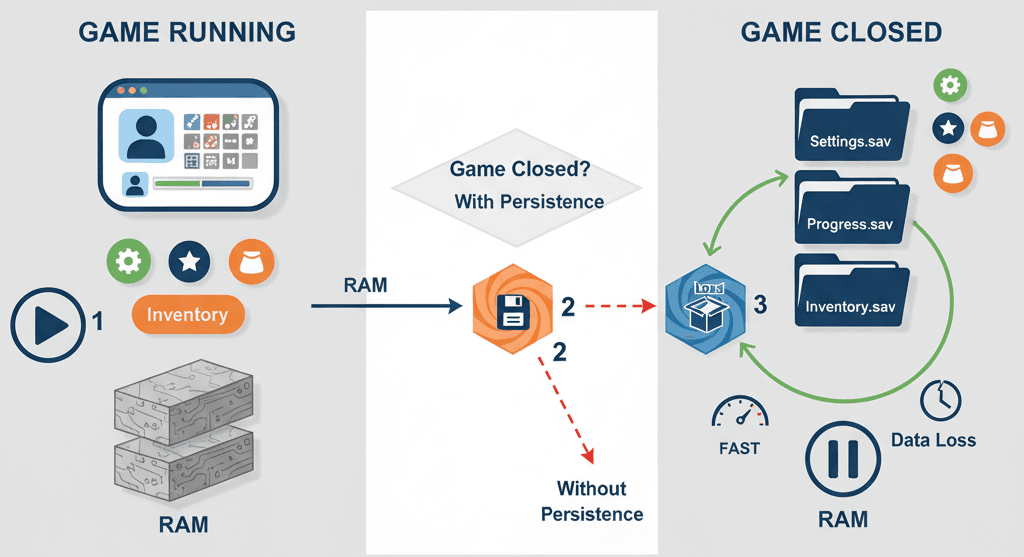
Been there - staring at a game that forgets everything the moment you close it? Let me explain what's really happening under the hood when we talk about persistent data unity systems.
Data persistence is the mechanism that allows a game to remember information over time, even after the application is closed. The core problem it solves is preventing the loss of all player progress and settings every time they stop playing. By implementing persistence, you can create a continuous experience, allowing players to save their character's stats, inventory, game world state, and personalized settings like audio volume or graphics quality.
Think of it like a bookmark in a book - it saves your spot so you can return to it later without having to find your page all over again. For us game developers, mastering data persistence is fundamental to creating engaging, long-term experiences that respect the player's time and investment.
Actually, wait - let me be more specific about what's happening technically. When your game runs, all your variables live in RAM (Random Access Memory). The moment you close the application, that memory gets cleared. Persistence is about taking the important stuff and storing it somewhere permanent - usually the hard drive - so we can restore it later.
The Core Building Blocks Every Developer Should Master
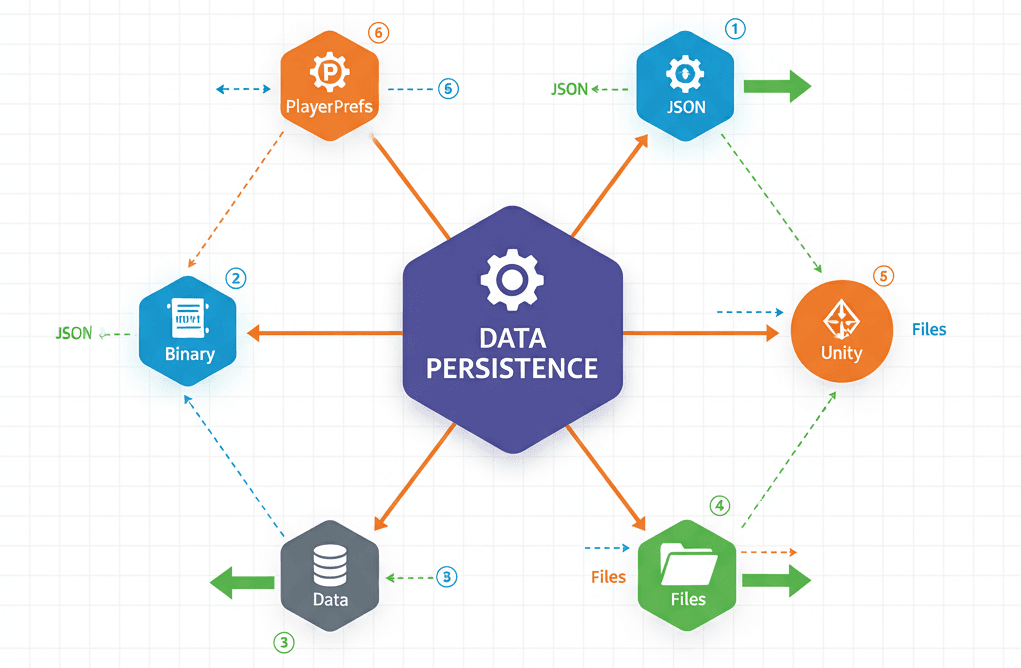
After working on multiple Unity projects, I've learned these are the essential concepts you absolutely need to understand:
- Serialization: This is the essential process of converting an object's state (like a C# class instance) into a stream of bytes or a structured text format (like JSON) that can be easily stored in a file or sent over a network.
- Deserialization: This is the reverse process of serialization, where you take the stored data from a file and reconstruct it back into a live object within your game, effectively restoring its previous state.
- PlayerPrefs: A built-in Unity feature that provides a simple, key-value pair system for storing small and simple data types like integers, floats, and strings locally on a player's device.
- JSON (JavaScript Object Notation): A lightweight, human-readable text format that is commonly used for serialization and is ideal for structuring complex data like player inventories or settings into a clear, organized file.
- BinaryFormatter: A mechanism in C# for serializing objects into a compact binary format, which is not human-readable but can be more performant and take up less space than text-based formats like JSON.
- File I/O (Input/Output): This refers to the fundamental operations of reading data from and writing data to files on the local file system, which is the basis for saving and loading serialized data.
Application.persistentDataPath: A crucial Unity API (Application Programming Interface - a way for different software to talk to each other) property that provides a safe, platform-independent file path where you can reliably store game data without worrying about OS-specific folder structures or permissions issues.
Here's what's funny - I used to think BinaryFormatter was always better because it's more compact. Turns out, for learning persistent data unity techniques, JSON is usually the sweet spot. It's readable when you're debugging, works across platforms, and isn't much slower for typical game data.
PlayerPrefs vs JSON - When I Use Each Approach
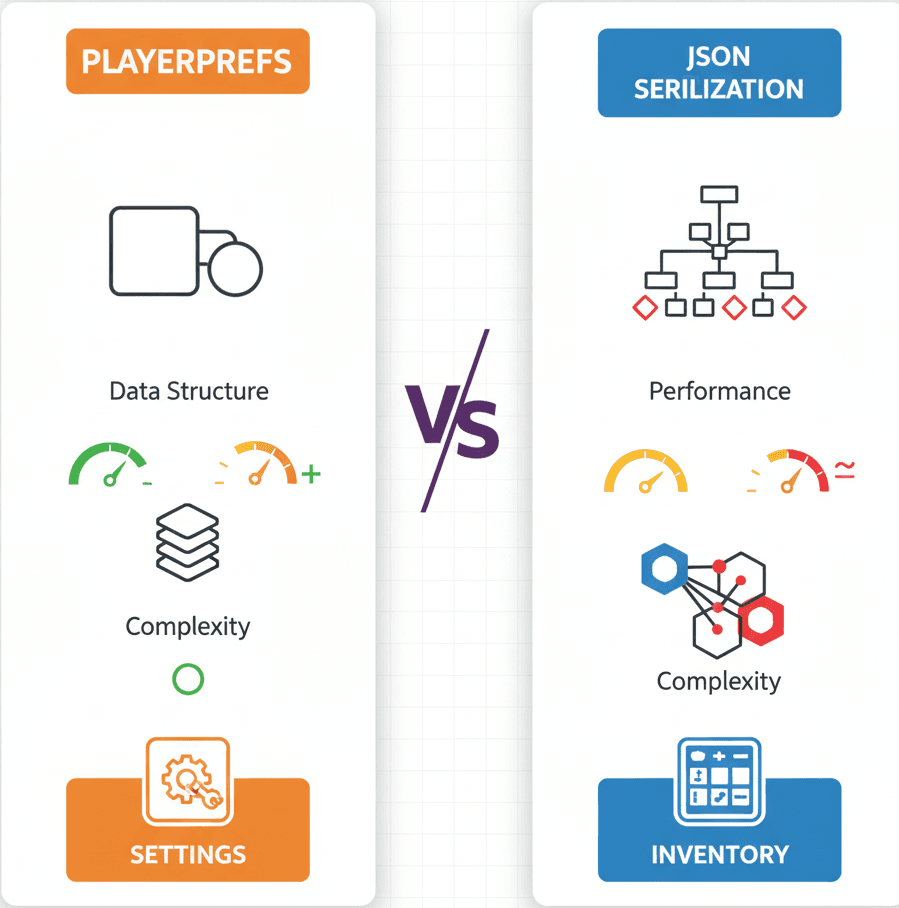
I get asked this question constantly, so let me break down exactly when I choose each approach:
| Criteria | Approach A: PlayerPrefs | Approach B: JSON Serialization |
|---|---|---|
| Best For | Simple, individual values like volume settings, quality level, or a single high score. | Complex data structures like player inventory, character stats, quest progress, or game settings. |
| Performance | Very fast for simple data types, but can become slow if used for a large number of keys. | Slower than binary, but generally fast enough for most use cases. Performance depends on the complexity of the data. |
| Complexity | Extremely simple to use with just a few static methods. No external setup required. | Requires creating a serializable C# class and managing file I/O, making it moderately more complex. |
| Code Example | PlayerPrefs.SetInt("Score", 100); |
string json = JsonUtility.ToJson(playerData); File.WriteAllText(path, json); |
From my time at KIXEYE working on mobile games, I learned that PlayerPrefs are perfect for settings and simple stats, but the moment you need to store data persistent unity information like inventory systems or complex game states, JSON becomes your best friend.
My Go-To Implementation Strategy for Student Projects
Let me show you how I approach this in my own projects. I always start with the data structure - getting this right saves hours of debugging later.
Setting Up Your Data Class:
First, you need a C# class marked with the [System.Serializable] attribute to tell Unity that its fields can be serialized:
[System.Serializable]

public class PlayerData
{
public int health;
public float score;
public Vector3 position;
}
Using PlayerPrefs for Simple Settings:
For basic settings, I stick with PlayerPrefs because they're dead simple:
// Storing a player's high score
PlayerPrefs.SetInt("PlayerHighScore", 1000);
// Saving the change to disk
PlayerPrefs.Save();

// Retrieving the high score later
int highScore = PlayerPrefs.GetInt("PlayerHighScore", 0); // The second argument is a default value
Converting Objects to JSON:
Unity's built-in JsonUtility can convert a serializable object into a JSON string, which is perfect for saving to a text file:
// Create an instance of the data class
PlayerData data = new PlayerData { health = 100, score = 550.5f };

// Convert the object to a JSON string
string json = JsonUtility.ToJson(data);
// json now holds: {"health":100,"score":550.5, "position":{"x":0.0,"y":0.0,"z":0.0}}
File Operations I Use Every Time:
Here's my standard approach for file handling:
using System.IO;

// Define a path for our save file
string path = Path.Combine(Application.persistentDataPath, "save.json");

// Save the JSON string to a file
File.WriteAllText(path, json);

// Load the JSON string from the file
string loadedJson = File.ReadAllText(path);
Trust me, you'll thank me later for using Application.persistentDataPath. I learned the hard way that hardcoded paths break when you try to build for different platforms.
Real Games That Got This Right (And What We Can Learn)
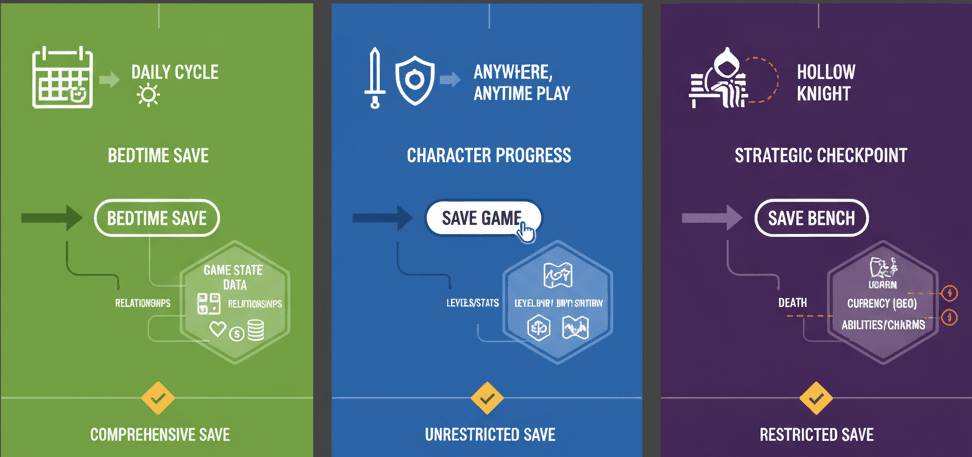
I've analyzed dozens of successful games to understand how they handle data persistence. Here are the implementations that really stand out:
Stardew Valley - The Master Class in Comprehensive Saving:
At the end of each day, the game saves everything: the state of your farm, your inventory, your relationships with NPCs, your character's skills, and the current season. This is likely achieved by serializing a massive "game state" object into a file. This object would contain lists and other data structures for every dynamic element in the game world.
What I find fascinating about this approach is how it creates a deep sense of progression and permanence. Players feel secure that their hard work building their farm and relationships is never lost, encouraging long-term engagement. From a technical standpoint, this requires careful planning of your data structures from day one.
The Elder Scrolls V: Skyrim - Unrestricted Save Freedom:
Players can save their game at almost any time, capturing the exact state of the world, including quest progress, character inventory and stats, and the positions of NPCs and items. A highly complex serialization system saves the state of countless objects. It likely uses a combination of binary and other formats to handle the enormous amount of data efficiently.
This freedom to save anywhere creates a safety net, encouraging exploration and experimentation. Players can try risky strategies knowing they can easily revert to a previous save if things go wrong. This is why I always recommend studying this game's approach when you're learning how to implement data persistent in Unity systems.
Hollow Knight - Strategic Save Restrictions:
The game saves automatically and only at specific "bench" locations. This saves the player's location, currency (Geo), collected charms, and major world events like defeated bosses. A SaveManager serializes the player's data to a file whenever they rest at a bench. The system is designed to be restrictive to enhance the game's challenge.
After analyzing this implementation, what makes this brilliant is how the limited save points create tension and raise the stakes of exploration. Reaching a new bench feels like a significant, hard-won achievement, making the world feel more dangerous and rewarding to navigate.
The Step-by-Step Walkthrough I Use for Every Project
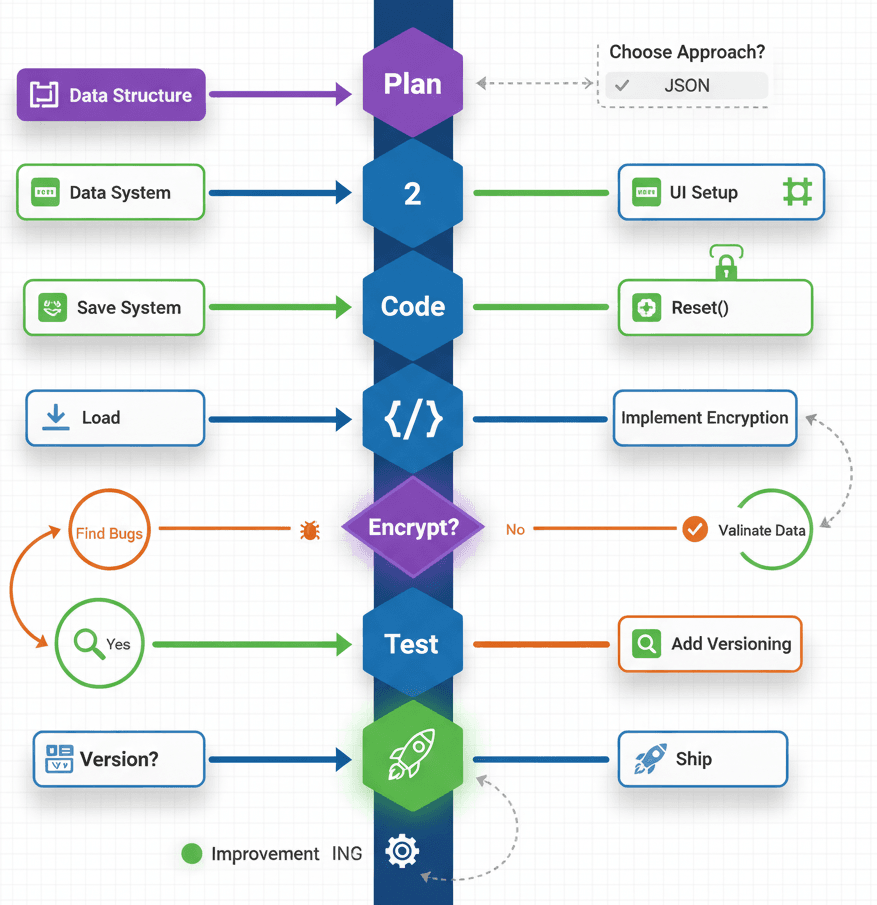
Let me walk you through my exact process for implementing persistent data unity systems. I've refined this approach over years of professional development:
Blueprint 1: Settings That Actually Stick (Audio/Graphics)
When I'm working on a new project, I always start with settings persistence because it's straightforward and immediately noticeable to players.
My SettingsManager Script:
using UnityEngine;

using UnityEngine.UI;
using UnityEngine.Audio;

public class SettingsManager : MonoBehaviour
{
public AudioMixer masterMixer;
public Dropdown qualityDropdown;
public Slider volumeSlider;

code
Code
download
content_copy
expand_less
IGNORE_WHEN_COPYING_START
IGNORE_WHEN_COPYING_END
void Start()
{
    // Load saved values when the game starts
    LoadSettings();
}

private void LoadSettings()
{
    // Load volume, defaulting to 0.75 if no value is saved
    float savedVolume = PlayerPrefs.GetFloat("MasterVolume", 0.75f);
    volumeSlider.value = savedVolume;
    masterMixer.SetFloat("masterVolume", Mathf.Log10(savedVolume) * 20);

    // Load quality level, defaulting to 2 (High)
    int savedQuality = PlayerPrefs.GetInt("QualityLevel", 2);
    qualityDropdown.value = savedQuality;
    QualitySettings.SetQualityLevel(savedQuality);
}

}
The Save Methods I Always Include:
// Add these methods inside the SettingsManager class

public void SetVolume(float volume)
{
masterMixer.SetFloat("masterVolume", Mathf.Log10(volume) * 20);
PlayerPrefs.SetFloat("MasterVolume", volume);
PlayerPrefs.Save(); // Immediately save the change
}

public void SetQuality(int qualityIndex)
{
QualitySettings.SetQualityLevel(qualityIndex);
PlayerPrefs.SetInt("QualityLevel", qualityIndex);
PlayerPrefs.Save();
}
Blueprint 2: Complete Game State with JSON
For complex game data, here's my tried-and-tested approach:
My PlayerData Structure:
[System.Serializable]
public class PlayerData
{
public int health;
public int score;
public float[] position; // Use a float array for Vector3 serialization

code
Code
download
content_copy
expand_less
IGNORE_WHEN_COPYING_START
IGNORE_WHEN_COPYING_END
public PlayerData(int health, int score, Vector3 position)
{
    this.health = health;
    this.score = score;
    this.position = new float;
    this.position = position.x;
    this.position = position.y;
    this.position = position.z;
}

}
My SaveManager Class:
using UnityEngine;
using System.IO;

public class SaveManager : MonoBehaviour
{
private string saveFilePath;

code
Code
download
content_copy
expand_less
IGNORE_WHEN_COPYING_START
IGNORE_WHEN_COPYING_END
void Awake()
{
    saveFilePath = Path.Combine(Application.persistentDataPath, "playerData.json");
}

public void SaveGame(PlayerController player)
{
    PlayerData data = new PlayerData(player.health, player.score, player.transform.position);
    string json = JsonUtility.ToJson(data, true); // 'true' for pretty print
    File.WriteAllText(saveFilePath, json);
    Debug.Log("Game Saved to " + saveFilePath);
}

public PlayerData LoadGame()
{
    if (File.Exists(saveFilePath))
    {
        string json = File.ReadAllText(saveFilePath);
        PlayerData data = JsonUtility.FromJson<PlayerData>(json);
        Debug.Log("Game Loaded");
        return data;
    }
    else
    {
        Debug.LogWarning("Save file not found!");
        return null;
    }
}

}
Integration with PlayerController:
public class PlayerController : MonoBehaviour
{
public int health = 100;
public int score = 0;
private SaveManager saveManager;

code
Code
download
content_copy
expand_less
IGNORE_WHEN_COPYING_START
IGNORE_WHEN_COPYING_END
void Start()
{
    saveManager = FindObjectOfType<SaveManager>();
    LoadPlayer();
}

void Update()
{
    // Press 'S' to save
    if (Input.GetKeyDown(KeyCode.S))
    {
        saveManager.SaveGame(this);
    }
    // Press 'L' to load
    if (Input.GetKeyDown(KeyCode.L))
    {
        LoadPlayer();
    }
}

public void LoadPlayer()
{
    PlayerData data = saveManager.LoadGame();
    if (data != null)
    {
        health = data.health;
        score = data.score;
        Vector3 position = new Vector3(data.position, data.position, data.position);
        transform.position = position;
    }
}

}
Pro Tips I Learned the Hard Way
Here are the crucial practices that took me months to figure out, but will save you tons of debugging time:
- Always Use
Application.persistentDataPath: Never hardcode file paths. This Unity property ensures your save files are stored in a safe, writable location on any platform (Windows, macOS, Android, iOS, etc.). - Create a Central
SaveManagerClass: Avoid scattering save/load logic across many scripts. A singletonSaveManagercentralizes all data handling, making it easier to manage, debug, and expand. - Implement Data Encryption for Sensitive Information: For competitive games or to prevent casual cheating, encrypt your save files. While not foolproof, it deters basic tampering.
- Use Versioning for Save Files: As you update your game, your data structures might change. Storing a version number in your save file allows you to handle old save files gracefully and upgrade them if needed.
What This Knowledge Will Actually Do for Your Games
Understanding persistent data unity systems transforms your projects from simple demos into actual games that people want to play repeatedly. Here's what changes:
- Enables Core Gameplay Progression: Without persistence, long-form games like RPGs or strategy games would be impossible, as players could never save their progress. Once you master these techniques, you can create games with meaningful progression systems.
- Improves Player Experience and Retention: Players are more likely to return to a game that remembers their achievements, settings, and place in the world, fostering a stronger sense of investment. I've seen student projects go from 5-minute demos to games people play for hours.
- Allows for Deep Customization: Saving allows you to offer players meaningful choices in settings (graphics, audio, controls) that persist between sessions, making the game more accessible and enjoyable.
- Facilitates Asynchronous Gameplay: Data persistence is the foundation for features like leaderboards or sending gifts to friends, where data is stored and retrieved later.
Your Next Moves as a Developer
Start simple - implement PlayerPrefs for basic settings in your current project. Once that's working smoothly, move on to JSON serialization for more complex data. Practice with small systems before attempting to save entire game states.
I always tell my students to look at how professional games handle persistence. Study the save systems in games you love - notice what gets saved, when saves happen, and how the UI communicates save states to players.
Most importantly, don't try to build the perfect system on your first attempt. Start with something that works, then iterate and improve as your game grows. That's exactly how I developed my approach over years of professional development.
Key Takeaways
- Persistent data unity systems are essential for any game that wants players to return - without them, you're basically asking people to start over every session.
- PlayerPrefs work perfectly for simple data like settings and single values, while JSON serialization handles complex game states and inventories.
- Always use
Application.persistentDataPathfor file storage - it's the only reliable cross-platform solution that won't break on different devices. - Create a centralized SaveManager class to handle all persistence logic instead of scattering save/load code throughout your project.
- Study successful games like Stardew Valley and Skyrim to understand how professional developers implement different persistence strategies.
- Start simple and iterate - build basic save functionality first, then add features like encryption and versioning as your game grows.
- Data persistence enables progression systems that transform simple demos into engaging games players want to revisit.
- Version your save files from day one to handle future updates gracefully without breaking existing player progress.
Common Questions
What is persistent data in Unity and why do I need it?
Persistent data unity systems let your game remember information between play sessions - like player progress, settings, and achievements. Without it, everything resets when players close your game, which creates a frustrating experience.
When should I use PlayerPrefs vs JSON serialization?
Use PlayerPrefs for simple values like volume settings, graphics quality, or high scores. Use JSON when you need to save complex data like inventories, character stats, or game world states with multiple interconnected values.
How do I implement data persistent in Unity for my first game?
Start with PlayerPrefs for basic settings, then create a serializable C# class for your game data and use JsonUtility.ToJson() to convert it to a string you can save with File.WriteAllText().
Where should I store data persistent unity files on different platforms?
Always use Application.persistentDataPath - it automatically provides the correct, writable location for save files on Windows, Mac, mobile devices, and other platforms without requiring platform-specific code.
What's the difference between serialization and deserialization?
Serialization converts your game objects into a format (like JSON text) that can be saved to a file. Deserialization is the reverse - taking that saved text and converting it back into usable game objects.
How can I prevent players from cheating by editing save files?
Encrypt your save files using a secret key, though this only stops casual tampering. For competitive games, consider server-side validation of important data like scores or achievements.
Why does my save system break when I update my game?
Data structure changes can make old save files incompatible. Always include a version number in your save data so you can detect and handle older file formats gracefully.
How do I save Vector3 positions and other Unity-specific types?
Unity's JsonUtility doesn't directly serialize Vector3, so convert them to float arrays manually or create wrapper classes that store the individual x, y, z components.
Should I save automatically or let players choose when to save?
This depends on your game design - automatic saving (like Hollow Knight's benches) creates tension, while manual saving (like Skyrim) gives players control. Consider what serves your game's experience best.
How can I debug save system issues in my Unity game?
Use Debug.Log to print the file paths and JSON content, check if files exist before loading, and test your save system on different platforms early in development to catch platform-specific issues.
What happens if the player's device runs out of storage space?
File.WriteAllText will throw an exception if it can't write the file. Always wrap file operations in try-catch blocks and provide user feedback about save failures.
How large can my save files be before performance becomes an issue?
JSON files under 1MB typically load instantly. For larger save files, consider splitting data across multiple files or using binary serialization, though most indie games never hit these limits.