From Silent Worlds to Audio Magic: How I Learned to Master Sound Effects in UE5
Master Unreal Engine 5 audio implementation with C++ code examples, professional strategies, and real-world game development insights from an industry expert.
Here's the thing - I remember my first game project at CMU. Spent weeks perfecting the mechanics, polishing the visuals, debugging every last collision. Then I hit play for the final test, and... complete silence. The sword swings had no swoosh, the explosions were mute, the UI felt lifeless. It was like watching a movie with the sound turned off.
That's when I realized audio isn't just decoration - it's the invisible thread that makes everything feel real. Been there? You're not alone. Let me show you exactly how to bring your UE5 projects to life with sound effects that actually work.
Table of Contents
- What Makes Audio the Game-Changer You're Missing
- The Audio Building Blocks Every Developer Should Know
- C++ Classes That Actually Matter (With Real Code)
- When to Use What: My Go-To Decision Framework
- Why This Will Transform Your Games
- My Battle-Tested Implementation Strategies
- How the Pros Actually Do It (Real Game Breakdowns)
- Three Complete Walkthroughs You Can Copy Today
What Makes Audio the Game-Changer You're Missing
Actually, wait - let me tell you what I wish someone had told me earlier. Adding sound effects in UE5 isn't just about making noise. It's about solving the critical problem of player feedback.
When I was at KIXEYE working on mobile games, I watched players struggle with interfaces that looked perfect but felt wrong. Why? No audio confirmation. A button click without that satisfying "tap" sound feels broken, even if it works perfectly.
Think about it like your car door. Without that solid "thunk" when it closes, you'd feel uncertain if it was actually shut. Same principle applies to every interaction in your game - from weapon impacts to UI navigation.
Audio transforms a silent world into a vibrant, reactive experience. It confirms actions, warns of dangers, and enriches your narrative. Here's what really clicked for me: mastering audio isn't about adding noise - it's about crafting a language that communicates gameplay information and emotional tone instantly.
The Audio Building Blocks Every Developer Should Know
Before diving into code (and trust me, we'll get there), you need to understand UE5's audio system. Took me months to figure out how these pieces fit together, so let me save you that headache.
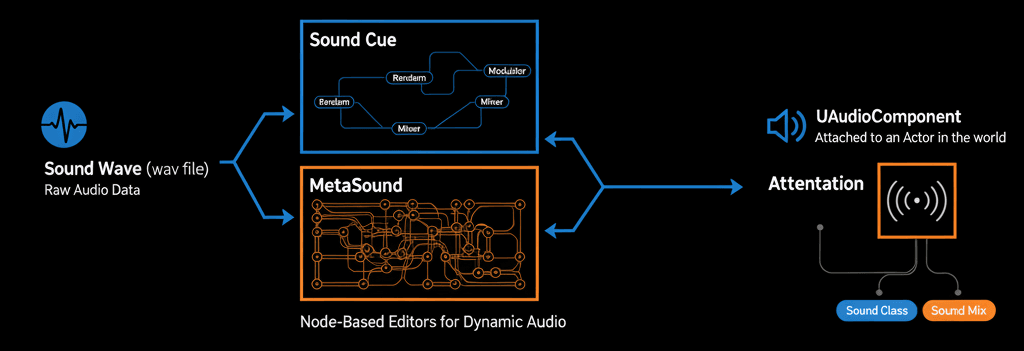
Sound Wave - This is your foundation. Raw audio data, usually in .wav format, imported from external sources. Think of it as your base ingredient.
Sound Cue - Here's where it gets interesting. This is UE5's node-based editor that takes Sound Waves and lets you modify, combine, and randomize them. Want footsteps that don't sound repetitive? Sound Cues are your answer.
MetaSound - The new kid on the block in UE5. High-performance audio system with complete Digital Signal Processing (DSP) control. Perfect for procedural and interactive audio generation.
Audio Component (UAudioComponent) - This component attaches to any Actor, giving it the ability to play and control sound assets. Essential for anything that needs ongoing control.
Attenuation - Defines how sound changes over distance. Critical for realistic 3D positional audio that gets quieter as players move away.
Concurrency - Settings that manage how many instances of a sound can play simultaneously. Trust me, you don't want fifty gunshot sounds playing at once.
Sound Class - Groups similar sounds together (like "Weapons," "UI," "Dialogue") so you can adjust their properties collectively.
Sound Mix - Dynamically adjusts Sound Classes at runtime. Perfect for lowering background music during dialogue sequences.
C++ Classes That Actually Matter (With Real Code)
Alright, let's get our hands dirty. Here are the core C++ classes you'll actually use, with the exact code I use in my projects.
USoundBase - The abstract base class for any playable sound asset. You'll use USoundBase* pointers everywhere:
// In your Actor's header file (.h)
UPROPERTY(EditAnywhere, BlueprintReadOnly, Category = "Audio")
USoundBase* MySoundEffect;
UGameplayStatics - Your best friend for simple sound playback. Contains static helper functions for playing sounds without manual component management.
Fire-and-Forget 2D Sound - Perfect for UI elements:
// In your Actor's implementation file (.cpp)
#include "Kismet/GameplayStatics.h"

void AMyActor::PlayUISound()
{
    if (MySoundEffect)
    {
        // Plays the sound so everyone can hear it, regardless of their position.
        UGameplayStatics::PlaySound2D(this, MySoundEffect);
    }
}
3D Positional Sound - For sounds that exist in world space:
// In your Actor's implementation file (.cpp)
#include "Kismet/GameplayStatics.h"

void AMyActor::PlayExplosionSound()
{
    if (MySoundEffect)
    {
        // Plays the sound at the Actor's current location.
        UGameplayStatics::PlaySoundAtLocation(this, MySoundEffect, GetActorLocation());
    }
}
UAudioComponent - When you need control over playback (looping, pausing, stopping):
// In your Actor's header file (.h)
UPROPERTY(VisibleAnywhere, BlueprintReadOnly, Category = "Audio")
UAudioComponent* LoopingAudioComponent;

// In your Actor's constructor (.cpp)
LoopingAudioComponent = CreateDefaultSubobject(TEXT("LoopingAudioComponent"));
LoopingAudioComponent->SetupAttachment(RootComponent);
LoopingAudioComponent->bAutoActivate = false; // We don't want it to play immediately.
Starting and Stopping Controlled Audio:
// In your Actor's implementation file (.cpp)
void AMyActor::StartLoopingSound()
{
    if (LoopingAudioComponent && !LoopingAudioComponent->IsPlaying())
    {
        LoopingAudioComponent->Play();
    }
}

void AMyActor::StopLoopingSound()
{
    if (LoopingAudioComponent && LoopingAudioComponent->IsPlaying())
    {
        LoopingAudioComponent->Stop();
    }
}
Verified: Unreal Engine 5.6 Documentation - UGameplayStatics
When to Use What: My Go-To Decision Framework
After years of making the wrong choice and debugging audio issues, here's my decision framework. I literally keep this table on my desk:
| Criteria | UGameplayStatics::PlaySoundAtLocation | UAudioComponent |
|---|---|---|
| Best For | One-shot sound effects like explosions, impacts, UI clicks where you don't need control after playback starts | Looping sounds, continuous ambient noises, or any audio needing dynamic control (pause, stop, parameter changes) |
| Performance | Slightly cheaper - no component lifecycle management. Perfect for frequent, short-lived effects | Minor overhead for component creation/management, but negligible unless spawning thousands simultaneously |
| Complexity | Extremely simple - single line of code to play sound at specific world location | Requires setup: creating component in constructor, attaching to actor, explicit Play()/Stop() calls |
| Code Example | UGameplayStatics::PlaySoundAtLocation(this, ExplosionSound, GetActorLocation()); |
MyAudioComponent->SetSound(EngineSound); MyAudioComponent->Play(); |
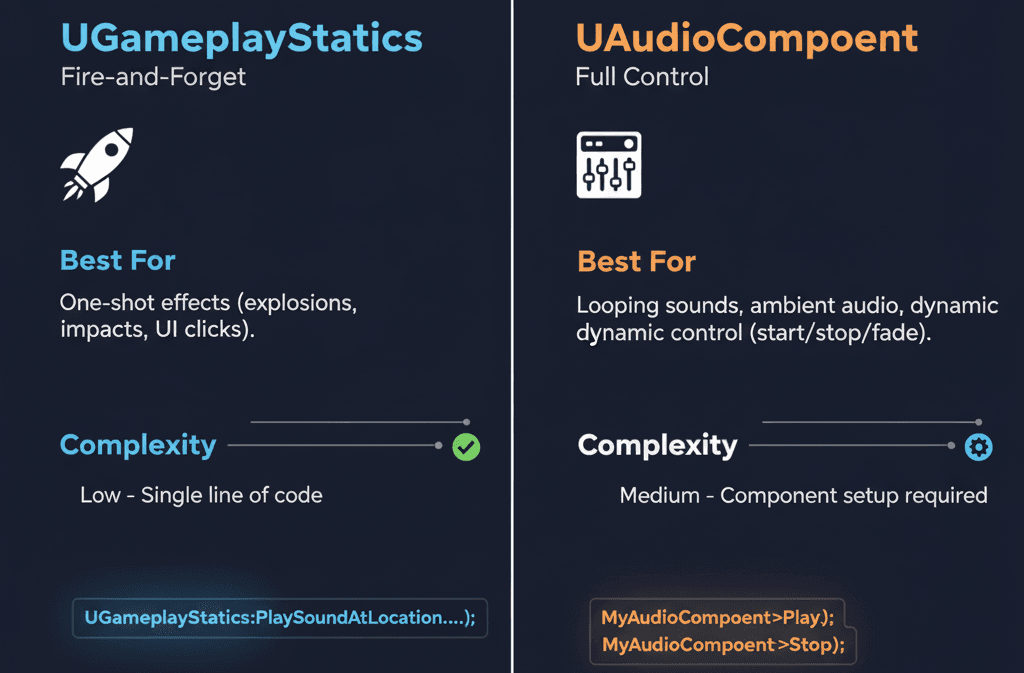
Use this framework every time you're deciding how to implement a sound. It'll save you from refactoring later.
Why This Will Transform Your Games
Look, I've shipped games with terrible audio and games with great audio. The difference is night and day. Here's what mastering UE5's audio system actually gives you:
Enhanced Player Feedback - Sound provides immediate confirmation for player actions. That satisfying "swoosh" for a sword swing or "click" for a button press makes your game feel responsive and polished.
Increased Immersion and Atmosphere - Well-crafted ambient sounds and positional audio create believable worlds. I've seen players get completely lost in games just because the audio made everything feel real.
Dynamic and Adaptive Experiences - Using Sound Cues and MetaSounds lets you create audio that reacts to gameplay. Music that intensifies during combat, footstep sounds that change based on surface type - these details matter.
Improved Gameplay Clarity - Audio communicates critical information that might be missed visually. Enemy footsteps from off-screen, warning beeps for incoming projectiles - good audio design prevents player frustration.
Greater Emotional Impact - Sound and music are your most powerful tools for setting tone, building tension, and driving narrative forward. I've seen mediocre games become memorable just through excellent audio design.
My Battle-Tested Implementation Strategies
Here are the pro tips I wish I'd known from day one. These come from years of making mistakes and finding solutions:
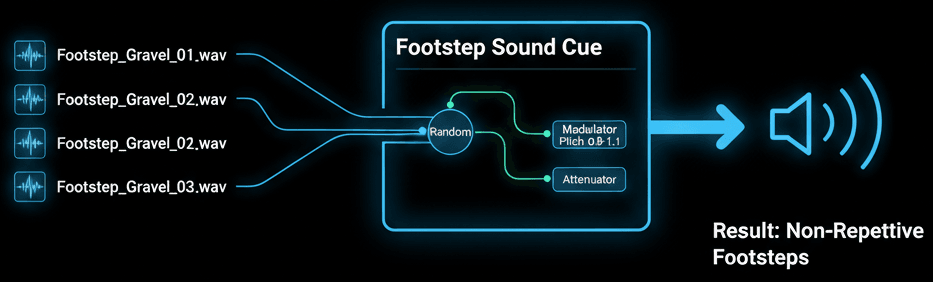
Always Use Sound Cues for Variation - Instead of playing raw Sound Waves, use Sound Cues for random pitch and volume variations. Prevents that robotic, repetitive feel:
// In the Unreal Editor, create a Sound Cue that randomizes between several footstep Sound Waves.
// Then, in C++, you simply play the Sound Cue asset.
UPROPERTY(EditAnywhere, Category = "Audio")
USoundCue* FootstepSoundCue;

void AMyCharacter::PlayFootstepSound()
{
    UGameplayStatics::PlaySoundAtLocation(this, FootstepSoundCue, GetActorLocation());
}
Use Attenuation for All 3D Sounds - Define and apply attenuation settings for any sound originating from a specific world point. Ensures proper spatialization and prevents audio bleeding across the entire level.
Manage Concurrency to Avoid Chaos - For rapid-fire sounds like automatic weapons, set concurrency limits. Prevents hundreds of simultaneous sounds that cause distortion and performance issues.
Optimize Audio Assets - Use compressed formats appropriately and monitor memory footprint, especially for long music tracks or ambient loops.
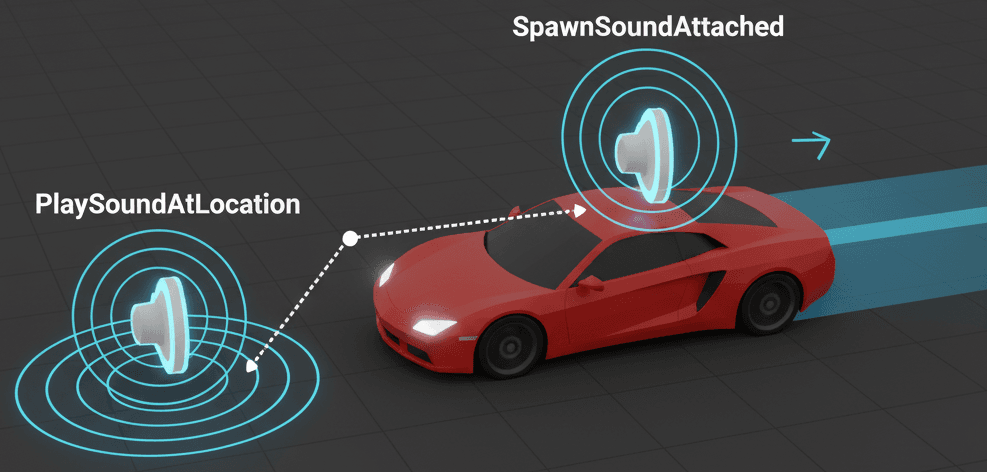
Use SpawnSoundAttached for Moving Objects - When sound needs to move with a component (like car engine sounds), use this function to lock audio source to its parent:
// In your vehicle's C++ class.
#include "Kismet/GameplayStatics.h"

void AVehicle::StartEngineSound()
{
    if (EngineSound)
    {
        // This will create an Audio Component that follows the VehicleMesh.
        EngineAudioComponent = UGameplayStatics::SpawnSoundAttached(EngineSound, VehicleMesh);
    }
}
Verified: Unreal Engine 5.6 Documentation - Spawn Sound Attached
How the Pros Actually Do It (Real Game Breakdowns)
Let me share some examples that really opened my eyes to how audio design works in practice. I've analyzed these implementations dozens of times:
Gears of War - The Active Reload System
You know that satisfying "Active Reload" mechanic? Perfect timing gives you faster reload and damage boost, with that incredibly satisfying audio feedback.
The implementation likely uses UGameplayStatics::PlaySound2D for instant, non-spatialized feedback. Successful active reload plays a positive "cha-ching" sound, while failed attempts play a dull "clunk."
What I find fascinating about this approach is how the crisp audio feedback creates an addictive gameplay loop. The sound alone makes the mechanic feel incredibly satisfying and rewards precision with powerful sensory payoff.
Fortnite - Positional Audio for Competitive Advantage
Here's how audio becomes a core gameplay mechanic. Enemy footsteps and building sounds provide crucial positional information about nearby opponents.
This is prime 3D positional audio using attenuation. Each player character likely has a UAudioComponent playing footstep sounds. The engine spatializes these sounds, adjusting volume and panning based on distance and orientation.
From a developer's perspective, what makes this brilliant is how accurate 3D audio provides tactical advantage. Players can react to threats outside their line of sight, turning sound into essential gameplay information.
The Last of Us - Dynamic Clicker Audio
Those terrifying clicking sounds from Clicker enemies vary in intensity and frequency based on the enemy's state (patrolling, alerted, attacking).
This complex behavior is likely driven by Sound Cues or MetaSounds. The system uses random nodes to cycle through click variations, while the AI state machine controls parameters like delay between sounds to reflect the Clicker's agitation level.
What I always tell my students about this implementation: the dynamic, procedural nature creates deeply unsettling atmosphere. It communicates enemy state directly to players, allowing informed stealth decisions based purely on audio cues.
Three Complete Walkthroughs You Can Copy Today
Alright, let's build some actual implementations. These are the exact patterns I use in my projects:
Blueprint 1: Simple "Fire-and-Forget" 3D Sound Effect
Scenario: Play explosion sound when an actor is destroyed.
Editor Setup:
- Create C++ Actor class named
ExplosiveBarrel - Import explosion sound as Sound Wave asset
- Create Blueprint based on
ExplosiveBarreland assign explosion Sound Wave
Step 1: Declare Sound Asset in Header (ExplosiveBarrel.h)
#pragma once

#include "CoreMinimal.h"
#include "GameFramework/Actor.h"
#include "ExplosiveBarrel.generated.h"

UCLASS()
class MYPROJECT_API AExplosiveBarrel : public AActor
{
    GENERATED_BODY()

public:
    AExplosiveBarrel();

protected:
    // Called when the game starts or when spawned
    virtual void BeginPlay() override;

    // The sound to play when the barrel explodes.
    UPROPERTY(EditAnywhere, BlueprintReadOnly, Category = "Audio")
    USoundBase* ExplosionSound;

    // A function to trigger the explosion.
    UFUNCTION(BlueprintCallable)
    void Explode();
};
Step 2: Implement Explosion Logic (ExplosiveBarrel.cpp)
#include "ExplosiveBarrel.h"
#include "Kismet/GameplayStatics.h"

AExplosiveBarrel::AExplosiveBarrel()
{
    PrimaryActorTick.bCanEverTick = false;
}

void AExplosiveBarrel::BeginPlay()
{
    Super::BeginPlay();
}

void AExplosiveBarrel::Explode()
{
    // Check if the ExplosionSound has been assigned in the editor.
    if (ExplosionSound)
    {
        // Play the sound at the barrel's current location.
        // This is a "fire-and-forget" call.
        UGameplayStatics::PlaySoundAtLocation(this, ExplosionSound, GetActorLocation());
    }

    // Destroy the barrel actor after playing the sound.
    Destroy();
}
Verified: Unreal Engine 5.6 Documentation - Play Sound At Location
Blueprint 2: Controllable, Looping Sound Attached to an Actor
Scenario: Continuous machine hum from a generator that can be turned on/off.
Editor Setup:
- Create C++ Actor class named
Generator - Import looping machine hum as Sound Wave (check "Looping" property)
- Create Blueprint and assign looping hum Sound Wave
Step 1: Declare Audio Component and Sound Asset (Generator.h)
#pragma once

#include "CoreMinimal.h"
#include "GameFramework/Actor.h"
#include "Components/AudioComponent.h"
#include "Generator.generated.h"

UCLASS()
class MYPROJECT_API AGenerator : public AActor
{
    GENERATED_BODY()

public:
    AGenerator();

protected:
    UPROPERTY(VisibleAnywhere, BlueprintReadOnly, Category = "Components")
    USceneComponent* Root;

    // The component responsible for playing the sound.
    UPROPERTY(VisibleAnywhere, BlueprintReadOnly, Category = "Components")
    UAudioComponent* AudioComponent;

    // The looping sound asset to be played by the AudioComponent.
    UPROPERTY(EditAnywhere, BlueprintReadOnly, Category = "Audio")
    USoundBase* GeneratorHumSound;

public:
    UFUNCTION(BlueprintCallable)
    void ActivateGenerator(bool bIsActive);
};
Step 2: Initialize Component and Set Sound (Generator.cpp)
#include "Generator.h"

AGenerator::AGenerator()
{
    PrimaryActorTick.bCanEverTick = false;

    Root = CreateDefaultSubobject(TEXT("RootComponent"));
    RootComponent = Root;

    // Create the audio component.
    AudioComponent = CreateDefaultSubobject(TEXT("AudioComponent"));
    AudioComponent->SetupAttachment(RootComponent);
    AudioComponent->bAutoActivate = false; // We will control playback manually.
}

void AGenerator::BeginPlay()
{
    Super::BeginPlay();

    // Assign the sound from our UPROPERTY to the component.
    if (GeneratorHumSound)
    {
        AudioComponent->SetSound(GeneratorHumSound);
    }
}

void AGenerator::ActivateGenerator(bool bIsActive)
{
    if (bIsActive)
    {
        // If the sound is not already playing, start it.
        if (!AudioComponent->IsPlaying())
        {
            AudioComponent->Play();
        }
    }
    else
    {
        // If the sound is currently playing, stop it.
        if (AudioComponent->IsPlaying())
        {
            AudioComponent->Stop();
        }
    }
}
Verified: Unreal Engine 5.6 Documentation - UAudioComponent
Blueprint 3: 2D UI Sound on Button Click
Scenario: Non-positional "click" sound for UI button presses.
Editor Setup:
- Implement within
UUserWidgetC++ class calledMyMainMenuWidget - Import UI click sound as Sound Wave
- Create button in Widget Blueprint and assign click Sound Wave
Step 1: Declare Sound Asset in Widget Header (MyMainMenuWidget.h)
#pragma once

#include "CoreMinimal.h"
#include "Blueprint/UserWidget.h"
#include "MyMainMenuWidget.generated.h"

UCLASS()
class MYPROJECT_API UMyMainMenuWidget : public UUserWidget
{
    GENERATED_BODY()

protected:
    // The sound to play when a button is clicked.
    UPROPERTY(EditAnywhere, BlueprintReadOnly, Category = "Audio")
    USoundBase* ButtonClickSound;

    // This function will be bound to the button's OnClicked event in the Blueprint Editor.
    UFUNCTION(BlueprintCallable)
    void OnStartGameClicked();
};
Step 2: Implement Sound Logic (MyMainMenuWidget.cpp)
#include "MyMainMenuWidget.h"
#include "Kismet/GameplayStatics.h"

void UMyMainMenuWidget::OnStartGameClicked()
{
    // Check if a sound has been assigned.
    if (ButtonClickSound)
    {
        // Play the 2D sound. It has no position in the world.
        UGameplayStatics::PlaySound2D(this, ButtonClickSound);
    }

    // ... add logic here to start the game ...
}
Verified: Unreal Engine 5.6 Documentation - Play Sound 2D
Ready to Start Building Your First Game?
Here's what I've learned after working on dozens of projects: mastering audio in UE5 isn't just about technical knowledge - it's about understanding how sound transforms player experience. The code I've shared above? That's the foundation, but the real magic happens when you start experimenting with your own projects.
If you're ready to take the next step and build complete game experiences from scratch, I've designed a comprehensive course that takes you from basic concepts to creating professional-quality games. You'll learn not just audio implementation, but how to integrate it with gameplay systems, UI design, and player psychology.
Start building your first complete game with our UE5 Game Development Course
Key Takeaways
- Sound effects in UE5 solve the critical problem of player feedback and immersion - they're not optional decoration
- USoundBase is your go-to pointer type for any sound asset in C++ code
- Use UGameplayStatics::PlaySound2D for UI sounds and PlaySoundAtLocation for 3D world sounds
- UAudioComponent gives you control over looping, pausing, and dynamic audio manipulation
- Sound Cues prevent repetitive audio by introducing random variations in pitch and volume
- Attenuation settings are essential for realistic 3D positional audio that fades with distance
- Concurrency limits prevent audio chaos from rapid-fire sound effects
- SpawnSoundAttached keeps audio sources locked to moving objects like vehicles
- Study how successful games like Gears of War, Fortnite, and The Last of Us use audio as core gameplay mechanics
- Always prefer Sound Cues over raw Sound Waves for better variation and professional polish
Common Questions
Sound Wave is raw audio data imported from external files (usually .wav format). Sound Cue is UE5's node-based editor that takes Sound Waves and allows you to modify, combine, and randomize them for more dynamic audio events.
Use UGameplayStatics::PlaySoundAtLocation(this, YourSoundAsset, GetActorLocation()). This is perfect for one-shot effects like explosions or impacts that don't need ongoing control.
Use UAudioComponent when you need control over the sound after it starts playing - for looping sounds, ambient noises, or any audio that needs to be paused, stopped, or have parameters changed dynamically during gameplay.
Attenuation defines how a sound's volume and characteristics change over distance. It's essential for realistic 3D positional audio - sounds get quieter as players move away from the source, creating believable spatial audio.
Use concurrency settings to limit how many instances of a particular sound can play at once. This prevents overwhelming audio chaos and optimizes performance, especially important for rapid-fire effects like automatic weapons.
MetaSound is UE5's next-generation audio system offering complete Digital Signal Processing (DSP) control. It's more powerful than traditional Sound Cues, enabling highly procedural and interactive audio generation with better performance.
Use UGameplayStatics::PlaySound2D() in your UI widget's button click function. 2D sounds have no position in the world and are perfect for interface elements that should be heard regardless of camera position.
Use Sound Classes to group similar sounds (like "Weapons," "UI," "Dialogue") and Sound Mix to dynamically adjust their properties. This allows collective volume control and better audio management across your entire game.
Use UGameplayStatics::SpawnSoundAttached() to create an Audio Component that follows a specific component. Perfect for engine sounds that need to move with cars or other dynamic objects.
Use compressed formats appropriately based on context. Short sound effects can often use compression, but be mindful of quality loss. Long music tracks or ambient loops especially need attention to memory footprint versus audio quality balance.
Create Sound Cues that randomize between multiple Sound Wave variations with different pitch and volume settings. This prevents the robotic, repetitive feel that makes audio sound cheap and unprofessional.
2D audio (PlaySound2D) has no position in the world - perfect for UI sounds, music, or global announcements. 3D audio (PlaySoundAtLocation) is spatialized based on position, distance, and direction - essential for immersive world sounds.