Unity Netcode: How To Resolve Responsiveness Issues On The Client
Learn to fix sluggish multiplayer controls with client-side prediction and server reconciliation techniques used by industry professionals
You know that sinking feeling when you're showing off your multiplayer game to friends, and every movement feels like you're controlling a character through molasses? I've been there. When I was starting out at CMU, I spent weeks building what I thought was going to be an amazing real-time strategy game, only to watch my players get frustrated with the sluggish controls during our first test session.
The problem wasn't my game design or my Unity skills — it was my complete misunderstanding of how Unity netcode actually works. I was doing what most beginners do: sending every single input to the server and waiting for permission to move. It felt "safe" from a programming perspective, but it made my game unplayable.
Here's the thing though — responsive multiplayer isn't magic. There's a systematic approach to making your Unity netcode feel instant, and I'm going to walk you through exactly how the industry handles it. By the end of this guide, you'll understand why games like Rocket League and Overwatch feel so smooth, and more importantly, how to implement these same techniques in your own projects.
Table of Contents
- When I First Hit the Netcode Wall
- Here's What Actually Causes That Frustrating Lag
- How the Pros Handle Server Authority (With Real Code)
- Two Approaches That'll Change Your Game
- Why This Stuff Actually Matters for Your Career
- The Tricks I Wish Someone Had Taught Me Earlier
- Games That Nailed It (And What You Can Learn)
- Let's Build Something That Actually Works
- Your Next Move as a Developer
When I First Hit the Netcode Wall
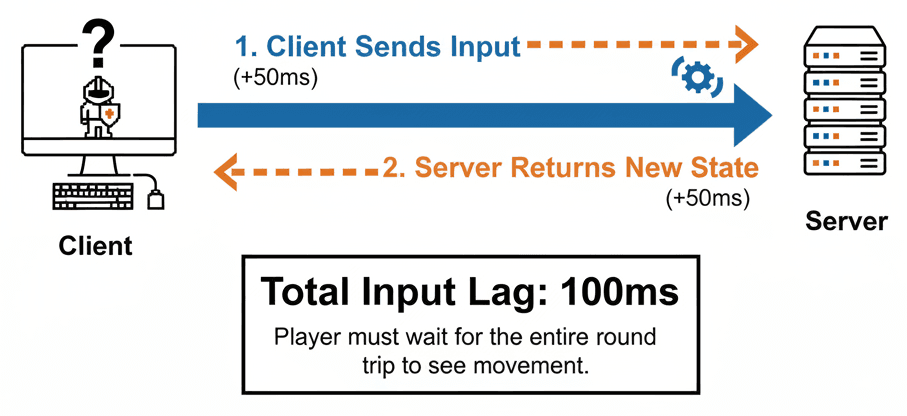
Let me paint you a picture of what we're actually solving here. In multiplayer games, the delay between pressing a button and seeing the result—known as latency—can completely ruin the player experience, making characters feel sluggish and unresponsive. This is about combating that delay to make player actions feel instant, even when communicating with a distant server.
Think of it like predictive text on your phone: it guesses the word you're typing before you've finished, making the process feel faster and smoother. By implementing techniques like Client-Side Prediction and Server Reconciliation, we can create fast-paced, fluid multiplayer action that feels just as responsive as a single-player game, ensuring that gameplay is dictated by skill, not by the quality of a player's internet connection.
The solution creates an illusion of immediacy where the game client doesn't wait for the server's permission to move your character but instead predicts the outcome of your input and shows it to you right away.
Here's What Actually Causes That Frustrating Lag
When I was struggling with my first multiplayer project, I didn't understand the fundamental concepts that make or break responsive gameplay. Let me break down the vocabulary that'll help you think about this stuff systematically.
Latency refers to the total time it takes for a data packet to travel from a client to the server and for the server's response to travel back, which is the primary cause of perceived input lag.
Tick Rate is the frequency, measured in Hertz, at which the game server processes incoming data and updates the game state for all connected clients. Think of it as how often your server "thinks" about the game.
Server Authority is a networking model where the server has the final say on the state of the game, meaning it validates all client actions to prevent cheating and ensure consistency across all players.
Client Authority is the alternative model where the client is trusted to have control over its own objects, which can provide instant responsiveness but opens the door to potential cheating if not managed carefully.
Client-Side Prediction is where the magic happens — it's a technique where the client simulates the results of its own inputs immediately, without waiting for the server's confirmation, to create the feeling of instant responsiveness for the player.
Server Reconciliation is the essential process that follows client-side prediction, where the server's authoritative game state is used to correct any inaccuracies in the client's predicted simulation, ensuring long-term consistency.
Interpolation smooths the movement of other players' characters on your screen by rendering them slightly behind their actual game state, allowing for fluid animation between received server updates.
Extrapolation is used when server updates are delayed or lost — it's a technique that predicts a remote player's future position based on their last known velocity and direction, helping to hide the effects of packet loss.
How the Pros Handle Server Authority (With Real Code)
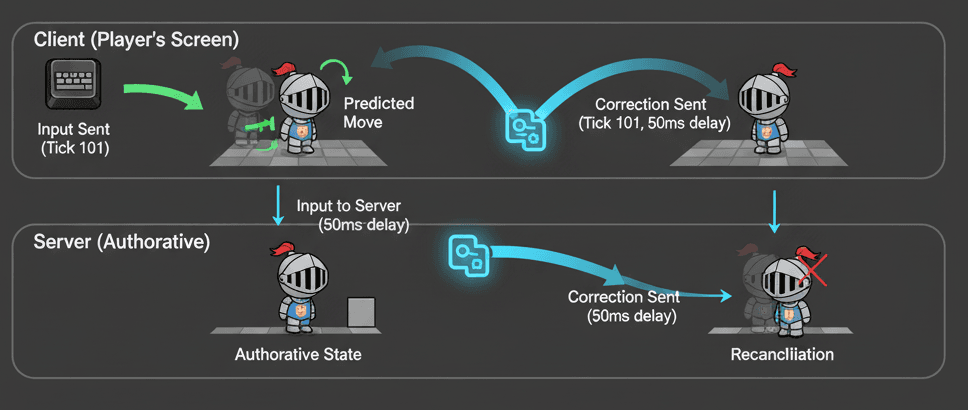
The foundation of any cheat-resistant game is server authority, where the server is the ultimate source of truth. Clients send their inputs, and the server executes the simulation and broadcasts the results. Here's how this looks in practice:
// A client requests to move by sending an RPC to the server.
[ServerRpc]
private void RequestMoveServerRpc(Vector3 direction)
{
    // The server processes the movement and updates the authoritative state.
    transform.position += direction * moveSpeed * Time.fixedDeltaTime;
}// A client requests to move by sending an RPC to the server.
[ServerRpc]
private void RequestMoveServerRpc(Vector2 direction)
{
// The server processes the movement and updates the authoritative state.
transform.position += (Vector3)direction * moveSpeed * Time.fixedDeltaTime;
}But here's where it gets interesting. To eliminate input lag, the client with ownership of an object predicts its own movement. It applies the input locally at the exact moment it happens, providing immediate visual feedback:
// This code runs on the client's machine in FixedUpdate.
private void HandleClientPrediction()
{
    if (!IsOwner) return;

    // Gather input.
    Vector3 moveInput = new Vector3(Input.GetAxis("Horizontal"), 0, Input.GetAxis("Vertical"));

    // Move the local player's character controller immediately.
    characterController.Move(moveInput * moveSpeed * Time.fixedDeltaTime);

    // Send the same input to the server for validation.
    RequestMoveServerRpc(moveInput);
}
After the server processes the client's input, it sends back the correct state. The client then compares this authoritative state with its predicted state and corrects any discrepancies:
// A client receives the authoritative state from the server.
[ClientRpc]
private void ReceiveServerStateClientRpc(Vector3 serverPosition, int serverTick)
{
    if (!IsOwner) return;

    // Find the client's stored state for that same tick.
    ClientState pastClientState = clientStateBuffer[serverTick % bufferSize];

    // If the positions don't match within a tolerance, a correction is needed.
    if (Vector3.Distance(pastClientState.Position, serverPosition) > 0.1f)
    {
        // Snap the player to the server's position.
        transform.position = serverPosition;

        // Re-simulate all inputs from the corrected tick forward to the present.
        ResimulateFromTick(serverTick);
    }
}
For remote players, we use interpolation to make their movement appear smooth. Their NetworkTransform component interpolates between received state updates, rendering them slightly in the past to create fluid motion instead of jittery teleports.
Two Approaches That'll Change Your Game
After working on multiple Unity projects, I've learned there are essentially two ways to handle netcode, and choosing the right one depends entirely on what kind of game you're building.
| Criteria | Approach A: Pure Server Authority | Approach B: Server Authority with Client Prediction |
|---|---|---|
| Best For | Slower-paced games like turn-based strategy or board games where input latency is not critical for the player experience. | Fast-paced, action-oriented games such as first-person shooters or racing games where instant feedback is absolutely essential. |
| Performance | This approach has a lower client-side CPU load because it avoids the need for re-simulation, but it is highly sensitive to network latency. | It demands more from the client's CPU due to the potential need to re-simulate inputs, but it effectively hides network latency from the player. |
| Complexity | The implementation is significantly simpler, as the client only needs to send inputs and receive back the final game state from the server. | This method is far more complex, requiring careful management of input history, state buffering, and reconciliation logic to handle corrections. |
| Code Example | // Client sends input and waits. |
// Client moves locally and sends input. |
I learned the hard way that you can't just pick one approach and call it done. Your choice here will fundamentally shape how your game feels to play.
Why This Stuff Actually Matters for Your Career
Implementing these advanced Unity netcode techniques correctly isn't just a technical exercise — it directly translates into a better game and a more satisfied player base. Here's what you'll gain:
Dramatically Improved Player Experience: By making controls feel instantaneous, players feel more connected to their characters and the game world, leading to a more immersive and less frustrating experience.
Enables Competitive, Fast-Paced Gameplay: High-level competitive play in genres like shooters or fighters is impossible with noticeable input lag; client-side prediction is what makes these games viable online.
Maintains Fairness and Prevents Cheating: Combining client-side prediction with a server-authoritative model gives you the best of both worlds: responsive controls for honest players and a secure backend that validates actions to stop cheaters.
Wider Player Accessibility: Well-designed netcode allows players with less-than-perfect internet connections to still have a playable and enjoyable experience, expanding your potential audience.
The Tricks I Wish Someone Had Taught Me Earlier
Writing good netcode is about more than just the basic implementation. These are the professional tips that took me months to figure out, and they'll help you create a more robust and optimized system.
Use a Fixed Timestep for Physics
Always run your prediction and reconciliation logic within FixedUpdate. This ensures that the physics simulation is deterministic, meaning the client and server will calculate the exact same results from the same inputs.
// Both client and server should process movement logic in FixedUpdate.
private void FixedUpdate()
{
    // On the client, apply local input and send it to the server.
    if (IsOwner)
    {
        HandleClientInput();
    }

    // On the server, process the queue of received inputs.
    if (IsServer)
    {
        ProcessClientInputs();
    }
}
Buffer Client Inputs with Ticks
Instead of just sending inputs, tag them with a "tick" or frame number. This allows the server and client to precisely reference which input corresponds to which state, which is essential for accurate reconciliation.
// A struct to hold input and the tick it was generated on.
public struct InputPayload : INetworkSerializable
{
    public int Tick;
    public Vector2 MoveInput;

    public void NetworkSerialize(BufferSerializer serializer) where T : IReaderWriter
    {
        serializer.SerializeValue(ref Tick);
        serializer.SerializeValue(ref MoveInput);
    }
}
Separate Visuals from Collision
Parent your visual model under the main networked GameObject that has the Rigidbody and Collider. The parent object can be corrected instantly during reconciliation, while the visual child can be smoothly interpolated or "lerped" to the corrected position, hiding jarring snaps from the player.
// In your reconciliation logic, snap the parent Rigidbody instantly.
// Then, in Update(), smoothly move the visual child towards the parent's position.
public Transform visualModel; // Assign this in the Inspector.

void Update()
{
    // Smoothly move the visual representation to match the authoritative physics body.
    visualModel.position = Vector3.Lerp(visualModel.position, transform.position, Time.deltaTime * 15f);
    visualModel.rotation = Quaternion.Slerp(visualModel.rotation, transform.rotation, Time.deltaTime * 15f);
}
Games That Nailed It (And What You Can Learn)
I've spent countless hours analyzing how successful games handle netcode, and here are the implementations that really stand out:
Rocket League
Players control high-speed, physics-driven cars to hit a ball. The game requires extremely precise control over boosting, jumping, and aerial maneuvers. What I find fascinating about this approach is that Rocket League heavily relies on client-side prediction for car movement. When a player boosts or flips, their client simulates the physics immediately. The server then runs its own physics simulation and sends corrections if the client's prediction was inaccurate, which is crucial for ensuring the ball's position is consistent for all players. The player feels an immediate, one-to-one connection with their car, making complex aerial dribbles and split-second saves possible.
Overwatch 2
As a fast-paced hero shooter, players need to aim and fire projectiles or hitscan weapons with precision while moving rapidly. Abilities like Tracer's "Blink" or Genji's "Swift Strike" require instant execution. From a developer's perspective, what makes this brilliant is the sophisticated netcode model that favors the shooter. When a player fires, their client predicts the hit and sends the event to the server. The server "rewinds" the game state to match the shooter's latency and validates the hit, a form of lag compensation. This ensures that if you shot at a target on your screen, it counts, even if the target has moved on the server. Aiming feels crisp and responsive, and players don't have to "lead" their shots to compensate for latency.
Valorant
A tactical shooter where holding angles and landing headshots in milliseconds is key. The game is famous for its emphasis on "peeker's advantage," where the player moving around a corner sees their opponent slightly before the opponent sees them. Here's how you can adapt this for your own game: Valorant uses a server-authoritative model with a high tick rate (128 Hz) to minimize the time between a player's action and the server's acknowledgment. While it still uses prediction for movement, its core philosophy is to ensure the server's view of the game is as accurate as possible, reducing discrepancies and making the gameplay feel incredibly precise and consistent. Players feel a high degree of confidence in the game's hit registration, and when eliminated, they can trust that what they saw was a very close representation of the authoritative game state.
Let's Build Something That Actually Works
Let me walk you through three complete implementations that I use when teaching Unity netcode. These are the exact approaches I've refined over years of building multiplayer games.
My Go-To Method for Basic Player Movement
Scenario Goal: Create a player-controlled character that moves instantly on the controlling client's screen, effectively hiding input latency.
Unity Editor Setup:
- Create a 3D
Capsuleor 2DSpriteand name it "Player" - Add a
NetworkObjectcomponent to the "Player" - For 3D, add a
CharacterController. For 2D, add aRigidbody2D(set to Kinematic) and aBoxCollider2D - Create a new C# script named
PredictedMovementand add it to the "Player"
using Unity.Netcode;
using UnityEngine;

public class PredictedMovement : NetworkBehaviour
{
    [SerializeField] private float moveSpeed = 5f;
    private CharacterController controller;

    private void Awake()
    {
        controller = GetComponent();
    }
} // This code goes inside the PredictedMovement class
private void Update()
{
// Only the owner of this object can control it.
if (!IsOwner) return;
// --- 3D Version ---
Vector3 moveInput = new Vector3(Input.GetAxis("Horizontal"), 0, Input.GetAxis("Vertical"));
Vector3 moveDirection = transform.TransformDirection(moveInput);
controller.Move(moveDirection * moveSpeed * Time.deltaTime);
// --- 2D Version ---
// Vector2 moveInput = new Vector2(Input.GetAxis("Horizontal"), Input.GetAxis("Vertical"));
// Vector2 newPosition = rb.position + moveInput * moveSpeed * Time.fixedDeltaTime;
// rb.MovePosition(newPosition);
// Now, send this input to the server so it can execute it for other clients.
MoveServerRpc(moveInput);
}// This code goes inside the PredictedMovement class
[ServerRpc]
private void MoveServerRpc(Vector3 moveInput)
{
// --- 3D Version ---
Vector3 moveDirection = transform.TransformDirection(moveInput);
controller.Move(moveDirection * moveSpeed * Time.deltaTime);
// --- 2D Version ---
// Vector2 newPosition = rb.position + (Vector2)moveInput * moveSpeed * Time.fixedDeltaTime;
// rb.MovePosition(newPosition);
}How I Handle Server Reconciliation in My Projects
Scenario Goal: Build upon the first approach by adding a server reconciliation step that corrects the client's position if it ever deviates from the server's authoritative state.
// Place these structs inside your PlayerMovement class or in a separate file.
public struct PlayerInputData : INetworkSerializable
{
    public int Tick;
    public Vector2 MoveInput;

    public void NetworkSerialize(BufferSerializer serializer) where T : IReaderWriter
    {
        serializer.SerializeValue(ref Tick);
        serializer.SerializeValue(ref MoveInput);
    }
}

public struct PlayerStateData : INetworkSerializable
{
    public int Tick;
    public Vector3 Position;

    public void NetworkSerialize(BufferSerializer serializer) where T : IReaderWriter
    {
        serializer.SerializeValue(ref Tick);
        serializer.SerializeValue(ref Position);
    }
} // Add these variables to your PlayerMovement class.
private const int BUFFER_SIZE = 1024;
private PlayerInputData[] _inputBuffer = new PlayerInputData[BUFFER_SIZE];
private PlayerStateData[] _stateBuffer = new PlayerStateData[BUFFER_SIZE];
private NetworkVariable _serverState = new NetworkVariable(writePerm: NetworkVariableWritePermission.Server);
private int _currentTick; [ServerRpc]
private void MoveServerRpc(PlayerInputData input)
{
MovePlayer(input.MoveInput); // Server simulates the move.
// Create the authoritative state.
var state = new PlayerStateData
{
Tick = input.Tick,
Position = transform.position
};
// Send the result back to the client for reconciliation.
ReconcileClientRpc(state);
}
[ClientRpc]
private void ReconcileClientRpc(PlayerStateData serverState)
{
if (!IsOwner) return;
int bufferIndex = serverState.Tick % BUFFER_SIZE;
var localState = _stateBuffer[bufferIndex];
// If server and client positions are too different, a correction is needed.
float distance = Vector3.Distance(localState.Position, serverState.Position);
if (distance > 0.01f)
{
// Snap to the server's state.
transform.position = serverState.Position;
// Re-simulate all ticks from the corrected tick to the current tick.
int ticksToResimulate = _currentTick - serverState.Tick;
for (int i = 0; i < ticksToResimulate; i++)
{
int tickToProcess = serverState.Tick + i;
var inputToProcess = _inputBuffer[tickToProcess % BUFFER_SIZE];
MovePlayer(inputToProcess.MoveInput);
// Update the local state buffer with the new, corrected position.
_stateBuffer[tickToProcess % BUFFER_SIZE] = new PlayerStateData { Tick = tickToProcess, Position = transform.position };
}
}
}How I Implement Instant Actions That Feel Responsive
Scenario Goal: Implement an instant "fire" action (like a hitscan weapon) that feels responsive by having the client execute the raycast and visual effects immediately, while the server validates the hit and deals damage.
// In the Update method, inside the if (IsOwner) block:
if (Input.GetButtonDown("Fire1"))
{
    // --- 3D Version ---
    Ray ray = playerCamera.ScreenPointToRay(new Vector3(Screen.width / 2, Screen.height / 2));
    if (Physics.Raycast(ray, out RaycastHit hit, 100f))
    {
        // Spawn visual effect locally right away.
        SpawnBulletTrail(gunTip.position, hit.point);

        // Tell the server what we hit.
        RequestHitValidationServerRpc(hit.point, hit.collider.GetComponent());
    }

    // --- 2D Version ---
    // RaycastHit2D hit = Physics2D.Raycast(gunTip.position, gunTip.right);
    // if (hit.collider != null)
    // {
    //     SpawnBulletTrail(gunTip.position, hit.point);
    //     RequestHitValidationServerRpc(hit.point, hit.collider.GetComponent());
    // }
} [ServerRpc]
private void RequestHitValidationServerRpc(Vector3 hitPoint, NetworkObjectReference targetObjectRef)
{
// Server-side validation (e.g., check distance, ammo, etc.)
// For simplicity, we'll trust the client for now but in a real game, you'd validate here.
if (targetObjectRef.TryGet(out NetworkObject targetObject))
{
// If the target has a health component, deal damage.
// targetObject.GetComponent().TakeDamage(25);
}
// Tell all clients to play the visual effect.
PlayHitEffectClientRpc(gunTip.position, hitPoint);
}
[ClientRpc]
private void PlayHitEffectClientRpc(Vector3 startPoint, Vector3 endPoint)
{
// The owner already played this effect instantly, so they should ignore this.
if (IsOwner) return;
SpawnBulletTrail(startPoint, endPoint);
}
// Helper function to spawn the visual effect.
private void SpawnBulletTrail(Vector3 start, Vector3 end)
{
// Your logic to instantiate and configure a line renderer or particle effect.
// Example:
// GameObject trail = Instantiate(bulletTrailPrefab, start, Quaternion.identity);
// LineRenderer lr = trail.GetComponent();
// lr.SetPositions(new Vector3[] { start, end });
} Your Next Move as a Developer
Now that you understand how responsive Unity netcode for gameobjects actually works, here's what I recommend for your next steps:
Start with the basic client-side prediction implementation I showed you. Get comfortable with the concept of predicting locally while sending inputs to the server. Once that feels natural, add server reconciliation to handle corrections. Finally, experiment with instant actions like the raycast firing example.
Remember that netcode for Unity is an iterative process — you'll refine your approach as you encounter different scenarios in your projects. The key is understanding these fundamental concepts so you can adapt them to whatever multiplayer challenge you're facing.
Wrapping Up
Building responsive multiplayer games in Unity isn't about complex algorithms or advanced networking theory — it's about understanding how to balance client-side prediction with server authority. By implementing the techniques I've shown you, your players will experience the kind of instant responsiveness that makes competitive multiplayer games possible.
The most important thing to remember is that good Unity netcode creates an illusion of immediacy while maintaining the security and consistency that only server authority can provide. Master these concepts, and you'll be building multiplayer experiences that feel just as smooth as single-player games.
Key Takeaways
- Latency is the enemy of responsive gameplay — use client-side prediction to hide network delays and make inputs feel instant
- Server authority prevents cheating — always validate important actions on the server, even when using client prediction
- Fixed timesteps ensure consistency — run all prediction and reconciliation logic in FixedUpdate for deterministic results
- Buffer inputs with tick numbers — this allows precise reconciliation when server corrections are needed
- Separate visuals from physics — smooth visual interpolation hides jarring position corrections from players
- Different games need different approaches — fast-paced action games require prediction, while turn-based games can use pure server authority
- NetworkTransform handles remote player interpolation — configure it properly to balance smoothness with bandwidth
- Instant feedback improves player experience — execute visual effects immediately on the client while validating on the server
Common Questions
Unity netcode for gameobjects is Unity's official networking solution that handles communication between clients and servers in multiplayer games. You need it because it provides the tools for synchronizing game state, handling player inputs, and managing network objects across multiple players in real-time.
Implement client-side prediction where the owning client immediately applies input locally before sending it to the server for validation. This creates instant visual feedback while maintaining server authority for security and consistency.
Use server authority for competitive games where cheating prevention is crucial, or for any game elements that affect other players. Client authority can work for non-critical cosmetic elements or single-player aspects of your game, but it's generally less secure.
Server reconciliation is the process where the server sends back the authoritative game state, and the client corrects any differences between its prediction and the server's reality. It's essential for maintaining long-term accuracy while still providing instant feedback.
Interpolation smooths movement between network updates by rendering remote players slightly behind their actual state. Unity's NetworkTransform component handles this automatically, creating fluid motion instead of jerky teleporting.
Interpolation renders between known past states for smooth motion, while extrapolation predicts future positions when updates are delayed. Interpolation is more accurate but introduces slight delay, while extrapolation can hide packet loss but may be less precise.
FixedUpdate ensures deterministic physics simulation because it runs at a consistent rate regardless of framerate. This means both client and server will calculate identical results from the same inputs, which is crucial for accurate reconciliation.
Execute the action immediately on the client for instant feedback, then send the details to the server for validation. The server can then broadcast the confirmed result to all other clients while the original player has already seen the immediate response.
Tick rate is how often the server processes game updates, measured in Hertz. Higher tick rates provide more accurate and responsive gameplay but require more bandwidth and processing power. Most games use 20-128 Hz depending on their needs.
Reduce the send rate for non-critical objects, increase interpolation buffer size for distant players, and only synchronize the transform components you actually need (position, rotation, or scale) rather than all three by default.
Create structs that implement INetworkSerializable containing the input data and a tick number. This allows both client and server to reference specific inputs when performing reconciliation and ensures data is efficiently transmitted over the network.
Use Unity's Network Profiler to monitor RPC calls and data transmission. Log tick numbers and positions during reconciliation, and test with simulated latency using Unity's Network Simulator to reproduce real-world conditions during development.